Introduction
Bestek places field technicians at the center of pre-paid installation and service workflows, giving installers a single mobile hub to sign up, view assigned workorders, schedule visits, upload proof and collect payment. Bestek is designed for technicians and service professionals working across the U.S., and the app emphasizes straightforward job intake, clear task scope and an efficient completion flow so you spend less time on paperwork and more time on the job.
Key features
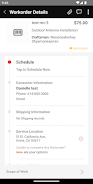
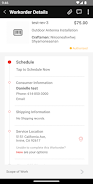
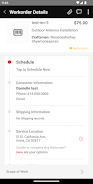
Bestek presents each workorder as a clear job card that includes scope of work, consumer contact details and any product or certification requirements. From a single screen you can review full workorder notes, accept or decline jobs, check required qualifications and see a simple ETA or map to the customer location. Built-in camera and gallery access let you attach photos and files directly to a workorder, while the integrated signature pad finalizes customer sign-off and triggers payment release when applicable.
How the workflow mechanics operate
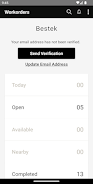
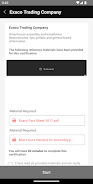
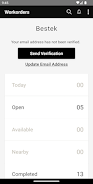
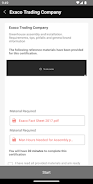
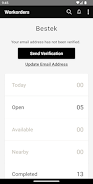
The app follows a predictable progression: register and complete verification, browse or receive nearby assignments, accept a job, travel to the location, perform the installation or service, capture evidence and obtain a customer signature. Certification checks are enforced during registration and when you accept work that requires specific qualifications, so you only receive assignments you are eligible to complete. Jobs move through defined stages—available, scheduled, in progress and completed—so status is always clear to you and to the consumer.
User interface and controls
Controls are optimized for field use: tap to open job details, use the map view or address directions for navigation, and interact with a calendar-like scheduling control to reserve or reschedule visits. Photo attachments are added with a single tap to launch the device camera or to pick images from the gallery. The signature control captures customer sign-off in a smooth, single-screen flow and provides immediate confirmation when a job has been closed out.
Progression systems and task management
Progression through each assignment is visual and linear so you can see at a glance which tasks remain. The app tracks completion checkpoints—arrival time, tasks performed, evidence uploaded and signatures collected—to make invoicing and payout reconciliation straightforward. Notification reminders and in-app alerts help you stay on schedule and reduce missed appointments, while calendar integration aids in planning a route of back-to-back visits.
Visual style, level structure and customization
The design favors high-contrast, readable text and compact job cards that scale for phones and tablets. Map-based nearby workorder discovery and list views let you filter by date, distance or required certification. You can customize your technician profile with service specialties, vehicle or tool notes, preferred service areas and notification preferences so the opportunities you receive better match your availability and skills.
Replay value and repeat business
Workorders frequently produce repeat or follow-up opportunities; by completing jobs reliably and maintaining required certifications you expand your steady work pipeline. The app supports recurring assignment patterns generated by participating sellers, and the simplicity of the workflow makes it efficient to accept and close many assignments each week without extra administrative overhead.
Accessibility, connectivity and device requirements
Bestek aims to be accessible in the field by following common mobile accessibility patterns such as readable font sizes and clear contrast. Because photo uploads, digital signatures and payment triggers require network access, a working internet connection is necessary for full functionality; without connectivity you will not be able to upload evidence, finalize signatures or trigger payments, so plan accordingly for low-signal areas.
Advantages and limitations
Advantages include a centralized mobile interface that reduces paperwork, streamlines certification checks and accelerates payment once work is signed off. Scheduling tools and nearby job discovery help manage daily routes and availability. Limitations are tied to the platform integrations: workorders are available only from participating e-commerce partners so job volume depends on those integrations, and account verification is required before accepting assignments. Additionally, the app relies on your device camera and a network connection for full operation.
- No virus
- No advertising
- User protection
Information
- File size: 46.63 M
- Language: English
- Latest Version: 3.2.1
- Requirements: Android
- Votes: 238
- Package ID: com.bpag.bestekpro
- Developer: Bestek Developer
Screenshots
















Explore More
Streamline operations and maximize productivity with our innovative business apps. Manage contacts, schedule meetings, and route calls seamlessly. Collaborate on documents and projects in real-time. Track inventory, finances, and analytics to inform smart decisions. Build customized proposals, invoices, and contracts to win clients. Stay on top of emails, tasks, and passwords for efficient work.

Tax Calculator India 2024-2025

ScanPro

Kyrgyz Russian Translation

Park4Me

7punches: Simple Time Clocking

69ers

Airble

MaaS360 MDM for Android