Introduction
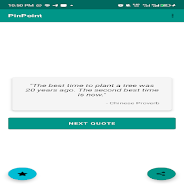
Pinpoint delivers short, soul-lifting quotes and micro-reflections designed to help readers stay productive and focused throughout the day. Pinpoint opens with a simple card-based feed of concise motivational lines that are easy to read between tasks, offering gentle reminders of constructive habits without clutter. The app is aimed at users who prefer low-effort inspiration: quick checks during breaks, a compact mental reset when motivation dips, or a calm nudge before starting focused work sessions.
Key Features
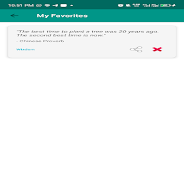
The core of Pinpoint is a curated stream of brief motivational messages that emphasize productivity, focus, and incremental progress. Each quote is optimized for rapid consumption: short sentences, clear language, and a layout that fits small screens. The app includes category filters so readers can narrow content to work-related prompts, mood-boosting lines, or habit-oriented reminders. A lightweight history and favorites function lets users save items to revisit later, and simple sharing options make it easy to pass a helpful thought to a friend or teammate. Presentation is intentionally minimal to reduce distraction—no long articles, pop-ups, or complex menus.
How It Works and Controls
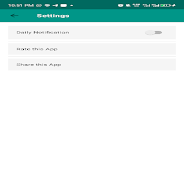
Pinpoint uses straightforward controls that keep interaction quick and predictable. Swipe or tap to move between quotes, tap a heart icon to save a line to your favorites, and access a concise history view to revisit recent items. The app places important controls within easy thumb reach so a single hand can operate navigation on most phones. A single settings screen offers options to manage feed preferences, enable or disable brief reminders, and clear saved items. There are no complicated gestures or nested menus, which helps maintain a calm, focused reading flow.
Progression and Motivation
Rather than traditional gamified progression, Pinpoint emphasizes lightweight, habit-friendly indicators to support consistency. Users can track how often they open the app and review a small progress summary that highlights reading streaks or the number of favorites collected. These subtle cues are designed to encourage regular use without pressure: a gentle visual cue after several sessions, or a weekly summary that shows which themes resonated most. This approach supports steady motivation and helps users notice small behavioral changes over time.
Visual Style and Customization
The visual design of Pinpoint focuses on legibility and calm. Clean typography, balanced spacing, and high-contrast text ensure quotes remain readable at a glance. Users can adjust font size and switch between a light and dark theme to match ambient lighting or personal preference. Backgrounds and card styles are restrained to avoid visual noise, but there are modest options to personalize the look so each user can create a comfortable reading environment that fits their workflow.
Accessibility and Offline Use
Pinpoint includes accessibility considerations to broaden its usefulness: adjustable text sizes, high-contrast mode, and clear visual focus indicators for readers who rely on larger text or simpler layouts. The app supports offline access to previously loaded quotes so short commutes or places with limited connectivity still provide a reliable source of quick inspiration. Because the content is concise by design, offline storage remains efficient and fast to load.
Replay Value and Everyday Use
Replay value in Pinpoint is rooted in daily practicality rather than complex mechanics. Short, varied lines are meant to be revisited throughout a workday to break monotony, renew focus, or provide a calm prompt before starting a task. Frequent but brief interactions make it easy to build the habit of checking the app during natural pauses—between meetings, during study breaks, or while preparing to concentrate. This lightweight cadence supports sustained usefulness without demanding long sessions.
Limitations and Intended Audience
Pinpoint intentionally keeps its scope narrow, concentrating on short motivational content rather than full productivity suites or structured coaching programs. It does not replace comprehensive habit-building tools or personalized coaching, and some users may prefer more elaborate planners or analytics. For people seeking concise inspiration and a simple way to maintain momentum in work or study, Pinpoint provides a focused, low-friction companion that complements other productivity practices.
- No virus
- No advertising
- User protection
Information
- File size: 22.00 M
- Language: English
- Latest Version: 8.1.1
- Requirements: Android
- Votes: 318
- Package ID: com.bestpindoudou
- Developer: Mavin Tech Ltd
Screenshots
















Explore More
Equip yourself with our all-in-one toolbox app for everyday tasks and projects. Instantly convert between units, calculate tips, scan documents, manage files, and more with handy productivity tools. Includes a level, compass, QR code reader, ruler, speedometer, decibel meter, and flashlight. Save frequently used tools to your customizable dashboard for one-tap access. Track billable hours, wages, budgets, and invoices. Annotate screenshots, magnify labels, and sign PDFs on the go.

1xSlots Casino

NeoSpin Casino

LifePad

SocialTech VPN

Desire by Lovehoney

888bets moçambique Apk

TogelUp

HOMETOGEL