Introduction
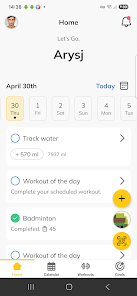
SHIFT Mode is a fitness and health tracking app that centralizes workout plans, nutrition logging, habit tracking and one-on-one coaching into a single, easy-to-use interface. From guided exercise videos and step-by-step workouts to meal logging, body measurements and scheduled reminders, SHIFT Mode helps you follow a structured routine without switching between multiple tools and apps. Available controls emphasize directness: tap a session to start, swipe to move between exercises, and use a clear timeline view to see today's agenda at a glance.
Core features and day-to-day flow
The core of the app organizes your day around training sessions, nutrition entries and small habits. Training plans are presented as sequenced sessions with embedded video demonstrations and built-in timers; each session includes suggested sets, reps, rest periods and an option to mark exercises as complete. Nutrition logging supports quick meal entries and manual macronutrient estimates so you can review calories and meal patterns over time. Habit tracking works alongside workouts: set simple daily tasks, receive reminders and watch a streak-based progress bar that encourages consistency. Messaging with your assigned success coach is integrated directly into the app so plan updates, feedback and scheduling remain in one place.
How the app handles controls and user interaction
SHIFT Mode keeps interactions simple and mobile-friendly. Primary controls rely on intuitive taps and swipes for navigation, while long-press and double-tap shortcuts allow quick edits to workouts or meals. Video playback includes basic transport controls, adjustable playback speed and chapter markers to jump to specific movements. A persistent bottom bar shows the active session, step timer and a single-tap pause button so users can keep moving without digging through menus. The calendar and program timeline provide drag-and-drop rescheduling for flexibility, and push notifications remind you of upcoming sessions or coach messages.
Progression systems and goal tracking
Progression in SHIFT Mode is built around phased plans and measurable outcomes rather than abstract levels. Plans are structured in phases—foundation, build and peak—so intensity and volume increase with clear purpose. Progress is tracked using a mix of objective metrics (workout completion, recorded weights, step counts from wearables) and subjective notes (effort level, soreness). Weekly summaries and comparison charts help you see trends in body measurements, progress photos and performance metrics. Coaches can adjust a plan based on your recorded data, creating a feedback loop that keeps progression aligned with real results.
Visual style, customization and personalization
The interface favors clarity: clean typography, contrast-focused color palettes and minimal visual clutter so information is easy to scan during a workout. Users can customize their dashboard to surface the most relevant modules—today's workout, meal log, habit tracker or chat—according to personal priorities. Profile settings allow goal selection (weight loss, strength, endurance), preferred units, and notification preferences. Coaches use the same app tools to assign tailored sessions and note-specific form cues, ensuring personalization remains practical and transparent rather than hidden behind algorithmic suggestions.
Replay value, challenges and motivation
Replay value comes from program cycles and built-in variety: the app supports repeating training cycles with progressive overload, swapping auxiliary exercises to avoid plateaus, and seasonal or weekly micro-challenges that focus on mobility, endurance or consistency. Habit streaks and milestone notifications celebrate consistency and concrete achievements, while scheduled deload weeks and recovery sessions keep long-term training sustainable. Because workouts can be repeated and modified, the app remains useful beyond a single program and adapts as fitness goals evolve.
Accessibility, offline use and device integration
SHIFT Mode includes accessibility options such as adjustable text sizes, captions for exercise videos and voice prompts for key timers so the experience works for a wide range of users. Integration with wearable devices and health platforms enables automatic syncing of steps, sleep and heart-rate data to enrich program feedback; note that some advanced tracking features require compatible hardware. For times without reliable connectivity, the app allows downloaded sessions and offline access to previously loaded videos and plan content so you can train in a gym or while traveling without interruption.
What to expect and practical considerations
In practice, SHIFT Mode streamlines coaching-led fitness by uniting planning, tracking and communication. Expect clear session workflows, straightforward meal logging and habit tracking that rewards consistency. Some capabilities are contingent on coach availability or compatible wearables, and full integration benefits come as you connect external devices. For users who prefer a single app to manage workouts, nutrition and coach interaction, SHIFT Mode offers a focused, reliable toolkit to support measurable progress over time.
- No virus
- No advertising
- User protection
Information
- File size: 106.00 M
- Language: English
- Latest Version: 8.10.3
- Requirements: Android
- Votes: 277
- Package ID: com.trainerize.shiftmode1
- Developer: cba-pro2
Screenshots
















Explore More
Take charge of your wellbeing with our innovative health and fitness apps. Monitor your activity, sleep, nutrition and more using our advanced tracking tools. Access personalized insights to develop healthy habits. Check symptoms, manage medications, and connect with doctors through our telehealth services. Follow customized workout plans for any fitness level with our virtual coaching.

Tap vpn - fast and safe
Half Marathon Trainer 13.1 21K
DWP Fitness - Diet & Workout

MaaS360 MDM for Android

AD Program

Health Connect (Beta)

Kidcare – Parental Control App

Ultimate IPTV Playlist Loader