Introduction
Pedometer - Step Tracker is a lightweight fitness utility that counts steps, estimates distance and calories, and keeps a simple activity log to help users stay motivated. This app focuses on accuracy, minimal battery use, and clear visuals so you can track daily movement without complex setup or intrusive permissions.
What this app does
Pedometer - Step Tracker records walking and running activity using the phone's motion sensors. It presents daily, weekly and monthly summaries, supports custom step goals and offers a straightforward history view. The app is aimed at people who want a no-fuss tracker that runs reliably in the background.
Primary features at a glance
- Step counting: Continuous tracking using accelerometer and hardware step sensor when available.
- Distance estimate: Calculated using stride length settings so totals match personal pace.
- Calorie estimation: Simple formula based on steps, weight and distance.
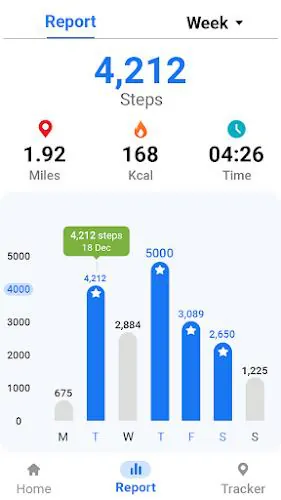
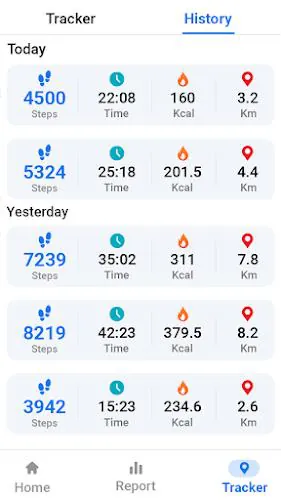
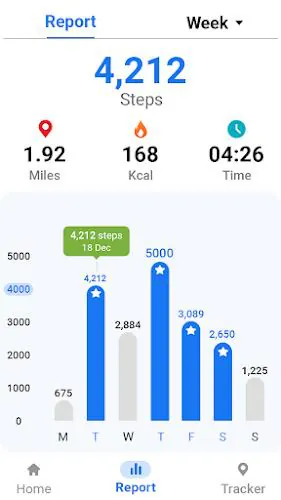
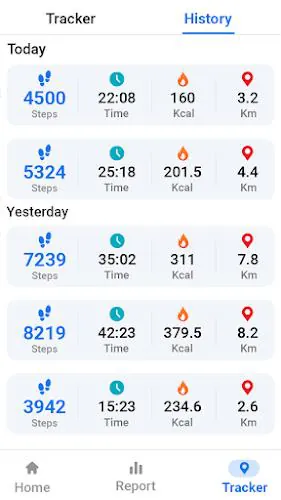
- Activity history: Day-by-day charts and exportable summaries for personal records.
- Low battery impact: Optimized background operation to preserve battery life.
How it works
The app uses the phone's built-in sensors to detect motion patterns associated with steps. When a step sensor is present, readings are more precise and require fewer computations. On devices without that sensor, the app applies filtering algorithms to accelerometer signals to avoid false positives and smooth out irregular spikes.
Sensor handling and accuracy
Pedometer - Step Tracker adapts to hardware differences by switching between sensor modes. There are settings to fine-tune stride length and sensitivity. For better accuracy, calibrate stride length after a measured walk and enable the step-sensor mode if your device supports it.
User interface and performance
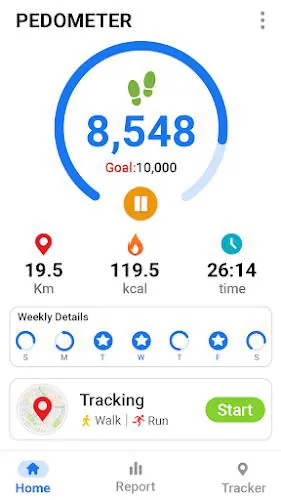
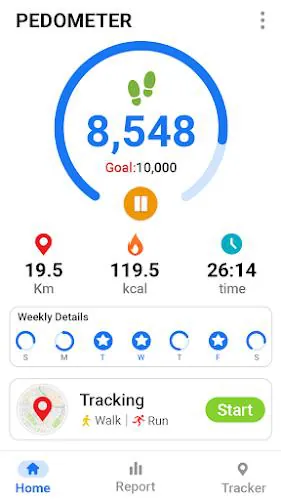
The interface prioritizes clarity: large counters, a progress ring for daily goals and quick access to history. Colors are muted and readable in daylight. Performance is a focus; background tracking minimizes CPU wakeups and avoids constant GPS use so battery drain stays low.
Customization options
- Daily goals: Set step goals and receive simple reminders.
- Units: Toggle between metric and imperial for distance reporting.
- Display widgets: Add a home-screen widget to see steps without opening the app.
- Personal data: Enter weight and height to refine calorie and distance calculations.
Data, privacy and backups
The app stores data locally and provides export options for CSV, making it easy to keep records or import into other fitness tools. Permissions are limited to necessary sensors and optional storage access for exports. Users who prefer offline use can keep tracking entirely on-device.
Useful tips for new users
- Calibrate stride length by walking a measured distance to improve distance accuracy.
- Place the phone in a consistent pocket or position for more reliable step detection.
- Enable the home-screen widget to glance at progress without unlocking the phone.
- Check weekly summaries to spot trends and adjust goals gradually.
Why people choose it
Pedometer - Step Tracker appeals to users who want a dependable, lightweight tracker without subscription tiers or complicated social features. It balances essential metrics with a small footprint, making it a practical companion for daily walking, commuting or light training routines.
Getting started quickly
Install, grant sensor access, input basic personal info and set a daily goal. Within minutes you'll see live step counts and a history screen where progress accumulates. The onboarding is intentionally brief so you can focus on movement rather than setup.
Final notes on usability
For those who value simplicity and battery-friendly operation, Pedometer - Step Tracker delivers core tracking functions with sensible customization. It forgoes complex integrations in favor of a clean, reliable experience that works well for everyday activity monitoring and gentle fitness encouragement.
- No virus
- No advertising
- User protection
Information
- File size: 10.08 M
- Language: English
- Latest Version: 1.2.8
- Requirements: Android
- Votes: 454
- Package ID: pedometer.stepcounter.fitnessapp.stepstracker
Screenshots


















Explore More
Equip yourself with our all-in-one toolbox app for everyday tasks and projects. Instantly convert between units, calculate tips, scan documents, manage files, and more with handy productivity tools. Includes a level, compass, QR code reader, ruler, speedometer, decibel meter, and flashlight. Save frequently used tools to your customizable dashboard for one-tap access. Track billable hours, wages, budgets, and invoices. Annotate screenshots, magnify labels, and sign PDFs on the go.

Board Game Stats

Text Art - Write Text On Photo

MERA PROXY PRO

Domino's Pizza Sri Lanka

Hatekhori Shongkha

Halloween Photo Editor -Makeup

Connecting - Friends Near Me

HFonts - font & emoji manager