Introduction
Easy Invest is a compact investment utility that delivers real-time market data and a straightforward interface to help individual investors make faster, more accurate decisions. Designed for Android devices running 6.0 and up, Easy Invest focuses on clarity and speed: live updates arrive in an uncluttered layout so users can spot opportunities and manage positions without wading through complex menus. The app's small download size and streamlined presentation make it convenient for everyday market monitoring on phones with limited storage.
Key Features
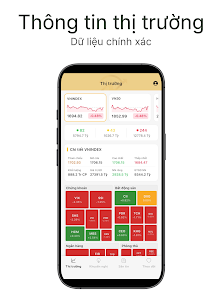
Real-time data feeds are at the core of Easy Invest, with continuously refreshed quotes and price changes presented alongside basic volume information so you can track market movement at a glance. Charts are optimized for mobile viewing and provide quick timeframes for short-term monitoring as well as longer views for trend assessment.
The interface prioritizes quick actions and simple controls: tap to expand a ticker into a full detail view, swipe to move through your watchlist, and long-press to pin favorite instruments. These touch-friendly controls keep common tasks within one or two interactions, reducing friction when markets move quickly.
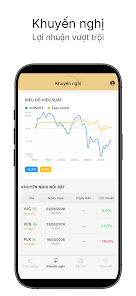
Built-in decision tools are intended for straightforward analysis rather than complex setup. Expect simple technical overlays and fundamental indicators that help inform a choice quickly — for instance, moving averages and percent-change calculations — presented in a way that matches the app’s uncluttered visual style.
Customization options include a personal watchlist and layout adjustments so you can arrange market tiles or chart panels to match your workflow. Small personalization touches, such as adjustable font size and color theme choices, help maintain readability on different devices and in varying light conditions.
Notifications and alert controls are designed to be practical: set price alerts or threshold notifications to receive concise prompts when an instrument crosses a level you care about. Alert settings are granular enough for daily monitoring without creating constant interruptions.
Because storage and speed matter, Easy Invest keeps a lightweight footprint (about 33 MB) and focuses on essential features that work well on mid-range phones from manufacturers such as Xiaomi and HONOR while remaining compatible across most devices running Android 6.0 and above.
Advantages
Easy Invest offers a clear, fast dashboard that is well suited for routine market checks and quick decision-making. The minimal design reduces visual clutter, helping both beginners and experienced users to focus on the most relevant numbers and chart views.
The small app size and efficient operation make daily monitoring practical on devices with limited free space and modest performance. Users report that the app loads quickly and preserves battery life by avoiding unnecessary background activity.
Onboarding and contextual tips are kept simple so new users can get started without a steep learning curve. The app's approach emphasizes practical tools over feature bloat, which benefits traders who prefer speed and straightforward information over complex configuration.
Disadvantages
As an early-stage release, Easy Invest currently has a small user base and limited community feedback; that means fewer user-generated guides and third-party tips are available compared with long-established platforms. Expect the developer to iterate on features as the audience grows.
The app requires Android 6.0 or newer, so it cannot be installed on older legacy devices. Also, while the app provides a set of useful tools for monitoring and basic analysis, it does not attempt to replicate the full feature set of heavyweight desktop terminals.
User Experience, Progression and Accessibility
The app’s progression model is driven by daily use: building a curated watchlist, adjusting alert thresholds, and reviewing simple indicators over time helps users develop a consistent routine. There are no forced learning gates; instead, users grow into more advanced usage by customizing views and saving preferred layouts.
Controls are designed for one-handed use where possible, with tap-to-expand chart details and swipe navigation between screens. Accessibility considerations include adjustable text sizes and contrast-aware color schemes to improve readability for a broad range of users, and settings allow users to limit background refresh to preserve data usage and battery life.
Offline behavior is pragmatic: when a connection drops, the app retains the most recent cached prices and chart images so you can still review your watchlist and recent moves until connectivity is restored. This helps maintain situational awareness when you are traveling or temporarily offline.
Version & Developer
Easy Invest is offered by Tran Hieu and the initial release is Version 1.0.0. The app was first published on Apr 30, 2026 and received an update on May 1, 2026; install size is approximately 33 MB and the app requires Android 6.0 and up. At launch the listing shows 10+ downloads and a content rating of Everyone, reflecting its status as a recently published and actively maintained utility.
- No virus
- No advertising
- User protection
Information
- File size: 33.00 M
- Language: English
- Latest Version: 1.0.0
- Requirements: Android
- Votes: 478
- Package ID: com.vn.eztrade
- Developer: Tran Hieu Easy Invest
Screenshots
















Explore More
Make travel planning effortless with our all-in-one trip companion app! Get insider tips from locals on top attractions, hidden gems, restaurants, and accommodations at your destination. Book flights, rental cars, and hotels at the lowest prices. Access maps offline; track bookings, itineraries, and reservations; create shared group trips; and auto-translate menus, signs, and conversations abroad. Our clever algorithms surface personalized recommendations everywhere you go.

Nhạc vàng

Musica Tayrone Cigano 2020

سورة فصلت - أحمد النفيس بدون ن

Stylish Name Maker

وصفات صحراوية سحرية

TCDC Digital Resource

French Turkish Dictionary

Estados do Brasil