Introduction
Lumina Cam is a pocket cinematic studio that turns your phone into a versatile, pro-oriented camera and editor. Designed for creators and everyday storytellers, Lumina Cam blends a responsive capture engine with film-inspired color science, a compact set of editing tools and a clear interface so you can shoot, refine and share polished images without extra hardware. The app includes an AI colorist that suggests scene-specific color formulas, a curated library of film-style presets, and pro-level controls that help you develop a consistent visual language across shoots.
What you can do
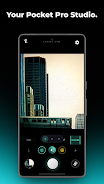
The capture experience in Lumina Cam focuses on speed and precision: a low-latency engine minimizes shutter lag and supports high-resolution, near-4K stills on compatible devices. You can switch between automatic modes for fast, point-and-shoot situations and manual-style controls when you prefer to set exposure, focus and white balance. Real-time effects such as film dust, light bloom and subtle halation are applied non-destructively so you can preview and adjust looks as you frame the shot. The app also offers an elegant framing option that adds a classic white border with discreet metadata when you want to present images in an editorial format.
Controls and workflow
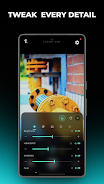
Lumina Cam organizes capture and editing into a simple linear workflow: capture, refine, save. Controls are grouped logically so users move from basic adjustments—exposure, ISO, shutter—to more advanced parameters like custom HSL curves, split toning and selective skin tone protection. The Glassmorphism editor exposes more than thirty-five parameters, letting you protect highlights, shift foliage hues or nudge color balance with fine increments. Preset previews render quickly, and a single-tap compare function helps you evaluate before-and-after results.
Customization and presets
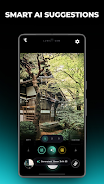
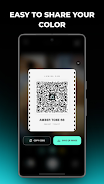
Presets are central to the Lumina Cam approach. The app ships with over thirty cinematic looks inspired by analog film stocks and allows you to save unlimited custom formulas if you unlock the pro option. Lumina Cam’s AI Colorist analyzes scene content—portraits, landscapes, night scenes—and proposes tailored color formulas you can accept, tweak or save. Saved tones can be exported as scannable Film Ticket QR codes that other users import, which streamlines sharing a specific look across devices without complex file transfers.
Editing and export
The editor supports lossless workflows where possible and emphasizes non-destructive adjustments so your original capture remains intact. Fine-grain controls include custom HSL curves, selective local adjustments and a subtle global fade control to emulate print or motion picture textures. When you’re ready to export, Lumina Cam offers common JPEG and high-resolution options and preserves embedded metadata when you choose the classic frame format. Cloud sync is available to back up presets and custom formulas, but exporting and local editing work offline so you can keep shooting without an internet connection.
Progression, learning curve and replay value
Rather than a gamified progression system, Lumina Cam’s progression is skill-based: as you learn the editor and experiment with the AI Colorist, you build a personal library of looks that speeds up future shoots. Beginners can rely on one-touch presets and automated suggestions to get pleasing results quickly, while more experienced users can dive deeper into parameter sets for repeatable, editorial-quality outcomes. Revisiting older shoots and reapplying new presets or tweaks gives the app ongoing replay value for creators who revisit themes or series projects.
Performance, accessibility and device support
Lumina Cam is optimized to balance image quality and real-time responsiveness across a range of hardware, though final results depend on your device’s camera sensor and processing capability. Core capture and offline editing are fully functional without a network connection; cloud backup and community preset exchange are optional features that enhance convenience. The interface is designed to be approachable: control groups are labeled clearly, and the UI supports larger touch targets for easier operation. Accessibility-friendly choices like adjustable parameter contrast and simplified tool views help users focus on composition and color without clutter.
Pricing and options
Lumina Cam offers a one-time Lumina Cam Pro purchase to unlock all premium filters, unlimited preset saves, full AI generation and an ad-free experience. The base app includes the capture engine, a set of free presets and core editing tools so you can evaluate the workflow before deciding to upgrade. Cloud backup and preset export are available after enabling Pro features, which keeps your custom color formulas safe and portable.
Overall, Lumina Cam is aimed at people who want editorial, film-like results from a mobile device: it combines speed, thoughtful controls and an extensible preset system so you can develop a consistent visual style and produce polished images on the go.
- No virus
- No advertising
- User protection
Information
- File size: 49.07 M
- Language: English
- Latest Version: 3.0.10
- Requirements: Android
- Votes: 144
- Package ID: com.dev.luminacam
- Developer: LumiByte Studio
Screenshots
















Explore More
Equip yourself with our all-in-one toolbox app for everyday tasks and projects. Instantly convert between units, calculate tips, scan documents, manage files, and more with handy productivity tools. Includes a level, compass, QR code reader, ruler, speedometer, decibel meter, and flashlight. Save frequently used tools to your customizable dashboard for one-tap access. Track billable hours, wages, budgets, and invoices. Annotate screenshots, magnify labels, and sign PDFs on the go.

Nghe Nhạc Vàng - Nhạc Trữ Tình

Beat Jam - Music Maker Pad

وهشام سماتي- عشقنا راه في خطر

Mazetools Soniface Pro

Oldies But Goldies Radio App

Enrique Iglesias - El Perdón

Stream on Screen for Price Tag
荐片播放器