Introduction
Android Info Master provides a local-first diagnostic dashboard that reveals detailed hardware and system information for Android devices, combining technical depth with a privacy-conscious design. The app surfaces CPU, memory, storage, battery and thermal readings alongside camera, display, sensor and connectivity details so technicians, power users and curious owners can quickly understand what is happening on a device. Everything is stored on the device: there are no accounts, no analytics, no cloud sync and no background uploads, and permissioned data is clearly labeled so you can decide when and how to run specific tests. The interface is designed to feel high-tech without being overwhelming: concise summaries on the home screen lead into deeper, exportable reports when you need them.
Key features
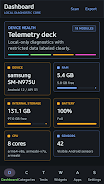
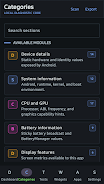
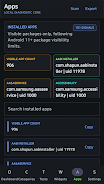
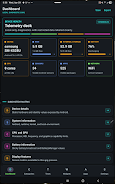
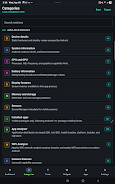
The device dashboard gives an at-a-glance health summary that highlights CPU load, memory pressure, storage availability, battery charge and temperature. Tap any metric to drill down into historical samples and raw values, or to start a live probe for real-time readings. Detailed system reports cover Android build information, kernel details, installed packages, app permissions and signature data; these reports are suited for troubleshooting, device comparisons and basic security audits. Android Info Master includes an App Analyzer that helps you filter installed apps by installer, target SDK, install location and potential risk categories so you can inspect what’s present on the device without guessing.
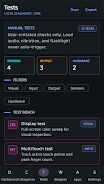
Connectivity and sensors are treated as first-class data sources. The Wi‑Fi Analyzer scans the nearby wireless environment and shows SSIDs, signal strength, channel usage, security modes and an estimated distance to networks based on signal level. Bluetooth devices, USB attachments and cellular status are reported when available. Live sensor probes let you watch accelerometer, gyroscope, magnetometer and light sensor streams, and manual hardware checks include display and touch diagnostics, flashlight and speaker tests, vibration and volume controls, plus fingerprint and Bluetooth hardware verification where supported.
Controls and navigation
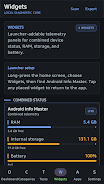
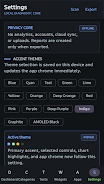
The app follows a simple control model: tap a dashboard card to expand details, swipe between report tabs, and use context menus to export or share a selected section. Short tapping opens a concise report view while long-press actions reveal deeper options such as saving a snapshot or copying raw JSON. Widgets and shortcuts let you pin quick health metrics to the home screen, and theme controls allow you to switch between accent colors and an AMOLED-friendly dark mode for reduced battery draw on OLED displays. No special gestures are required, and accessibility support includes scalable text sizes and contrast-friendly color choices.
Progression, history and replay value
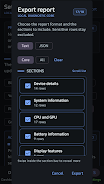
Rather than a game-like progression, Android Info Master emphasizes repeatable diagnostics and record keeping: you can take snapshots of system state over time, compare saved reports side-by-side, and export these snapshots as plain text or structured JSON for archival or offline analysis. This creates a practical progression for troubleshooting work—start with a baseline, reproduce an issue, capture another snapshot and compare differences. Regular use helps users build a timeline of behavior for battery life, thermal events or app-related anomalies, making the app a useful tool for device maintenance and long-term monitoring without requiring continuous background activity.
Visual style, customization and accessibility
The visual design is crisp and utilitarian with a subtle high-tech aesthetic: clear data tables, simple graphs and color-coded status indicators make complex information easier to scan. Customization options focus on readability and comfort rather than gimmicks: adjustable font sizes, low-contrast and high-contrast palettes, and a dark AMOLED theme to minimize power use on supported screens. Home screen widgets provide compact or expanded views, and the export format choice (text or JSON) makes it straightforward to feed data into other tools or reports. Accessibility settings aim to make the app usable for a broad audience, with readable labels, support for screen readers and predictable navigation patterns.
Privacy, offline use and limitations
Privacy is central: all data remains on the device until you explicitly export it, and Android Info Master never requires a sign-in or background upload. Some features require runtime Android permissions such as camera access for flashlight testing, location or Wi‑Fi scanning to enumerate networks, and phone or network permissions for restricted connectivity details; the app clearly explains why each permission is requested and only gathers that data when you grant consent. Note that because the app intentionally avoids cloud sync, settings and saved snapshots are local to each device and cannot be automatically synchronized between phones or backed up to an account. This trade-off preserves user control and reduces remote exposure while still providing comprehensive, offline diagnostics.
- No virus
- No advertising
- User protection
Information
- File size: 23.80 M
- Language: English
- Latest Version: 1.0.2
- Requirements: Android
- Votes: 374
- Package ID: com.csware.androidinfomasterpro
- Developer: Crystal Software
Screenshots

















Explore More
Make your house a home with our suite of helpful home apps. Discover clever tools to organize closets, streamline chores, and simplify cooking. Take the stress out of cleaning and maintenance with handy checklists and schedules. Enhance security and control appliances and lighting with our smart home integrations. Design, visualize, and renovate like a pro using our 3D planning software.

Real Beauty Loyalty

Helpr

Forescore

Sweet Home: Games for kids

PigeonCast:Mirror via AirPlay

95.3 WLKR

Radyo Delisi

Radio You FM 106.9