Introduction
Service Bus Dojo is a compact, cross-platform client for managing and debugging Azure Service Bus that helps developers stop wrestling with complex portals and heavyweight tools. It provides fast, precise access to queues and topics so you can inspect messages non-destructively, send single or batched messages, and run advanced workflows like forwarding or resubmitting without slowing down your integrations. Built for corporate developers, Service Bus Dojo streamlines routine operations and boosts productivity during development and testing, and it includes a 7-day free trial so teams can evaluate its impact on their workflow.
Key Features
⭐ Connect securely to Azure Service Bus with free-tier connection management suitable for development and testing environments.
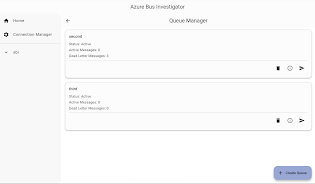
⭐ Inspect messages non-destructively (peek) to investigate queue contents without affecting consumers.
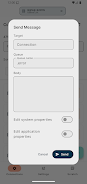
⭐ Send individual messages through a clean, intuitive dialog or compose multiple items for batch delivery during testing.
⭐ Blazing-fast operations powered by a Rust core give Service Bus Dojo responsive and reliable performance.
⭐ Batch sending support speeds up load testing and iterative development workflows.
⭐ Advanced operations like forwarding and resubmitting messages enable deeper investigative workflows for debugging integrations.
Advantages
✅ Streamlines common Service Bus tasks to reduce context switching and accelerate developer workflows.
✅ Designed for corporate developers, Service Bus Dojo brings enterprise-focused tools without relying on cumbersome portals.
✅ Cross-platform client simplifies queue inspection, sending, and advanced message handling in one interface.
✅ A 7-day free trial lets teams evaluate functionality and performance before making a decision.
Disadvantages
❎ The free-tier connection management is aimed at development and testing, which may limit suitability for production scenarios.
❎ The trial period is limited to 7 days, which can feel brief for larger teams to fully evaluate.
❎ Its enterprise focus may be more than casual or occasional users need, making the tool feel heavyweight for simple tasks.
- No virus
- No advertising
- User protection
Information
- File size: 65.29 M
- Language: English
- Latest Version: 2.9.3
- Requirements: Android
- Votes: 496
- Package ID: com.AhyaanTech.AzureServiceBusInvestigator
- Developer: AhyaanTech
Screenshots



















Explore More
Equip yourself with our all-in-one toolbox app for everyday tasks and projects. Instantly convert between units, calculate tips, scan documents, manage files, and more with handy productivity tools. Includes a level, compass, QR code reader, ruler, speedometer, decibel meter, and flashlight. Save frequently used tools to your customizable dashboard for one-tap access. Track billable hours, wages, budgets, and invoices. Annotate screenshots, magnify labels, and sign PDFs on the go.

兴业证券优理宝

Desktop VNC Viewer

TicketTT

Aurora FPV

CrossConf – главное IT-событие

کێش

Asma-Ul-Husna

TioPatinhax