
Introduction
Squad X is a mobile organizer built to make planning group activities fast and painless. With Squad X you can create an event in minutes, reserve a venue, invite friends privately or open the activity to the broader community, and manage shared costs so each participant pays their fair share. The app focuses on simple workflows and clear invitations so pickup games, meetups, classes and casual gatherings come together without lengthy message threads.
How it works
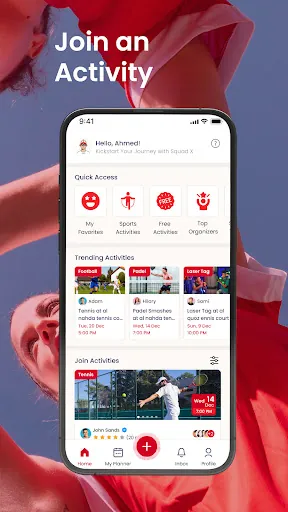
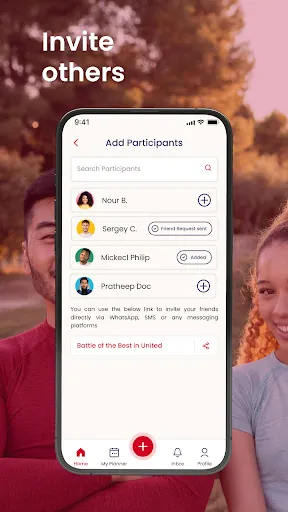
Creating an activity in Squad X follows a straightforward form: choose a title, pick date and time with an integrated calendar control, drop a pin or select from suggested venues, and define attendance limits and privacy. Controls are tap-first and context-sensitive — tap a date to edit time, swipe to switch between list and map views, and use inline reminders to set automatic notifications for guests. Invitations can be sent to your contacts or posted to the public activity feed where nearby users can discover and request to join.
Detailed features
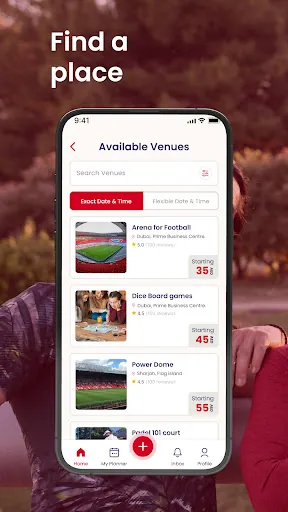
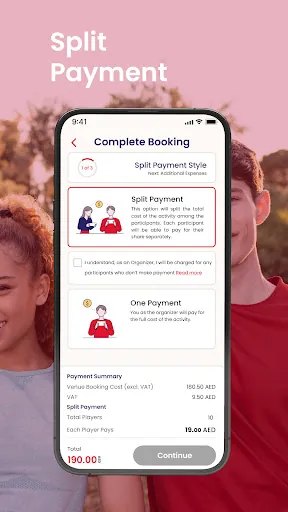
The built-in payment split tool lets organizers add one or several costs and divide them among participants with options for equal shares or custom amounts; Squad X then provides a simple settlement summary each participant can review. Venue reservations are handled from the event page so you can attach booking references or notes and keep all logistics in one place. The public listing supports filters by date, location, activity type and skill level, which helps you find events that match your schedule and interests without endless searching.
Controls and progression
Controls remain consistent across creation, browsing and management: large tap targets, clear state indicators for RSVP and payment, and quick actions to message attendees or update event details. Progression in Squad X is practical rather than gamified — as you organize more activities you accumulate templates and reusable settings, which speeds up future planning. Organizer history and saved templates act as a lightweight progression system that reduces setup time for recurring or similar events.
Customization and visual style
Squad X presents information in a clean, readable layout with clear typographic hierarchy and a neutral color scheme that emphasizes schedules and maps. You can customize notifications, choose whether events show as public or invite-only, and apply tags or categories to make events easier to find later. Event pages can include a short description, image, and practical notes such as equipment needs or skill level, helping participants know what to expect before they join.
Replay value and level structure
Replay value comes from the ease of reusing templates, setting up recurring activities, and browsing a constantly refreshed public feed of events. The app organizes activities into categories and date ranges rather than fixed levels, so users progress by building a fuller calendar and network of regular participants. Regular meetups and series are easy to manage, and the ability to copy past events reduces repetitive setup work.
Accessibility, offline use and user experience
Accessibility features are built in with scalable text sizes and support for common screen readers so event details remain usable for a range of users. Squad X caches recent searches and event pages so you can view information offline and draft an event while disconnected; drafts sync automatically when your device reconnects. Overall the user experience emphasizes minimal friction: fewer taps to launch an event, clear next steps for attendees, and straightforward payment summaries to reduce post-event confusion.
Privacy, safety and support
Privacy controls let hosts restrict visibility to invited guests or open events to the community with moderation options. Payment summaries are transparent so everyone can see charges and contributions, and hosts can mark attendees as paid or pending. For questions or troubleshooting, the app includes an in-app support channel and links to documentation to help organizers and participants get the most out of Squad X without surprises.
- No virus
- No advertising
- User protection
Information
- File size: 107.10 M
- Language: English
- Latest Version: 2.2.1
- Requirements: Android
- Votes: 483
- Package ID: com.icecodesoftware.squadx
- Developer: Ice Code Software L.L.C
Screenshots


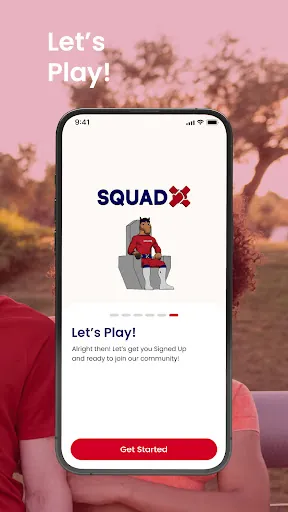
















Explore More
Discover and share the hottest events around with our intuitive apps. Find local concerts, festivals, shows, and more based on your unique interests. Create customizable calendars of upcoming events to coordinate schedules with friends. Purchase tickets seamlessly from our integrated platforms. Check real-time transit schedules to plan your trip. Access maps, directions, and parking information for any venue.

Phonedoc Doctor

Brianni

Olhar Quarteira

Lavesco Jobs

Fusion Exhibit

ぶちエエやまぐち!

LCNO

Pluck Numbat Cove Yore