


Introduction
words.hk 粵典 is a compact Cantonese language companion that provides character definitions, pronunciations, and usage examples in a single app. It helps learners, translators, and native speakers quickly lookup words, hear audio pronunciations, and explore tones and romanization systems for accurate Cantonese understanding.
What words.hk 粵典 Offers
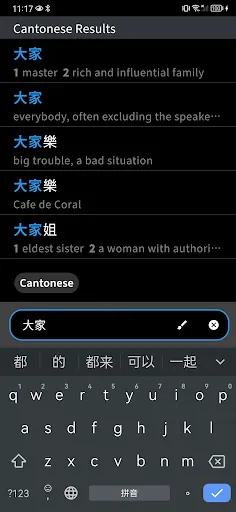
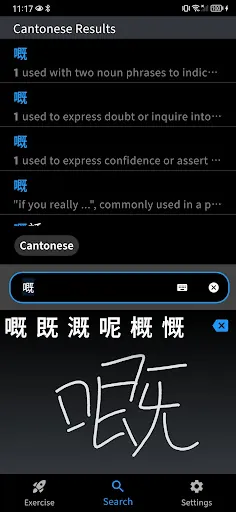
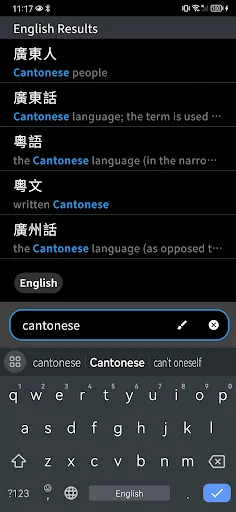
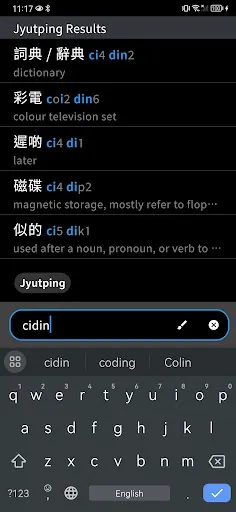
At its core, words.hk 粵典 is a focused dictionary and learning tool designed specifically for Cantonese. It contains an extensive database of Chinese characters, Cantonese readings in Jyutping, example sentences, and audio clips. The app supports quick searches by character, word, or romanization, making it easy to find entries whether you type hanzi, jyutping, or English glosses.
Search and Lookup Tools
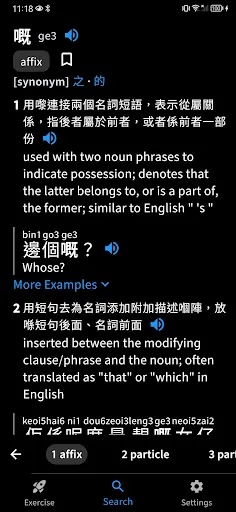
Search speed is a priority. The app delivers instant suggestions as you type and supports fuzzy matching so partial inputs produce helpful results. Users can filter results by tone, part of speech, or frequency of use. A multi-tab entry view breaks down definitions, variant characters, and common collocations for each headword.
Pronunciation and Audio
High-quality audio recordings accompany many entries to demonstrate native Cantonese pronunciation and tone contours. The app also displays Jyutping romanization and tone marks, which are invaluable for learners practicing accurate intonation. Playback controls let you loop phrases or slow down audio to dissect tricky syllables.
Learning and Reference Features
Beyond raw definitions, words.hk 粵典 includes contextual materials such as example sentences, idioms, and regional notes. Lookup history and a customizable favorites list allow users to build personal vocabularies. Each saved item can be reviewed later, exported, or organized into study sets for targeted practice.
User Interface and Navigation
The interface emphasizes clarity: a clean search bar, readable character typography, and logically organized tabs for meaning, pronunciation, and usage. The app adapts to both compact phone screens and larger tablets, with responsive layouts that keep information accessible without clutter. Night mode and font-size controls help reduce eye strain during extended study sessions.
Offline Use and Data Management
For commuters and travelers, the app offers offline access to the dictionary database after an initial download. Offline mode preserves essential lookup functionality and audio playback for saved entries. Storage options let users choose which language packs or audio bundles to keep locally, conserving device space.
Performance and Compatibility
words.hk 粵典 is optimized for smooth performance on a wide range of Android devices. Indexed search and efficient caching reduce CPU and battery use. The app handles large character datasets without lag and includes compatibility checks for older Android versions while taking advantage of newer platform features where available.
Practical Workflows
For translators and content creators, the app supports copy-and-paste, quick sharing of entries, and bulk lookup workflows. Language learners can combine the dictionary with flashcard exports or external SRS tools. Built-in bookmarking and notes let users annotate entries with personal observations or mnemonic cues.
Customization and Accessibility
Personalization options let users toggle between simplified and traditional characters, choose preferred romanization display, and set default audio speeds. Accessibility features include adjustable text sizes, high-contrast mode, and screen-reader friendly labels, making the app usable for a broader audience.
Getting Started Tips
- Download core data: Install the offline database at first launch to enable lookups without connectivity.
- Set preferred display: Choose traditional or simplified characters and Jyutping visibility to match your learning goals.
- Use favorites: Save tricky words to build a review list and export study sets when needed.
words.hk 粵典 is practical for everyday usage, study routines, and professional reference needs. Its combination of clear search, reliable audio, and thoughtful interface choices makes it a useful tool for anyone working with Cantonese text or speech.
- No virus
- No advertising
- User protection
Information
- File size: 46.50 M
- Language: English
- Latest Version: 2.1.1
- Requirements: Android
- Votes: 433
- Package ID: hk.words.wordshk
- Developer: Xiang (Kevin) Li
Screenshots
















Explore More
Discover your next great read with our innovative book apps. Access millions of ebooks, audiobooks, and comics on any device. Get personalized recommendations from our advanced algorithms so you always have your next great story lined up. Track your reading habits and browse curated lists for inspiration. Join online book clubs to connect with fellow bibliophiles. Listen to samples and download seamlessly with our integrated stores.

MEXC Global: BTC, ETH, Gamefi

Bloomberg Connects

Metro Micro

IZI: play, listen, watch, call

ClassPass: Fitness, Spa, Salon

Kyrgyz Russian Translation

Park4Me

Juice Recipes





























