

Introduction
CHM Viewer brings fast, reliable CHM (Compiled HTML Help) reading to Android devices with a focus on performance, clarity, and offline convenience. CHM Viewer opens CHM files saved on your device or copied from other sources and renders them with a native C++ engine so documents load instantly and remain responsive even when they contain thousands of linked pages. The app pairs that core rendering performance with a modern Jetpack Compose interface to deliver a distraction‑aware reading experience that adapts to system dark and light themes.
Key features
The rendering engine is written in native C++ to give you quick load times and smooth scrolling across large help files and technical manuals. Table of contents support provides a persistent sidebar for rapid jumps between chapters and sections, and internal hyperlinks and anchors within CHM files are preserved so documents behave like the original compiled help. The UI uses Material 3 design principles for consistent spacing and typography, while system dark and light theme integration helps reduce eye strain during long reading sessions.
User interface and controls
CHM Viewer is built with a straightforward, touch-friendly interface that prioritizes the content. The table of contents sidebar slides in for navigation and can be dismissed to focus on the article body. Standard gestures such as vertical scrolling and tapping links are supported, and text layout adapts to different screen sizes for readable line length and comfortable line spacing. Controls are intentionally minimal to keep the interface clean: common navigation actions are easy to reach, and visual chrome is reduced while you read so the document remains the focal point.
Performance, resource use and offline reading
The native rendering backend and careful memory management mean CHM Viewer handles very large documentation files without excessive memory use or battery drain. Because it works directly with local CHM files, the app is fully usable offline and is intended for people who need to consult documentation, manuals, or portable eBooks away from a network connection. The application maintains a compact footprint on device storage and performs background tasks sparingly to preserve battery during extended reading sessions.
Navigation, reading progress and document handling
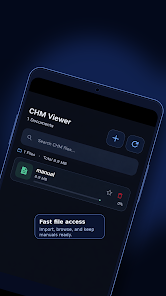
Navigation centers on the document structure: table of contents entries are presented clearly so you can jump between sections quickly and understand how chapters fit together. Internal links remain active and images embedded in CHM pages are rendered inline to preserve context. CHM Viewer strives to make long documents manageable by remembering where you left off inside a file, so returning to a manual picks up at the last read position. File handling integrates with standard Android storage and file managers so opening a CHM from downloads, a USB drive, or cloud-synced folders behaves predictably.
Accessibility and customization
CHM Viewer respects system accessibility settings such as font scaling and contrast to improve readability for different users. Dark mode and light mode follow the system preference, and the UI is designed to keep interactive elements large enough for easier tapping. The app favors a stable reading environment over a crowded feature set so users who need a focused, legible view of technical material can concentrate on reading without distraction.
Suitability and typical use cases
This reader is particularly well suited for developers, technicians, students, and anyone who relies on CHM format manuals and offline documentation. Because CHM is a compiled HTML format, it is commonly used for API references, product manuals, and archived help systems; CHM Viewer preserves that structure and makes those documents accessible on mobile devices. The lightweight design also makes it a practical choice for older or lower‑power phones where heavy document suites might feel sluggish.
Limitations and trade-offs
While CHM Viewer focuses on rendering CHM content quickly and accurately, it is primarily a reader rather than a full document management suite. It does not attempt to be a universal ebook app and may not support EPUB, PDF, or advanced annotation and cloud synchronization features that are common in larger document platforms. If you need extensive note taking, collaborative tools, or online libraries, CHM Viewer is intentionally minimal and may be best used alongside other apps that provide those capabilities.
Stability and updates
The app emphasizes stability and predictable behavior across a wide range of CHM files. Regular updates improve compatibility and resource handling while keeping the interface familiar. For anyone who needs a dependable, offline CHM reader that favors speed and a clean reading surface, CHM Viewer offers a focused solution without unnecessary complexity.
- No virus
- No advertising
- User protection
Information
- File size: 50.00 M
- Language: English
- Latest Version: 1.1.6
- Requirements: Android
- Votes: 156
- Package ID: com.vincentkoms.chmviw
- Developer: Vincentkoms
Screenshots
















Explore More
Discover your next great read with our innovative book apps. Access millions of ebooks, audiobooks, and comics on any device. Get personalized recommendations from our advanced algorithms so you always have your next great story lined up. Track your reading habits and browse curated lists for inspiration. Join online book clubs to connect with fellow bibliophiles. Listen to samples and download seamlessly with our integrated stores.

MEXC Global: BTC, ETH, Gamefi

Bloomberg Connects

Metro Micro

IZI: play, listen, watch, call

ClassPass: Fitness, Spa, Salon

Kyrgyz Russian Translation

Park4Me

Juice Recipes





























