Introduction
FoodScan AI is a smart mobile utility that identifies foods, estimates calories, and provides nutritional breakdowns using the phone camera. It simplifies meal logging by scanning plates, packaging, or recipes and returning clear nutrient data and portion guidance in seconds for healthier daily choices.
Quick overview
Designed for busy people who want accurate nutrition information on the go, FoodScan AI combines image recognition with nutrition databases to speed up food tracking. The interface focuses on fast results, minimal taps, and readable insights that help users adjust meals without manual searching.
Core tools and capabilities
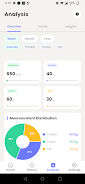
The app centers around a few practical utilities that make nutrition tracking straightforward. Key elements include camera-based food recognition, portion estimation, and macronutrient breakdowns. A library of common foods and brand items improves identification accuracy for packaged goods. When you scan a meal, the system suggests serving sizes and calorie estimates and offers alternatives to meet specific dietary goals.
How the scanning process works
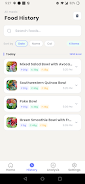
After granting camera access, point your device at a plate or product label. The app analyzes shapes, colors, and context to detect items and then cross-references its nutrient database. Results appear with a confidence rating and are editable if portions differ. Scans can be saved to a daily log for review and export.
Interface and usability
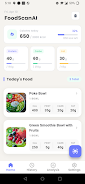
The user interface emphasizes clarity: large photos, labeled nutrient cards, and quick-action buttons to edit or save entries. Menus are compact and accessible, so logging takes less time than manual entry. Visual cues indicate estimated portion sizes while toggles let you switch between metric and imperial units.
Integration and workflow
FoodScan AI supports syncing with health platforms and export options for spreadsheets. The daily log shows a timeline of scans, water intake, and exercise entries so you can see how meals fit into broader habits. Exported data helps with meal planning or sharing with nutritionists.
Customization and preferences
Users can set dietary goals—calorie ranges, carb targets, or protein minimums—and the app will highlight scans that align or deviate. Favorite foods can be pinned for rapid entry, and custom items let you store family recipes or home-cooked meals with precise nutrient values. Notifications can remind you to scan meals to improve consistency.
Performance and accuracy
Recognition accuracy depends on image quality and how distinct the food is. Simple dishes and packaged items yield the best results, while mixed plates may require minor edits. The portion estimation uses visual heuristics and user feedback, so accuracy improves as you correct entries and add custom items.
Security and privacy considerations
Scans and logs are stored locally by default, with optional cloud backup for syncing across devices. The app requests only necessary permissions and provides settings to control data sharing. Users handling medical conditions should use the app as an informational aid and consult professionals for medical advice.
Practical tips for new users
- Scan in good lighting and avoid overly cluttered backgrounds to improve detection.
- Use the edit tools to correct portion sizes—small adjustments teach the app your habits.
- Pin frequently eaten meals to speed up daily logging.
- Enable sync if you want to back up logs or view entries on multiple devices.
FoodScan AI fits users looking for a practical, camera-first alternative to manual food diaries. With incremental learning, customizable entries, and a streamlined log, it helps make nutritional tracking less time-consuming and more intuitive.
Getting started
Download and open the app, grant camera permission, and try a few test scans to see the results. Spend a few minutes creating favorites and setting goals—this initial setup enhances daily use and the relevance of suggestions.
- No virus
- No advertising
- User protection
Information
- File size: 44.61 M
- Language: English
- Latest Version: 10.0.0
- Requirements: Android
- Votes: 220
- Package ID: com.di.foodscanai
- Developer: Lutlo25
Screenshots
















Explore More
Make your house a home with our suite of helpful home apps. Discover clever tools to organize closets, streamline chores, and simplify cooking. Take the stress out of cleaning and maintenance with handy checklists and schedules. Enhance security and control appliances and lighting with our smart home integrations. Design, visualize, and renovate like a pro using our 3D planning software.

All Recovery - Photos & Videos

Tax Calculator India 2024-2025

OnDjoss

Park4Me

Scary sound effects

Home Workouts - Lose Weight

Juice Recipes

HFonts - font & emoji manager