


Introduction
Renovo is a compact utility that streamlines Android maintenance, combining storage cleanup, battery saving, and privacy safeguards into a single toolkit for everyday users and power users alike. It delivers scheduled maintenance, lightweight resource monitoring, and fast app management with a minimal footprint.
What Renovo brings to the table
Renovo targets the common pain points of Android ownership: cluttered storage, runaway background processes, and hard-to-find privacy settings. Rather than presenting a dozen redundant features, Renovo focuses on high-impact tools that reduce friction and keep devices responsive. The app feels like a modern maintenance suite built around quick wins and sensible defaults.
Core tools and features
- Storage cleaner: Scans cached files, residual APKs, and large media that users often forget. The scan results are grouped by category to simplify decisions.
- Battery optimizer: Identifies apps with excessive wake locks and suggests targeted restrictions to extend unplugged time.
- Privacy inspector: Lists apps that request sensitive permissions and offers one-tap disable or permission review workflows.
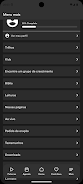
- App manager: Batch-uninstall, freeze, or force-stop multiple apps at once, plus quick access to app details and storage usage.
- Scheduled tasks: Automate cleaning and optimization jobs at times you choose so maintenance happens without thinking about it.
Design and performance
Renovo uses a stripped-back interface that prioritizes clarity. Primary actions are reachable in two taps, and visual metrics are limited to what matters: free space, memory usage, and estimated battery time. Animations are subtle, which helps the app feel fast even on mid-range devices. Memory footprint and CPU usage remain modest while background monitoring is active.
How it works day-to-day
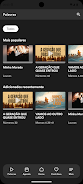
After an initial scan, Renovo provides a concise dashboard with suggested actions. Tap clean to remove junk files, or open the battery panel to see which apps are consuming the most energy. For privacy-conscious users, the permission list highlights sensitive access like camera, microphone, and location. Actions can be applied individually or in bulk.
Customization and control
Power users will appreciate Renovo's granular controls. You can whitelist apps to exclude them from automatic optimizations, schedule deep-clean sessions during overnight charging, and adjust sensitivity for background process detection. The app also supports a mild form of automation so that routine maintenance stays unobtrusive.
User experience notes
Onboarding is straightforward: the first-run flow explains each module with short, practical tips. Notifications are informative without being pushy and can be fully disabled. Renovo also provides short logs of actions performed, so you can review what was removed or altered before accepting future recommendations.
Tips for new users
- Run an initial full scan and review items before deletion to avoid removing personal files.
- Use scheduled cleaning during off-hours to avoid interruptions while using the device.
- Whitelist communication and banking apps to prevent accidental disruptions from aggressive optimizations.
- Check the privacy inspector after major app installs to manage permissions proactively.
Why many users install Renovo
People choose Renovo because it balances automation with transparency. The app reduces repetitive tasks without hiding what it does. Its focused feature set avoids bloat while covering the essentials of device upkeep. For users who want a quick, reliable way to keep their phone tidy and efficient, Renovo fits the role well.
Final thoughts on everyday management
Renovo doesn’t try to be a one-stop replacement for every system tool, but it fills the daily maintenance gap neatly. If you value straightforward controls, low resource use, and sensible automation, the app provides the practical utilities needed to keep an Android device running smoothly. Regular use can improve perceived speed, extend battery life, and simplify permission management without a steep learning curve.
- No virus
- No advertising
- User protection
Information
- File size: 14.00 M
- Language: English
- Latest Version: 2604.9.0
- Requirements: Android
- Votes: 230
- Package ID: br.com.inchurch.renovo6
- Developer: inChurch
Screenshots

















Explore More
Equip yourself with our all-in-one toolbox app for everyday tasks and projects. Instantly convert between units, calculate tips, scan documents, manage files, and more with handy productivity tools. Includes a level, compass, QR code reader, ruler, speedometer, decibel meter, and flashlight. Save frequently used tools to your customizable dashboard for one-tap access. Track billable hours, wages, budgets, and invoices. Annotate screenshots, magnify labels, and sign PDFs on the go.

MEXC Global: BTC, ETH, Gamefi

Text Art - Write Text On Photo

MERA PROXY PRO

Domino's Pizza Sri Lanka

Hatekhori Shongkha

Halloween Photo Editor -Makeup

Connecting - Friends Near Me

Cartola





























