


Introduction
Revo Training is a mobile app designed to streamline skill development with guided sessions, progress tracking, and adaptive plans that grow with you. The app combines clear routines, analytics, and customizable drills to help users build lasting habits and measurable improvements in any training discipline.
Core Functionality
Revo Training focuses on delivering structured practice through short, focused sessions and long-term programming. Users can choose from predefined plans or create bespoke workflows by combining exercises, timers, and rest intervals. The app records every session, turning raw activity into actionable metrics that reveal strengths and weaknesses.
Interface and Usability
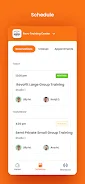
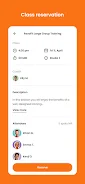
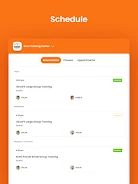
The interface is clean and task-oriented, prioritizing easy navigation during active sessions. Large buttons and readable timers minimize distraction while training, and a clear dashboard presents daily targets, recent achievements, and upcoming sessions. Contextual tips and inline explanations make setup straightforward for new users.
Personalization and Adaptive Plans
Revo Training adapts to your progress by adjusting difficulty and volume automatically. After each workout the app analyzes performance and suggests modifications to keep training efficient and avoid plateaus. Customizable templates let experienced users fine-tune intensity, frequency, and rest patterns for specific goals.
Session Types and Tools
The app supports a variety of session formats including interval circuits, technique drills, steady-state practice, and timed challenges. Built-in tools include a programmable interval timer, an exercise library with descriptions, and a note field for session observations. You can combine tools into routines and save them for repeated use.
Tracking and Insights
Tracking in Revo Training goes beyond simple logs. The app captures duration, repetitions, perceived effort, and ancillary notes, then visualizes trends over days, weeks, and months. Insightful charts highlight consistency, highlight peak performance windows, and flag regressions so you can adjust programming quickly.
Integration and Data Export
For users who want to analyze data externally, Revo Training offers export options in common formats. Sync capabilities with calendar apps keep sessions visible alongside daily commitments. Integration with wearable devices enhances accuracy by importing heart rate and motion data to refine intensity estimates.
Customization Options
Every aspect of a plan is editable: session length, number of sets, rest periods, and difficulty scaling. You can set reminders, choose audio cues, or enable vibration feedback to keep your focus during busy or noisy environments. Themes and layout settings allow the UI to match personal preference and accessibility needs.
Performance and Compatibility
Revo Training is optimized to run smoothly on a broad range of Android devices, with minimal battery impact during passive tracking and careful resource management during active sessions. Offline mode enables uninterrupted use without a connection, while cloud sync ensures your data remains available across devices.
Getting Started Quickly
Begin by selecting a goal, then complete a short baseline assessment to tailor the initial plan. The onboarding flow explains key features and recommends a conservative starting load to promote adherence. Within the first week you can expect to see progress metrics and receive adjustments based on your responses.
Community and Support
Revo Training includes community-driven elements such as shared routines and public challenges that encourage accountability and variety. Built-in help covers frequently asked questions and troubleshooting steps, while in-app support connects users with detailed guides and customer service when needed.
Why Choose Revo Training
Revo Training combines practical tools, flexible customization, and data-driven feedback to make daily practice easier and more effective. Its balance of automation and manual control suits users who value science-backed progression without losing the ability to personalize every detail.
- No virus
- No advertising
- User protection
Information
- File size: 87.00 M
- Language: English
- Latest Version: 3.37.0
- Requirements: Android
- Votes: 228
- Package ID: com.pushpress.revotrainingcenter
- Developer: PushPress, Inc.
Screenshots



















Explore More
Empower learning and research with our innovative reference apps. Access dictionaries, thesauruses, encyclopedias, and more with our comprehensive databases. Get homework help, study tips, and writing guides from our academic resources. Learn new skills by browsing how-to videos and manuals. Stay up-to-date with latest news, data, and facts curated by our editors.

Bloomberg Connects

OnDjoss

Kyrgyz Russian Translation

Domino's Pizza Sri Lanka

Bollinger 1829

TANTRI : QR Menu & POS

Vi2Go

DATING SITES





























