


Introduction
eDreams helps travelers search, compare and book flights, hotels and rental cars from a single mobile interface, delivering quick search results, curated deals and trip management tools. The app streamlines bookings and provides real-time notifications, making it easy to plan multi-destination journeys and manage reservations on the go.
What eDreams Offers
At its core, eDreams centralizes travel planning so users can find itineraries and accommodation without switching between multiple websites. The app aggregates inventory from airlines, hotel chains and car rental companies, then displays options by price, duration and convenience. A range of filters and sorting choices helps narrow results for travelers who value cost, schedule or specific carriers.
Key Features and Tools
- Smart search: Instant comparisons across carriers and lodging with flexible date options and nearby airport choices.
- Price calendar: Visual heat maps and cheapest-day indicators make finding lower fares faster.
- Multi-city planning: Build complex routes with stopovers and different transport modes in one booking flow.
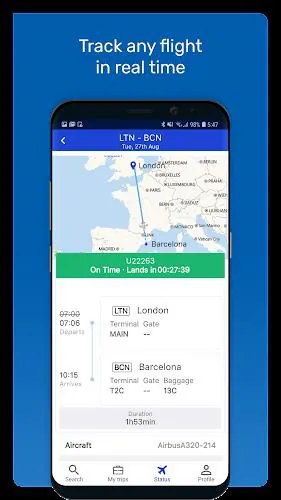
- Push alerts: Receive flight changes, gate updates and promotional deals straight to your device.
- Secure payments: Multiple payment methods and clear cancellation policies reduce uncertainty during checkout.
Booking Workflow Simplified
eDreams guides users through a step-by-step booking sequence that minimizes clicks. Start with a broad search, refine using filters, then compare selected options in a single view. The checkout page consolidates traveler data, seating preferences and ancillary services like baggage or priority boarding. Confirmations and digital receipts are stored in-app for easy retrieval.
Interface and Navigation
The interface emphasizes clarity and speed. Search results present essential details—price breakdowns, travel time and layover information—while expandable cards reveal further terms and refund rules. Menu items prioritize upcoming trips, saved searches and special offers, so frequent users can jump directly to what matters. The visual design keeps important call-to-action buttons within thumb reach for one-handed use.
Deals, Alerts and Fare Tracking
One of eDreams’ strengths is its fare monitoring system. Users can set alerts for specific routes or dates and receive notifications when prices drop below a target threshold. The built-in deals section highlights time-limited offers and seasonal promotions, helping travelers capture savings without constant manual checking.
Managing Trips and Aftercare
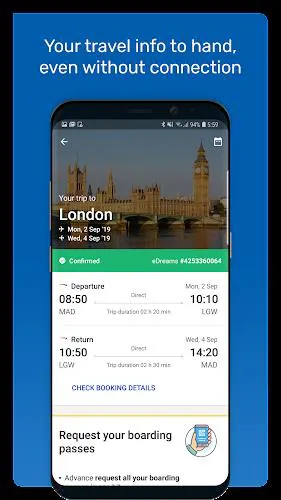
After booking, the app centralizes itineraries with flight times, hotel check-in instructions and car pick-up locations. Edit options allow date changes and add-ons, subject to provider rules. Customer support is reachable via in-app chat and email; response times vary by region, but the app’s documentation and FAQs cover common issues like refunds, vouchers and baggage allowances.
Performance, Compatibility and Security
eDreams is optimized to run smoothly on modern Android devices, prioritizing fast search results and minimal data usage. Offline access to stored itineraries is helpful when connectivity is limited. Payment processing follows industry standards, and the app uses encryption to protect sensitive information. Regular updates address bugs and expand supported airlines and properties.
Why Travelers Choose This App
Travelers pick eDreams for its speed, aggregated choices and the convenience of managing bookings from a single application. The combination of fare alerts, multi-city support and in-app documentation reduces friction for both leisure and business trips. With straightforward filtering and visible price comparisons, it’s a practical tool for anyone who wants to spend less time searching and more time traveling.
Getting Started
Download the app, create a profile and save frequent travelers and payment methods to speed up future reservations. Try a few searches to tune alert preferences and explore the price calendar to understand seasonal trends. Using saved searches and notifications can cut down on manual monitoring and help secure better fares.
- No virus
- No advertising
- User protection
Information
- File size: 103.09 M
- Language: English
- Latest Version: 4.851.0
- Requirements: Android
- Votes: 89
- Package ID: com.edreams.travel
- Developer: eDreams App
Screenshots





















Explore More
Streamline operations and maximize productivity with our innovative business apps. Manage contacts, schedule meetings, and route calls seamlessly. Collaborate on documents and projects in real-time. Track inventory, finances, and analytics to inform smart decisions. Build customized proposals, invoices, and contracts to win clients. Stay on top of emails, tasks, and passwords for efficient work.

Tax Calculator India 2024-2025

ScanPro

Kyrgyz Russian Translation

Park4Me

7punches: Simple Time Clocking

69ers

Airble

MaaS360 MDM for Android





























