Introduction
Battery charge sound alert helps you monitor charging progress by playing customizable tones when your phone reaches selected battery levels. It notifies you at charge start, full charge, and user-defined percentages to prevent overcharging and battery stress while offering simple controls and reliable alerts for everyday use.
Overview
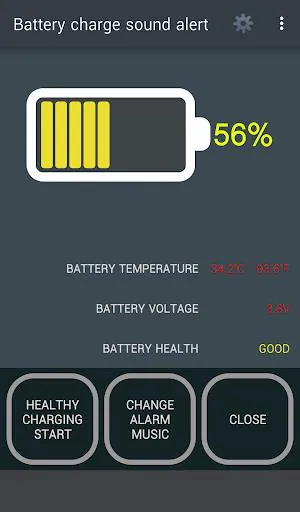
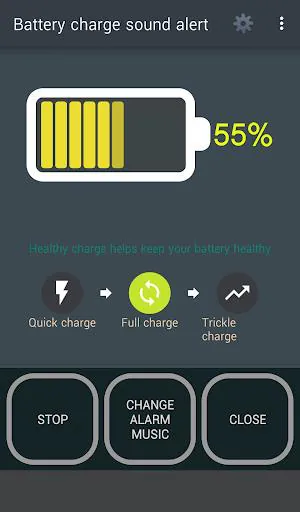
Battery charge sound alert is a lightweight utility designed to bring audible clarity to your charging routine. The app focuses on timely reminders, letting you know when charging begins, when it reaches specific milestones, and when the battery is full. Rather than constantly checking the screen, users get short, clear sounds that reduce guesswork and help extend battery longevity.
Practical uses
This app is ideal for people who frequently charge overnight, use shared chargers, or want to avoid leaving their device plugged in after reaching 100%. Professionals who need predictable phone readiness can set alerts at common thresholds like 20%, 50%, and 80% to match personal workflows and charging habits.
Key features at a glance
- Custom alerts: Choose different tones for charge start, intermediate levels, and full charge notifications.
- Threshold settings: Configure multiple percentage points that trigger sound notifications.
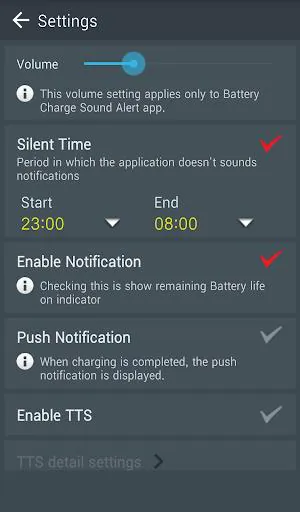
- Silent exceptions: Disable sounds during meetings, nighttime, or when Do Not Disturb is active.
- Volume and priority: Adjust playback volume and notification priority so alerts are heard even with media running.
- Battery-friendly: Built to use minimal background resources and avoid impacting normal battery drain.
How it works
After a quick setup, Battery charge sound alert watches your device’s charge state and plays a brief sound whenever a configured threshold is crossed. The app can monitor charging via AC, USB, or wireless connections. It uses system battery callbacks to remain efficient and only wakes to perform the small notification task, keeping background activity minimal.
Customization and control
One of the strengths of Battery charge sound alert is its flexible customization. You can assign distinct tones to different events, create sequences of alerts as the battery climbs, and set quiet hours. For users who prefer visual cues, an optional toast or persistent notification can accompany the sound.
Setting tones and schedules
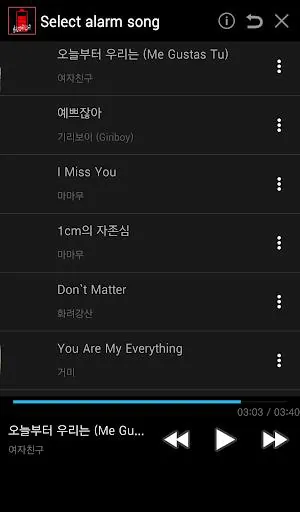
The sound selection includes built-in tones and lets you pick ringtone files from your device. Schedule rules allow the app to stay silent during scheduled meetings or sleep hours, and there’s a quick toggle to temporarily mute alerts without losing configured thresholds.
User interface and experience
The interface prioritizes clarity. Settings are grouped into logical categories so even first-time users can set thresholds in seconds. Each option includes brief descriptions to explain the impact of changes. The app avoids clutter, focusing on the essentials: thresholds, sounds, and exceptions.
Performance considerations
Battery charge sound alert is optimized for low overhead. It relies on efficient system APIs and avoids continuous polling. This design choice reduces unnecessary CPU and battery use while ensuring timely alerts. Background behavior adheres to modern Android restrictions, prompting clear permission requests when needed.
Tips for best results
- Choose louder tones for noisy environments and softer tones for home or office use.
- Set an 80% alert if you follow partial charging to prolong battery lifespan.
- Enable Do Not Disturb exceptions if you need alerts to break through in urgent situations.
- Test each sound briefly after setup to confirm volume and clarity.
Getting started
Installation is straightforward: install the app, open it, and grant any required permissions. Pick your primary alert levels and assign sounds. A short trial period of a few charge cycles will help you fine-tune thresholds and schedules for daily habits.
Why people choose it
Users appreciate Battery charge sound alert for its reliability and simplicity. It removes the need to stare at a charging screen, prevents unintentional overcharging, and offers enough customization to fit different lifestyles. For anyone who plugs in frequently and wants a little extra control, the app provides a practical, unobtrusive solution.
Battery charge sound alert strikes a balance between powerful options and an approachable interface, making it a useful addition to routine phone maintenance for both casual and power users.
- No virus
- No advertising
- User protection
Information
- File size: 40.48 M
- Language: English
- Latest Version: 4.0.6
- Requirements: Android
- Votes: 422
- Package ID: ddolcatmaster.mypowermanagement
- Developer: 똘켓
Screenshots
















Explore More
Make your house a home with our suite of helpful home apps. Discover clever tools to organize closets, streamline chores, and simplify cooking. Take the stress out of cleaning and maintenance with handy checklists and schedules. Enhance security and control appliances and lighting with our smart home integrations. Design, visualize, and renovate like a pro using our 3D planning software.

Metro Micro

Tax Calculator India 2024-2025

ClassPass: Fitness, Spa, Salon

OnDjoss

Park4Me

Scary sound effects

Home Workouts - Lose Weight

Juice Recipes