


Introduction
SDC is a lightweight Android app designed to simplify secure file storage and sharing, combining end-to-end encryption, cloud sync, and intuitive file management in one place. SDC helps users organize documents, media, and backups with easy access controls, offline mode, and biometric protection for fast, private access to important files.
Core features at a glance
SDC packs essential tools for personal and professional use into a compact interface. Key capabilities include encrypted vaults for sensitive files, automatic background sync to popular cloud providers, quick previews for common document and media formats, and granular permission settings for shared folders. The app also supports file compression, scheduled backups, and a built-in search that indexes content for faster retrieval.
User interface and workflow
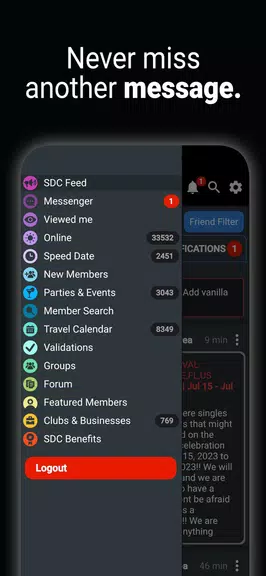
The design emphasizes clarity and quick navigation. A central dashboard displays recent and starred items, while a left-hand menu (or bottom bar on smaller screens) provides rapid access to vaults, cloud accounts, and settings. Drag-and-drop gestures make organizing folders straightforward, and multi-select operations let you move, share, or delete batches of files with a few taps. Contextual menus adapt based on file type so you see relevant actions without clutter.
Security and privacy
Security is a core pillar of SDC. Files stored in private vaults are protected with AES-256 encryption, and keys are managed locally unless you opt to synchronize them across devices. Biometric unlocking and strong PIN support reduce friction while preserving strong access controls. Transport-level protection secures data during cloud sync, and an optional local-only mode prevents any cloud interaction for users who prefer on-device storage.
Sharing, collaboration, and access control
Sharing is flexible: generate password-protected links for temporary access, invite collaborators to specific folders with read or edit privileges, or share directly to other apps. Link expiration and download limits help manage exposure. For teams, SDC offers role-based folder sharing and an activity log so administrators can track uploads, downloads, and permission changes in a single place.
Performance and device compatibility
SDC is optimized for low-resource devices and handles large libraries without lag. Background sync is throttled to avoid battery drain, and transfers resume automatically after interruptions. The app supports Android versions back to mid-range levels while taking advantage of newer APIs for improved file handling on the latest devices. Offline caching ensures that frequently used files remain accessible without network access.
Integration with other tools
To fit into existing workflows, SDC integrates with major cloud providers and supports standard file formats so you can open documents in your preferred editors. Intent-based sharing lets other apps send files to SDC, and a built-in file viewer reduces the need to switch applications for common tasks. For advanced users, the app exposes configurable export and import options to streamline backups and migrations.
Customization and settings
Users can tailor SDC to their habits through multiple preferences: choose a light or dark theme, set automatic cleanup rules, configure sync schedules, and adjust thumbnail generation for a balance of speed and detail. Notification settings are granular, so you receive alerts for important events like failed backups or shared-folder invitations without being overwhelmed by routine updates.
Getting started and tips
Setting up SDC takes minutes. Create a primary vault, enable biometric access if available, and connect one or more cloud accounts to start syncing. Use tags and favorites to organize content quickly, and enable scheduled backups to protect against accidental loss. For teams, create a shared folder structure and assign roles before inviting members to keep access organized and secure.
Why choose SDC
SDC balances strong data protection with a user-friendly experience that adapts to both casual users and professionals. It streamlines everyday file tasks—searching, sharing, and safeguarding—while keeping performance and battery impact minimal. Regular updates add support for new file formats and cloud endpoints, ensuring the app stays compatible with evolving workflows.
Try SDC to centralize your files with confidence: it delivers practical tools for organizing, protecting, and sharing content without unnecessary complexity.
- No virus
- No advertising
- User protection
Information
- File size: 20.50 M
- Language: English
- Latest Version: 1.0
- Requirements: Android
- Votes: 240
- Package ID: com.sdcmedia.swingers.g4
- Developer: SDC Media
Screenshots



















Explore More
Discover and share the hottest events around with our intuitive apps. Find local concerts, festivals, shows, and more based on your unique interests. Create customizable calendars of upcoming events to coordinate schedules with friends. Purchase tickets seamlessly from our integrated platforms. Check real-time transit schedules to plan your trip. Access maps, directions, and parking information for any venue.

Board Game Stats

Bloomberg Connects

Metro Micro

TVSMILES

Tax Calculator India 2024-2025

Park4Me

Scary sound effects

TryController





























