


Introduction
MyStory.today - Write A Book provides a compact writing studio for drafting, organizing, and exporting full-length stories from your phone. It offers a distraction-free editor, chapter management, and simple export options so writers can capture ideas, arrange plotlines, and monitor progress while working anywhere, anytime.
What the app does
MyStory.today - Write A Book is designed to move a manuscript forward without fuss. The app centers on a clean editor and intuitive project structure so you can create scenes and chapters, reorder sections, and attach notes or synopses to any portion of your work. Basic formatting, auto-save, and offline access keep ideas safe while you write.
Core features
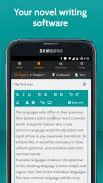
- Distraction-free editor: A minimal interface hides menus and tools until you need them, creating a focused environment for longer writing sessions.
- Project organization: Create multiple books, divide each into chapters and scenes, and store character notes, settings, and research alongside your text.
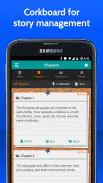
- Quick navigation: Jump between chapters, search text, and pin important scenes for fast access during revision.
- Export and backup: Export manuscripts in common formats compatible with other writing tools. Cloud sync and local backup options protect your drafts.
- Progress tracking: Set daily word goals, view session statistics, and track milestones to keep the project moving forward.
- Offline functionality: Work without an internet connection; changes sync when you reconnect.
User interface and workflow
The interface prioritizes readability and simple controls. The main editor supports basic formatting, and a sidebar or swipe menu gives access to chapters, notes, and metadata. Adding a new chapter or rearranging sections is done with drag-and-drop gestures. The workflow supports iterative writing: draft, annotate, reorder, and then export for editing in more advanced programs if needed.
How it supports creative process
MyStory.today - Write A Book helps writers structure ideas without interrupting momentum. Use the built-in note cards to sketch plot beats, record character arcs, and assemble a visible story outline. The app also stores research items and image references so you can keep world-building details close to the draft. Progress indicators and session timers encourage consistency and help overcome writer’s block by breaking the work into manageable targets.
Performance and compatibility
The app is lightweight and responsive on a wide range of Android devices. It prioritizes fast loading of projects and smooth scrolling through long texts. Export functions produce files that are compatible with common desktop writing apps and word processors. Cloud synchronization uses secure protocols to transfer data, and local backups give a secondary safety net for important drafts.
Collaboration and sharing
While primarily focused on single-author workflows, MyStory.today - Write A Book offers simple sharing options. Export a chapter to send to a beta reader, or share an entire manuscript as a document. Some versions may support basic collaboration features such as read-only links or shared project folders; check the app settings to see available sharing methods and permissions.
Getting started
Begin by creating a new project and naming your book. Add a short synopsis and then start a first chapter. Use the note cards to outline a rough structure, set a daily word target, and enable auto-save to protect your work. If you plan to draft on multiple devices, enable cloud sync early so updates remain consistent across phones and tablets.
Tips for effective use
- Break work into scenes: short writing sessions often produce steady progress.
- Keep research in the app: reduce context switching by storing reference material inside the project.
- Use progress stats: small, regular goals beat sporadic marathon sessions.
- Export frequently: keep copies of major milestones in different formats.
MyStory.today - Write A Book provides a practical blend of simplicity and useful tools for long-form writing. By focusing on organization, a clean editor, and reliable export options, it supports both first drafts and ongoing revision work while staying light enough for everyday mobile use.
- No virus
- No advertising
- User protection
Information
- File size: 19.49 M
- Language: English
- Latest Version: 1.9.0
- Requirements: Android
- Votes: 302
- Package ID: today.mystory.app
- Developer: Richard Nespithal
Screenshots

















Explore More
Discover your next great read with our innovative book apps. Access millions of ebooks, audiobooks, and comics on any device. Get personalized recommendations from our advanced algorithms so you always have your next great story lined up. Track your reading habits and browse curated lists for inspiration. Join online book clubs to connect with fellow bibliophiles. Listen to samples and download seamlessly with our integrated stores.

Bloomberg Connects

Metro Micro

ClassPass: Fitness, Spa, Salon

Kyrgyz Russian Translation

Park4Me

Juice Recipes

MsBook.Pro- Cărti electronice

Virink





























