
Introduction
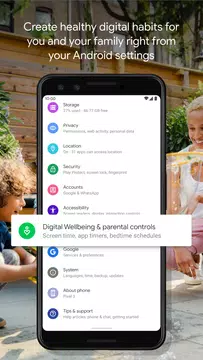
Take control of your digital habits with Digital Wellbeing, a powerful app developed by Google that helps you see the bigger picture of your device usage. Monitor your app usage, notifications, and phone unlocks to gain insights into your habits and make positive changes. Set daily app timers, activate Bedtime mode to wind down at night, and enable Focus mode to stay on track during work or school. With helpful features like grayscale screen and Do Not Disturb mode, Digital Wellbeing empowers you to disconnect when you need to and prioritize your well-being. Download Digital Wellbeing on Android today and start cultivating healthier digital habits.
Features of Digital Wellbeing:
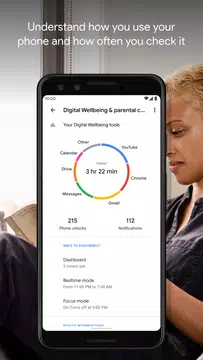
> **Insightful Digital Habits Analysis**: With Digital Wellbeing, you can gain a comprehensive overview of your digital habits, including app usage frequency, notification volume, and screen unlock frequency. This insightful analysis can help you make informed decisions about your phone usage.
> **App Timers for Healthy Boundaries**: Set daily app timers to establish healthy boundaries and prevent excessive screen time. By limiting the amount of time you spend on certain apps, you can prioritize more meaningful activities in your daily life.
> **Bedtime Mode for Restful Sleep**: Activate Bedtime Mode to create a bedtime routine that promotes restful sleep. This feature gradually fades your screen to grayscale and silences notifications, helping you unwind and disconnect from your device before bedtime.
> **Focus Mode for Enhanced Productivity**: Boost your productivity with Focus Mode, a tool that enables you to temporarily pause distracting apps with a single tap. Whether you're at work, school, or home, setting up automatic Focus Mode schedules can reduce distractions and enhance your focus.
Playing Tips:
> **Set Custom App Limits**: Experiment with different app timers to find the optimal balance between productivity and leisure. Customizing app limits according to your priorities can help you achieve a more balanced digital lifestyle.
> **Establish a Bedtime Routine**: Make the most of Bedtime Mode by creating a consistent bedtime routine that includes winding down without digital distractions. By following a structured routine, you can improve your sleep quality and overall well-being.
> **Utilize Focus Mode Strategically**: Identify your peak productivity hours and schedule Focus Mode accordingly to maximize your concentration. By strategically using Focus Mode during crucial tasks, you can minimize interruptions and accomplish more in less time.
Conclusion:
Digital Wellbeing offers a holistic approach to managing your digital habits and promoting a healthier balance between screen time and real-world activities. By leveraging its insightful features such as app timers, bedtime mode, and focus mode, you can gain a deeper understanding of your phone usage patterns and cultivate positive behaviors for improved well-being. Take control of your digital lifestyle today with Digital Wellbeing and experience the benefits of disconnecting when you want to.
- No virus
- No advertising
- User protection
Information
- File size: 22.10 M
- Language: English
- Latest Version: 1.23.729347901 (7062
- Requirements: Android
- Votes: 354
- Package ID: com.google.android.apps.wellbeing
Screenshots

















Explore More
Make your house a home with our suite of helpful home apps. Discover clever tools to organize closets, streamline chores, and simplify cooking. Take the stress out of cleaning and maintenance with handy checklists and schedules. Enhance security and control appliances and lighting with our smart home integrations. Design, visualize, and renovate like a pro using our 3D planning software.

Metro Micro

Tax Calculator India 2024-2025

ClassPass: Fitness, Spa, Salon

OnDjoss

Park4Me

Scary sound effects

Home Workouts - Lose Weight

Juice Recipes