Introduction
Experience the convenience of controlling your computer from your mobile device with AIO Remote. This innovative app, available for Android, allows users to connect to their desktop applications seamlessly through WiFi or Bluetooth. With a user-friendly interface and customizable remote controls, AIO Remote enhances your computing experience by providing keyboard control, mouse touchpad functionality, a remote file manager, and even specialized controls for presentations and gaming. Whether you need to manage documents, navigate media files, or play games with friends, AIO Remote has you covered. Share your custom remote designs and streamline your workflow with this versatile application.
Features of AIO Remote:
Versatile Customization: AIO Remote allows users to create fully customized remote controls tailored to their personal preferences, making it versatile for various tasks and applications.
Compatibility: AIO Remote supports multiple operating systems, including Windows, Linux, and Mac, ensuring a wide range of users can benefit from its features.
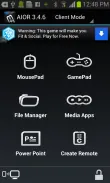
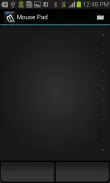
Keyboard and Mouse Control: The app offers keyboard control for sending keystrokes and advanced mouse touchpad control for smooth and responsive interactions with the desktop environment.
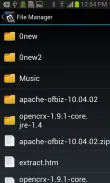
Remote File Manager: Users can browse files on their computer from their mobile device, simplifying the process of accessing and opening files remotely.
Gaming Support: AIO Remote supports custom gamepad design, allowing multiple mobile devices to be used simultaneously as gamepads for a unique gaming experience.
Playing Tips for AIO Remote:
Customize Your Remote: Take advantage of the versatile customization options to create remote controls that suit your specific needs and preferences.
Explore Keyboard and Mouse Controls: Get comfortable with using the keyboard and mouse touchpad controls for efficient interaction with your computer.
Try Gaming with Friends: Utilize the multi-touch support to play games with up to four friends remotely using personalized gamepads.
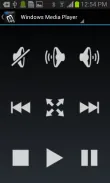
Use Predefined Remotes: Quickly access predefined remotes for common tasks like controlling media players and file managers without extensive setup.
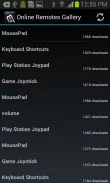
Share Custom Remotes: Share your custom remotes with others to enhance collaboration and productivity.
Conclusion:
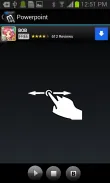
AIO Remote is a powerful application that offers versatile customization, compatibility across multiple operating systems, and convenient remote control features such as keyboard and mouse control. With support for gaming, file management, and presentation controls, AIO Remote enhances the user experience by streamlining tasks and providing a seamless remote access solution. Whether you're working on documents, playing games, or giving presentations, AIO Remote offers a comprehensive set of tools to enhance your computing experience. Download AIO Remote now to revolutionize the way you interact with your computer.
- No virus
- No advertising
- User protection
Information
- File size: 13.90 M
- Language: English
- Latest Version: 3.5.9.14
- Requirements: Android
- Votes: 93
- Package ID: com.allinoneremote
- Developer: Hisham Hassan Bakr
Screenshots
















Explore More
Equip yourself with our all-in-one toolbox app for everyday tasks and projects. Instantly convert between units, calculate tips, scan documents, manage files, and more with handy productivity tools. Includes a level, compass, QR code reader, ruler, speedometer, decibel meter, and flashlight. Save frequently used tools to your customizable dashboard for one-tap access. Track billable hours, wages, budgets, and invoices. Annotate screenshots, magnify labels, and sign PDFs on the go.

Nghe Nhạc Vàng - Nhạc Trữ Tình

Beat Jam - Music Maker Pad

وهشام سماتي- عشقنا راه في خطر

Mazetools Soniface Pro

Oldies But Goldies Radio App

Enrique Iglesias - El Perdón

Stream on Screen for Price Tag

荐片播放器