
Introduction
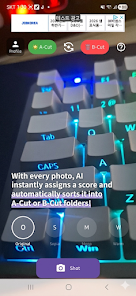
swipeShot: Photo Cleaner is a lightweight utility that helps you quickly clean and organize your photo gallery using simple swipe gestures. Instead of deleting images one by one, the app lets you sort photos fast—swipe right to keep, left to delete—so you can reclaim space and remove clutter like screenshots, blurry photos, and duplicates. The interface is intentionally minimal to keep focus on images and speed up decisions, and a review-and-restore step prevents accidental losses. If your device is running low on storage or your camera roll is overflowing, swipeShot: Photo Cleaner can simplify cleanup in minutes.
Key Features
⭐ Easy swipe-to-sort: swipe right to keep and left to delete for rapid photo categorization.
⭐ Instant storage cleanup: quickly locate and remove screenshots, blurry shots, and duplicate images.
⭐ Fast gesture-driven workflow: swipeShot: Photo Cleaner emphasizes speed and simplicity for managing large libraries.
⭐ Review & restore: preview the delete list before finalizing and recover items after accidental swipes.
⭐ Minimalist interface: a clean, distraction-free design keeps attention on your photos.
Advantages
✅ Reclaim storage space fast by removing redundant images and forgotten screenshots.
✅ Saves time compared with manual deletion thanks to intuitive swipe gestures and a streamlined workflow.
✅ Using swipeShot: Photo Cleaner makes routine gallery maintenance simple, reducing clutter in minutes.
✅ The minimal UI and review step lower the risk of mistakes while keeping the process efficient.
Disadvantages
❎ Focused on sorting and cleanup rather than photo editing or advanced media management tools.
❎ Automated detection of blurry or duplicate images may require user confirmation and might not be perfect in every case.
- No virus
- No advertising
- User protection
Information
- File size: 33.00 M
- Language: English
- Latest Version: 1.0.20
- Requirements: Android
- Votes: 126
- Package ID: com.hrpark.swipeshot
- Developer: 박해룡
Screenshots


















Explore More
Equip yourself with our all-in-one toolbox app for everyday tasks and projects. Instantly convert between units, calculate tips, scan documents, manage files, and more with handy productivity tools. Includes a level, compass, QR code reader, ruler, speedometer, decibel meter, and flashlight. Save frequently used tools to your customizable dashboard for one-tap access. Track billable hours, wages, budgets, and invoices. Annotate screenshots, magnify labels, and sign PDFs on the go.

MEXC Global: BTC, ETH, Gamefi

Text Art - Write Text On Photo

Domino's Pizza Sri Lanka

Hatekhori Shongkha

Halloween Photo Editor -Makeup

Connecting - Friends Near Me

Cartola

HFonts - font & emoji manager