Introduction
Smart Notepad is a simple, secure note-taking app designed for quick capture and long-term organization of text notes, checklists, and reminders. The app keeps everything local so you can work offline, create plain-text notes quickly, and rely on straightforward tools for tagging, searching, and exporting your data. Whether you need a compact place for shopping lists, meeting notes, short drafts, or reminders, Smart Notepad focuses on speed, privacy, and reliability without requiring an account.
Key features
The core of Smart Notepad is its note editor and tag-based organization. Create and edit plain-text notes with a clear title and body, and attach one or more tags to group related entries. Tags act as flexible labels rather than fixed folders, so you can filter and collect notes across different projects or topics without moving files. The integrated search finds notes by keyword or tag, helping you locate a note quickly even if you have many entries. Local backup and restore lets you export a snapshot of your notes to a file you control and later import it to recover or transfer your data.
Controls and daily workflow
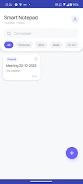
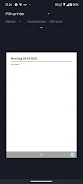
Getting started is straightforward: open the app, tap the plus button to create a new note, add a title and the content, then save. Use the search field to enter keywords or tag names when you need to find something fast. The edit screen provides the basic functions you need: update text, change tags, and save revisions. In settings you will find the export and import options for manual backups. Reminders are available for marking time-sensitive notes so the app can prompt you about important items; set or clear reminders from the note edit view. All actions are intentionally simple to keep the focus on writing and retrieval rather than complex menus.
Organization, progression, and reuse
Smart Notepad supports a progression from capture to archive: quickly capture ideas, then tag and refine them as they evolve. Over time you can build an organized archive of searchable notes that reflects your workflow and priorities. Because tags are flexible, your organization can naturally evolve without rigid structure—start with broad tags and add more specific labels as needed. Reuse and remix content by copying note text into new entries or updating tags to move items between contexts; this lightweight progression model rewards regular use and reduces friction when managing many small items.
Visual style and accessibility
The interface is intentionally minimal and uncluttered to keep attention on content. Fonts, spacing, and contrast are chosen for readability, and the app works well with Android accessibility features such as system font size adjustments and TalkBack. If you rely on larger text or screen readers, Smart Notepad respects those system settings so notes remain accessible. The simple layout also helps when using the app in different lighting conditions or on devices with varied screen sizes.
Offline use, privacy, and backups
One of the main advantages of Smart Notepad is that it is fully functional without an internet connection. Notes are stored locally on your device, and there is no mandatory cloud syncing or account creation. Local storage plus an optional app lock gives you control over privacy and access. Backups are performed by exporting a local file that you manage; you can import that file later to restore your notes on the same device or transfer them to another device. This approach keeps your data in your hands while allowing manual backups for peace of mind.
Tips, use cases, and reliability
Use Smart Notepad for everyday tasks like grocery lists, quick meeting notes, drafting short texts, daily reminders, and tracking ideas. Keep a few common tags to make finding related notes fast, and regularly export a backup file if you want an extra layer of safety. The app is designed to be lightweight and dependable: its offline-first model and straightforward tools minimize complexity, so you can focus on capturing and organizing information rather than managing sync conflicts or permissions. If you like a no-frills approach to notes and value local control, Smart Notepad offers a compact, dependable way to keep your thoughts and tasks organized on your Android device.
- No virus
- No advertising
- User protection
Information
- File size: 108.73 M
- Language: English
- Latest Version: 1.0.0
- Requirements: Android
- Votes: 201
- Package ID: smart.notepad.proxima
- Developer: GLOBEEDGE TECHNOLOGIES
Screenshots

















Explore More
Equip yourself with our all-in-one toolbox app for everyday tasks and projects. Instantly convert between units, calculate tips, scan documents, manage files, and more with handy productivity tools. Includes a level, compass, QR code reader, ruler, speedometer, decibel meter, and flashlight. Save frequently used tools to your customizable dashboard for one-tap access. Track billable hours, wages, budgets, and invoices. Annotate screenshots, magnify labels, and sign PDFs on the go.

myJersey

Training Feel

7 Bussid Private Bus Mod

1win

Iwan fals Paling Lengkap

CZUR

The Doylo

Radio You FM 106.9