Introduction
Fuel Consumption is a practical tool for drivers who want a reliable way to record refuels, monitor vehicle efficiency and understand running costs. With Fuel Consumption you can log kilometers, liters and fuel costs for multiple vehicles and review automatically calculated averages; the app surfaces trends that help you make smarter refuelling decisions. Designed for both cars and motorbikes, Fuel Consumption keeps fuel-type details and price history so you can compare petrol, diesel, electricity, LPG or methane costs on a single timeline.
Key features and what they do
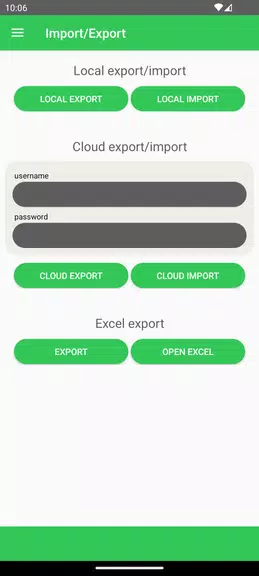
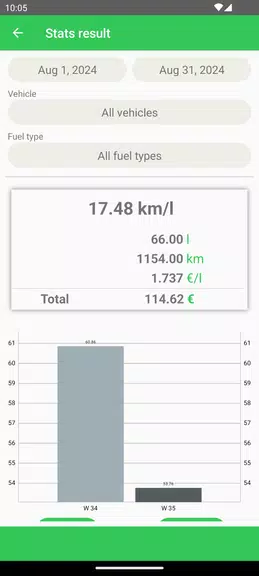
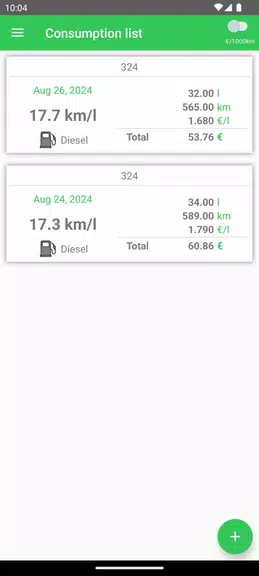
The app captures full-refill records and applies the full‑full calculation method to produce consistent average-consumption figures after every complete fill. It shows period-based summaries that combine distance traveled, total spend and average consumption so you get a clear view of where money goes. You can maintain separate vehicle profiles, tag each record with fuel type and fuel station, and export your entire dataset to an Excel file for offline analysis or accounting. Cloud backup is available alongside local storage so you control where your data lives and can restore it if you change phones.
How data entry and controls work
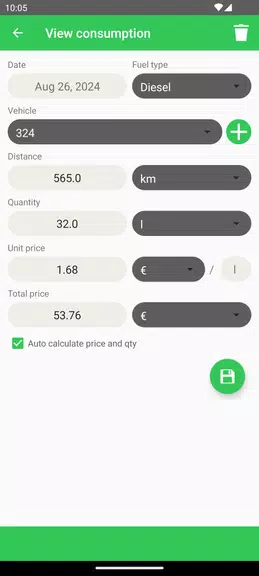
Recording a refill is straightforward: select a vehicle profile, enter the odometer reading, the litres added and the total cost, then save. The interface uses plain labels and input fields rather than complex menus, so new users can start tracking in minutes. Drop-down selectors and numeric keyboards reduce typing errors, and optional notes let you record contextual information such as fuel brand or weather. Because averages are calculated from full-to-full refills, the app flags partial fills so you can decide whether to include or exclude them from specific summaries.
Progression, goals and using statistics
Although Fuel Consumption does not rely on game-like progression, the record-and-review workflow provides a natural improvement loop: as you log more refuels the statistics become more representative, enabling you to spot efficiency gains, the effect of different fuel types, or the impact of maintenance and driving habits. Use the period comparison views to benchmark month-to-month performance, and export snapshots for long-term tracking. These measurable trends effectively let you create personal targets for fuel economy and cost reduction without any extra gamification elements.
Visual design, charts and accessibility
The visual design favors clarity: charts show average consumption and cost per distance on a simple timeline, tables break down entries by vehicle and fuel type, and color contrasts are chosen for legibility. Fonts are kept readable for long lists of records and touch targets are sized for easy input on phones. Accessibility considerations include support for large text settings and straightforward navigation that works with screen readers. The app layout is intentionally minimal so data remains the primary focus.
Offline use and reliability
Fuel Consumption works offline for data entry and local analysis; cloud backup and synchronization occur when a connection is available. This makes the app practical for rural or low-coverage areas where drivers frequently refuel without mobile data. Export to Excel is supported locally, which ensures you can share or archive records independent of any online service.
Limitations and best practices
The accuracy of results depends on careful input: odometer readings and litre amounts must be entered manually, so consistent habits make a noticeable difference. The app uses the full‑full method exclusively, which produces reliable averages but requires recording full refuels to maintain accuracy; frequent partial fills can reduce the usefulness of calculated averages unless you mark or exclude them. Finally, while Fuel Consumption offers detailed statistics and export options, it intentionally avoids complex fleet management features so single owners and small fleets can benefit from a focused, easy-to-use experience.
- No virus
- No advertising
- User protection
Information
- File size: 8.40 M
- Language: English
- Latest Version: 1.0.6
- Requirements: Android
- Votes: 159
- Package ID: com.stefanoandreetta.fuelconsumption
- Developer: Stefano Andreetta
Screenshots
















Explore More
Hit the open road with confidence using our automotive apps. Access comprehensive makes/models reference guides for expert vehicle knowledge. Get step-by-step repair and maintenance tutorials so you can DIY with ease. Scan diagnostic codes and get repair estimates from local shops. Stay on top of your vehicle's health with digital logs and alerts. Plan road trips leveraging real-time maps, traffic data, and trip computer integration.

Photo Editor Background Change

Text Art - Write Text On Photo

IZI: play, listen, watch, call

New Friday Night Funkin FNF Tips 2021

Starbucks Turkey

Kyrgyz Russian Translation

Hatekhori Shongkha

Bollinger 1829