Introduction
todo is a compact, privacy-focused to-do list designed for people who want fast, reliable task management without cloud dependencies. The app puts simple lists in the foreground: adding items requires a single tap, priorities are visibly marked, and the interface removes clutter so you can capture errands, shopping items, and short projects as quickly as possible. If you prefer apps that respect local storage and prioritise speed over complex workflows, todo offers a streamlined environment that keeps your information on-device and accessible even when you are offline.
Key features
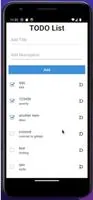
The core functionality emphasizes rapid task entry and effortless review. Create entries via a single plus control, edit inline without disruptive modal dialogs, and complete tasks with a swipe or a tap. Lightweight organization comes from short labels and simple priority flags rather than nested folders, making it faster to scan lists and decide what to do next. The app also supports repeatable tasks and maintains a basic completion history so you can see recent activity without sifting through a full audit trail. Visual cues such as dimming or crossing out completed items and a subtle completion ratio provide clear feedback on daily progress.
Controls and interaction
Controls are built around intuitive gestures and direct manipulation. Tap to add, long press to open quick-edit options, drag to reorder priorities, and swipe to finish items — patterns that match common mobile behaviors so new users can get productive immediately. Text entry is inline and responsive, and the interface avoids blocking modal flows where possible so you keep context while adjusting priorities or notes. Reordering by drag-and-drop is immediate and preserves manual priorities for short-term planning without creating hierarchy or extra views to manage.
Progression and motivation
Rather than gamification, progression is communicated through straightforward metrics and visible momentum. The completion ratio for each list and the presence of repeatable items help you build routines, while a compact history lets you glance back at what you completed recently. These elements are meant to support steady productivity: they encourage short sessions of focus and give practical feedback without adding social features or competitive overlays. For users who value measurable progress, these cues provide enough information to plan the next steps without turning task management into a game.
Customization and visual style
The visual approach stays intentionally restrained to reduce distraction. You can adjust text size and list density to suit different devices and preferences, and color accents for priority markers make scanning easier without overwhelming the UI. An optional compact view increases the number of visible items on smaller screens; combined with clear spacing and readable typography, these settings let you tailor the presentation while preserving consistent behavior across the app. todo keeps design choices minimal so customization adjusts comfort and legibility rather than adding complex skins or themes.
Offline use and data safety
All data is stored locally on your device, which eliminates the need for an account or background synchronization and keeps task contents private by default. That local-first model means the app remains fully functional offline and performs well on older hardware because it avoids heavy background services. For users who want external copies, standard device-level export and backup tools can be used to preserve lists. This approach gives you explicit control over backups and sharing instead of automatic cloud duplication.
Accessibility and performance
Accessibility is considered in layout and contrast: the app supports large text settings, ensures readable contrast between elements, and is compatible with platform screen readers so people with different needs can rely on the same simple workflows. Lightweight performance priorities keep animations subtle and interactions responsive, helping the app stay useful during quick trips to the store or longer planning sessions without draining resources or causing delays.
Who this app is for
todo is aimed at users who want a no-frills, trustworthy checklist tool for everyday tasks: shoppers, students, people juggling personal errands, and anyone looking for a fast way to capture and complete short-term items. If you value control over your data, a low learning curve, and a minimal interface that emphasizes speed and clarity, this app provides a focused space to capture tasks, review priorities, and maintain steady progress through your day.
- No virus
- No advertising
- User protection
Information
- File size: 31.22 M
- Language: English
- Latest Version: 1.0.3
- Requirements: Android
- Votes: 338
- Package ID: dz.houdev.todo
- Developer: Houssem Dev
Screenshots
















Explore More
Equip yourself with our all-in-one toolbox app for everyday tasks and projects. Instantly convert between units, calculate tips, scan documents, manage files, and more with handy productivity tools. Includes a level, compass, QR code reader, ruler, speedometer, decibel meter, and flashlight. Save frequently used tools to your customizable dashboard for one-tap access. Track billable hours, wages, budgets, and invoices. Annotate screenshots, magnify labels, and sign PDFs on the go.

CrossConf – главное IT-событие

کێش

Asma-Ul-Husna

TioPatinhax

Tips 9Apps 2018

Wiebkes Waage

Square No Crop

Lumie