Introduction
Soulo is a digital memorialization platform designed to help individuals and families create, maintain and share online memorials for loved ones and for themselves. From the first setup you choose whether a profile represents someone living or deceased and then invite a trusted circle of family and friends to contribute photos, videos, music and written memories. Soulo focuses on simple organization and a respectful presentation so that personal stories remain discoverable, shared only with the people you choose.
Key Features
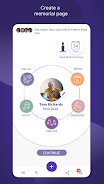
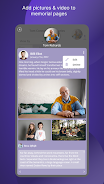
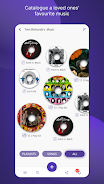
The app provides a guided onboarding flow that asks a few clear questions to establish the memorial's scope and privacy level, then walks users through creating a profile, uploading media and adding initial memories. Adding content is straightforward: tap to upload photos and videos from your device, attach audio or music files, or compose and format written memories with simple edit controls. Soulo keeps contributions organized into dedicated sections — Media, Memories, Timeline, Music and Circles — so items are easy to browse and search later.
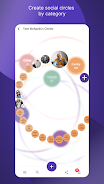
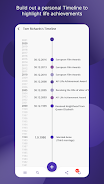
Soulo's collaborative Circles let you invite contributors and manage who can add or edit content. Contributors can add timestamps, brief captions or contextual notes to help place items on a timeline, and entries can be tagged for easier filtering. The timeline view emphasizes chronology, while the Memories section highlights longer-form stories and reflections. Media items open in a clean viewer with basic playback and scrolling controls so older files remain accessible without clutter.
User Experience and Controls
User controls are designed for clarity: straightforward buttons for upload, edit and delete, simple toggles for visible/hidden items within a Circle, and an easy-to-find settings area for managing invitations and privacy. Soulo aims to minimize friction during contributions by providing autosave drafts for longer memories, lightweight editing tools for photos and captions, and inline prompts that explain each field during setup. The interface uses readable fonts, clear contrast, and large touch targets to make navigation comfortable on phones and tablets.
Progression and Long-term Use
Rather than a game-style level system, progression in Soulo happens organically as a memorial grows: initial setup, followed by periodic additions from family and friends, then curation and reorganization over time. Soulo supports that natural lifecycle by making it easy to add new media, reorder timeline items, and tag memories for future reference. Over months and years a memorial can evolve from a simple profile to a rich, searchable archive that documents family history and important moments.
Customization and Visual Style
Profiles can be customized with a profile photo, cover image and a brief bio that frames the page’s focus. Visual presentation emphasizes dignity and readability with neutral color palettes, unobtrusive typography and a layout that separates media, stories and music into identifiable blocks. Contributors can choose how prominently individual memories appear on the front page by assigning featured status to certain posts, and images display with consistent aspect ratios to maintain a tidy appearance across devices.
Accessibility, Offline Use and Replay Value
Soulo is built to be accessible for a wide range of users: text sizes scale up for readability, and layout choices reduce visual clutter for assistive technologies. For contributors who may be offline or have intermittent connectivity, the app supports composing and saving drafts locally; those drafts sync when a connection is restored so work is not lost. Replay value comes from the ongoing nature of memories — families can return repeatedly to add anniversaries, new media, or updated narratives, which keeps the memorial relevant across generations.
Advantages
Soulo centralizes scattered photos, videos and written recollections into one curated space that can be shared with a defined community. Its structured sections and timeline make it easier to find specific moments later, and the invitation-based Circles encourage collaborative remembering rather than siloed file storage. The app’s straightforward controls and onboarding reduce setup time and make it accessible to contributors with varying technical comfort.
Disadvantages
No tool can populate a memorial on its own: the depth and completeness of a profile depend on contributions from family and friends, and initial configuration is required before full collaboration begins. Because Soulo emphasizes private, trusted sharing, those looking for broad public discoverability or automated content aggregation may find the app’s privacy-first approach limiting. Users should also allow some time for contributors to learn the interface and for drafts to sync when connectivity is intermittent.
- No virus
- No advertising
- User protection
Information
- File size: 29.16 M
- Language: English
- Latest Version: 1.0.8
- Requirements: Android
- Votes: 208
- Package ID: com.memories.soulo
- Developer: Soulo Memories Ltd
Screenshots

















Explore More
Equip yourself with our all-in-one toolbox app for everyday tasks and projects. Instantly convert between units, calculate tips, scan documents, manage files, and more with handy productivity tools. Includes a level, compass, QR code reader, ruler, speedometer, decibel meter, and flashlight. Save frequently used tools to your customizable dashboard for one-tap access. Track billable hours, wages, budgets, and invoices. Annotate screenshots, magnify labels, and sign PDFs on the go.

myJersey

Training Feel

7 Bussid Private Bus Mod

1win

Iwan fals Paling Lengkap

CZUR

The Doylo

Radio You FM 106.9