Introduction
Sectora is an intuitive composition and image-analysis tool designed for artists who want a practical, visual way to transfer, analyze and refine reference images. Sectora uses a flexible grid system, optional diagonal guides and simple visual effects so painters, illustrators and mixed-media artists can break down proportion, perspective and color relationships with clarity. The first paragraph introduces the core idea: a clean interface that puts dynamic sectioning, mosaic and blur analysis within reach to speed decision-making during every stage of a project.
Key features and visual tools
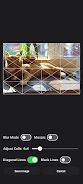
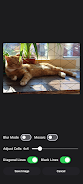
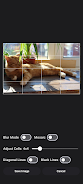
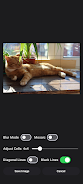
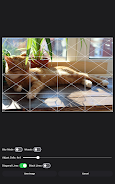
Sectora offers a customizable grid system where you can set the number of rows and columns, change grid opacity and lock a grid to a particular orientation. Optional diagonal guidelines help to check perspective and anchor focal points, while the mosaic and blur effects let you reduce distracting detail so the big shapes and value patterns become obvious. Dynamic sectioning allows multiple overlay layers and different visual modes to be combined, so you can assess a single image for proportion, color block structure and tonal value without constantly switching apps.
Controls and interaction model
The app is built around standard touch and stylus gestures: pinch to zoom, two-finger rotate for grid alignment, drag to reposition the overlay, and intuitive sliders to tweak mosaic cell size or blur strength. Grid snapping and a subtle alignment assist make it easier to place guidelines against features in a photo, and toggles let you hide or reveal individual sections for progressive comparison. These controls are designed to feel immediate and non‑intrusive so the tool supports visual decisions rather than becoming a complication.
Customization, templates and progression
Rather than a fixed workflow, Sectora gives you room to build a progression that matches your practice. Start with a simple 3x3 grid to establish general proportions, then increase density or add diagonals to refine perspective and foreshortening. You can save custom grid templates and workspace settings for recurring template sizes or camera ratios, which makes it easy to reproduce a setup for a series of studies. This gradual increase in structural complexity supports deliberate practice: move from coarse block-in to detailed section-by-section transfer without reconfiguring the tool each time.
Visual analysis and project workflow
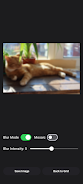
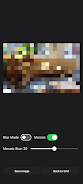
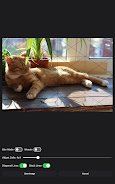
The mosaic mode converts an image into color blocks so you can evaluate color relationships and transitions without being distracted by texture or detail; the blur mode emphasizes primary shapes and tonal masses to simplify value studies. Together these modes help you plan stages of a painting or drawing, identify where to simplify forms and determine color temperature shifts across a composition. Sectora also supports basic project management on the device: load reference photos from your library, apply overlays and export the overlaid view as a single image to use in other creative apps or to print as a transfer guide.
Accessibility, stylus support and offline use
Accessibility is considered through adjustable contrast for lines and customizable grid size for users with different vision needs, plus support for most active styluses so drawing directly over the reference feels natural. The app runs fully offline for local, private use; no persistent internet connection is required to access grids, visual modes or saved templates. These decisions prioritize reliability whether you are working in a studio, at a cafe or on location.
Use cases, replay value and limitations
Sectora is useful across genres — portraiture, landscape, still life and architectural study — and its replay value comes from the ability to try different overlay combinations and saved templates on the same reference image to explore multiple compositional approaches. Because the app specializes in analysis and layout support, it does not replace a full painting or drawing application: you will typically export overlays and continue final rendering in a dedicated art app or traditional media. Some advanced composition techniques can take practice to integrate into a routine, but the stepwise template and overlay options make learning those techniques more approachable over repeated studies.
- No virus
- No advertising
- User protection
Information
- File size: 39.10 M
- Language: English
- Latest Version: 1.1
- Requirements: Android
- Votes: 267
- Package ID: com.lenarivo.sectora
- Developer: Lena Rivo
Screenshots
















Explore More
Equip yourself with our all-in-one toolbox app for everyday tasks and projects. Instantly convert between units, calculate tips, scan documents, manage files, and more with handy productivity tools. Includes a level, compass, QR code reader, ruler, speedometer, decibel meter, and flashlight. Save frequently used tools to your customizable dashboard for one-tap access. Track billable hours, wages, budgets, and invoices. Annotate screenshots, magnify labels, and sign PDFs on the go.

myJersey

Training Feel

7 Bussid Private Bus Mod

1win

Iwan fals Paling Lengkap

CZUR
The Doylo

Radio You FM 106.9