Introduction
NextOnTrip is a travel planning and discovery app that combines curated places and practical trip tools into a single, approachable workspace. Whether you prefer carefully planned itineraries or spontaneous detours, NextOnTrip helps you collect photos, view visit details, and assemble day-by-day routes so everything you need is organized and easy to access while you travel.
Key features and discovery
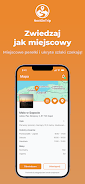
The app collects curated places and landmarks with photos, brief descriptions, estimated visit times, opening hours, and user-submitted tips that help you decide where to go. An interactive map surfaces nearby attractions and off-the-beaten-path spots using category filters and simple searches. Each place entry focuses on practical details rather than promotional content, so you get concise information to compare options quickly.
Trip planner and progression
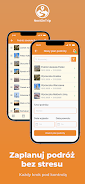
NextOnTrip’s flexible planner lets you build multi-day itineraries by adding places into a visual day-by-day structure. You can assign dates, set approximate durations for stops, and reorder entries to fine-tune travel flow. The planner shows a clear progression from planned to in-progress to completed status, helping you track what still needs arranging and what you have already visited during a trip.
Controls and interaction
The app’s controls favor touch-first interactions: pinch to zoom the map, tap a place for quick details, drag-and-drop to reorder stops in an itinerary, and tap-and-hold to mark a location as visited or to add a personal note. Quick actions are available from both list and map views so you can switch between overview planning and granular editing without losing context. These familiar gestures make onboarding fast for new users and efficient for experienced planners.
Customization and visual style
Customization centers on how you organize and present your trips. Save favorites to build a personal collection, attach short notes or photos to places you add, and create reusable trip templates you can clone for future travel. The visual style emphasizes clean map layers, large photos for visual browsing, and a readable typography hierarchy so itinerary details remain easy to scan on smaller screens.
Sharing, collaboration, and community
Sharing tools enable you to invite friends to a private trip or to publish an open plan for collaborators to view. Participant management is simple: invite, accept or decline, and see who is active on a given trip. Community contributions let users suggest new places and enrich entries with practical tips; this keeps the database evolving and helps other travelers discover up-to-date recommendations. NextOnTrip balances private coordination with community-sourced discovery to support both group planning and solo exploration.
User experience, accessibility, and reliability
The app aims for a calm user experience with straightforward flows for adding places, editing plans, and reviewing trip summaries. Accessibility options include adjustable text sizes, clear contrast on map overlays, and straightforward touch targets to help users with different needs navigate the interface. Frequently viewed places and saved itineraries are cached so that essential details remain available if connectivity is intermittent while you are on the road.
Replay value and long-term use
Replay value comes from reusing saved itineraries and building a personal travel history. Marking visited places creates a record you can revisit to remember trips and to refine future plans. Templates, favorites, and community-sourced lists also make it easy to assemble new itineraries quickly, whether you are planning a weekend escape or a longer route that revisits favorite cities.
Limitations and realistic expectations
Coverage varies by region because the place database grows with user submissions and curator input; in less-traveled areas some entries may be sparse. Collaborative trips depend on participant engagement, so active coordination improves outcomes. While NextOnTrip focuses on practical planning and discovery, very remote locations may still require additional local research before you travel.
Getting started
To begin, search or browse the map for places that interest you, add them to a day in the trip planner, reorder stops with a drag gesture, and invite companions if you want to coordinate together. Over time you will build a tailored collection of favorites and templates that reflect how you travel, making subsequent planning faster and more personal with NextOnTrip.
- No virus
- No advertising
- User protection
Information
- File size: 115.94 M
- Language: English
- Latest Version: 1.0.1
- Requirements: Android
- Votes: 337
- Package ID: pl.nextontrip
- Developer: MountDevs Sp. z o.o.
Screenshots


















Explore More
Make travel planning effortless with our all-in-one trip companion app! Get insider tips from locals on top attractions, hidden gems, restaurants, and accommodations at your destination. Book flights, rental cars, and hotels at the lowest prices. Access maps offline; track bookings, itineraries, and reservations; create shared group trips; and auto-translate menus, signs, and conversations abroad. Our clever algorithms surface personalized recommendations everywhere you go.

Nhạc vàng

Musica Tayrone Cigano 2020

سورة فصلت - أحمد النفيس بدون ن

Stylish Name Maker

وصفات صحراوية سحرية

TCDC Digital Resource

French Turkish Dictionary

Estados do Brasil