Introduction
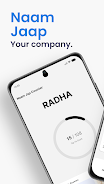
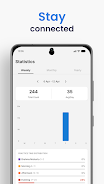
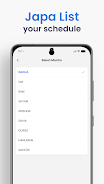
Naam Jap Counter is a lightweight digital mala and chant counter designed to help devotees keep a steady rhythm during Naam Jaap, mantra repetition and meditation. The app reduces each repetition to a single, distraction-free tap so you can remain focused on breath and sound rather than device menus. It supports unlimited on-screen counting, preserves session totals so you can pause and resume practice, and summarizes activity with daily, weekly and monthly reports that make long-term habit building visible without complicated analytics.
Key features
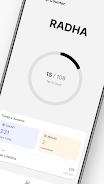
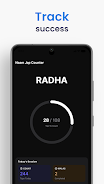
The core of Naam Jap Counter is simplicity: a large central tap target that advances the count with every press, a lifetime total that accumulates every session you complete, and a dedicated mala mode that highlights 108-count cycles for traditional practice. Haptic feedback is customizable to suit personal preference, and a dark mode reduces glare during evening sittings. Built-in memory stores today’s count and previous session totals so the app quietly supports intermittent practice without interrupting the flow of a ceremony or a meditative period.
How the controls and session flow work
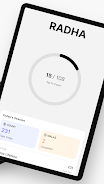
Controls are deliberately minimal to avoid distraction. A single tap on the central area increases the counter instantly; this straightforward interaction is intended for one-handed use and repetitive motion during chanting. When you need to stop, the app retains your current numbers so you can return later and continue without losing progress. On-screen access to your session history and summary reports is direct, letting you review totals immediately after practice or at the end of the day.
Progression, tracking and practice structure
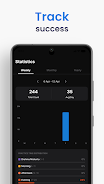
Progression in Naam Jap Counter is driven by repeated practice and simple reporting rather than gamified levels. The lifetime counter, daily totals, and the weekly and monthly summaries allow you to observe trends and form personal goals. The mala (108-count) tracking provides a natural level structure: you can complete single malas, multiple rounds, or set a desired daily target outside the app and use the stored totals to measure adherence. These straightforward tools help you establish consistency without adding pressure.
Customization and visual style
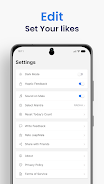
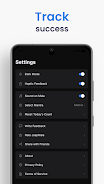
The app favors a clean, uncluttered interface so the visual design does not compete with your practice. Font sizes and the central counter are easy to read at a glance, and the dark mode offers a softer palette for low-light conditions. Haptic intensity is adjustable so tactile feedback can be subtle or more pronounced depending on your device and preference. Colors and layout stay minimal to maintain focus: the emphasis is on readable digits and an intuitive tap surface rather than decorative elements.
User experience, accessibility and device behavior
Naam Jap Counter is optimized for a calm, focused user experience. Large tap targets and clear numeric displays make it accessible for a wide range of users; the simple interaction model reduces the learning curve for beginners. Because counting is manual, the app places no reliance on voice recognition or motion sensors, which keeps control predictable and private. The app’s memory functionality supports resume-after-pause behavior so interruptions do not cause lost progress.
Replay value and practical use cases
The replay value comes from repetitious practice and the personal satisfaction of maintaining a chanting routine. Whether you use the app for short daily japa sessions, longer meditation periods, or temple-style repeated malas, the combination of unlimited counting and cycle-aware mala tracking supports varied session lengths. Users often integrate the app into morning and evening rituals, using the simple reports to reflect on streaks and cumulative practice over weeks and months.
Limitations and realistic expectations
Naam Jap Counter intentionally keeps functionality focused: counting is manual via taps only, and there are no automatic voice recognition or motion-based detection features. Reporting is intentionally basic—daily, weekly and monthly summaries give clear visibility into practice frequency, but the app does not offer advanced analytics, social features, or cloud sync. This pared-down approach reduces complexity and keeps the tool lightweight and dependable for regular use.
- No virus
- No advertising
- User protection
Information
- File size: 47.41 M
- Language: English
- Latest Version: 1.0
- Requirements: Android
- Votes: 263
- Package ID: com.digitalnaamjapcounterapp
- Developer: JSLab
Screenshots

















Explore More
Equip yourself with our all-in-one toolbox app for everyday tasks and projects. Instantly convert between units, calculate tips, scan documents, manage files, and more with handy productivity tools. Includes a level, compass, QR code reader, ruler, speedometer, decibel meter, and flashlight. Save frequently used tools to your customizable dashboard for one-tap access. Track billable hours, wages, budgets, and invoices. Annotate screenshots, magnify labels, and sign PDFs on the go.
View more