Introduction
Video To GIf Maker is a compact Android utility that converts short phone videos into animated GIFs quickly and privately. Video To GIf Maker emphasizes on-device processing so your clips are edited and exported without leaving your device, preserving privacy while producing shareable looping media suitable for social posts, messaging, and small web embeds.
What it does
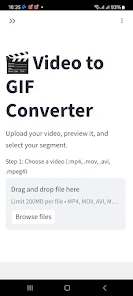
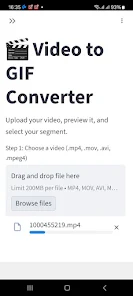
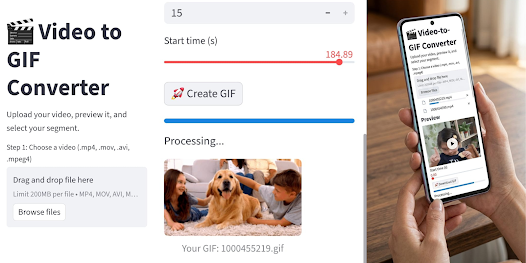
This app offers a straightforward editing flow built around a precision trimming timeline and real-time preview. You can open MP4, 3GP, AVI, MOV and MKV files, scrub frame-by-frame to find the exact loop points, and set both start and end frames for a smooth repeat. Adjustable frame rate and speed controls let you emphasize action or create slow-motion loops while watching immediate previews before export.
Editing controls and workflow
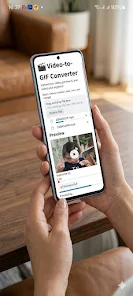
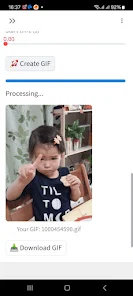
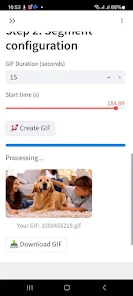
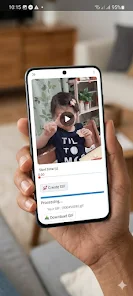
The interface focuses on simple touch controls: drag handles on a timeline to trim, pinch-to-zoom for detailed frame selection, and a scrubber for frame-accurate positioning. Playback controls include loop preview and single-frame stepping so you can evaluate loop continuity. Conversion begins with a single confirmation tap and runs locally, with progress feedback shown on-screen so you know how long the export will take.
Export, quality and optimization
Export options balance resolution and file size: choose higher pixel dimensions when detail matters, or enable file-size optimization to keep GIFs mobile- and web-friendly. The app supports high-resolution output when your device can handle it, and it allows you to adjust frame rate to reduce the final file size without drastic loss of motion quality. All processing occurs offline, avoiding uploads and giving you full control over output files.
Customization and visual output
While the core focus is conversion and trimming, the app includes useful tweaks for final appearance such as playback speed adjustments and loop mode settings. These controls let you craft everything from quick reaction GIFs to polished, repeating clips for stories or posts. The simple preview makes it easy to test different frame rates and speeds until the loop feels natural.
User experience and accessibility
Video To GIf Maker is designed to be lightweight and approachable: clear iconography, large touch targets, and a minimal learning curve help both beginners and more experienced creators work quickly. Memory- and battery-friendly implementation reduces background resource use, and the offline workflow ensures the app remains useful when you don’t have a network connection. Basic accessibility considerations—such as contrast between timeline elements and readable labels—make the editing controls easier to use in varied lighting conditions.
Performance and device compatibility
Conversion speed and maximum output quality depend on the original video resolution and your device's processing capacity. On mid-range phones, short clips convert in seconds; very high-resolution videos or long durations will take longer and produce larger GIF files. The app is intentionally compact to fit a wide range of Android devices and to minimize storage footprint while maintaining responsiveness during editing.
Privacy, ads and pricing
The core features are free to use and supported by unobtrusive ads; there is no requirement to upload media to cloud servers for conversion. All edits and exports occur locally on your device, so your source videos remain private unless you choose to share them. Ads are present during some workflows and may be noticed during extended editing sessions.
Limitations and compatibility notes
Keep in mind that GIFs are best for short, looping content—very long clips will result in large files and may not display smoothly in all apps. Video To GIf Maker supports common container formats but behavior can vary with uncommon codecs; if an import fails, re-encoding the clip to a standard MP4 with a widely supported codec typically resolves the issue. The app does not rely on external servers and does not offer cloud syncing or online collaboration features.
Tips for best results
For optimized GIFs, pick a short segment with a clear loop point, lower the frame rate moderately if you need smaller files, and use the preview to check smoothness before exporting. Save your final GIF to the gallery and share directly to messaging or social apps from the one-tap save screen. With on-device processing and simple controls, Video To GIf Maker makes producing quick, shareable loops straightforward while keeping your source media private.
- No virus
- No advertising
- User protection
Information
- File size: 27.00 M
- Language: English
- Latest Version: 1.2
- Requirements: Android
- Votes: 294
- Package ID: com.hichamamane.videotogifmaker
- Developer: yasser gold
Screenshots
















Explore More
Explore an immersive world of entertainment with our media software. Watch, listen, and engage with your favorite shows, music, movies, and more. Access exclusive content, personalized recommendations, and innovative formats. Enhance your experience with our suite of cutting-edge applications. Discover hidden gems tailored to your unique tastes. Create, share, and connect over personalized playlists, reviews, and forums.

Tik - Study Planner
Text Repeater Tool

AR Drawing Easy Pro

Kick & Snare: Live Beatmaker

Kiolix Pulse - Global Trends

Happy Mail

Joust Kindle Fair Coral

Best Phone Ringtones