


Introduction
STEAMER - Achievement Tracker gives your gaming account a clean, modern home for tracking progress across your digital library. STEAMER - Achievement Tracker consolidates playtime, completion statistics, and achievement progress into a single, searchable view so you can quickly decide what to play next or focus on completion goals without switching between menus and web pages.
Key features and how they work
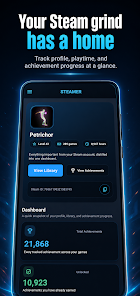
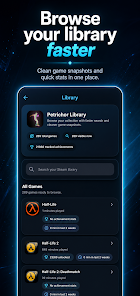
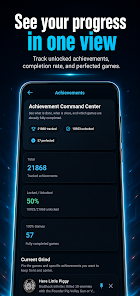
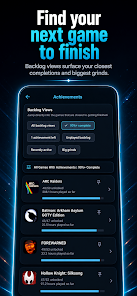
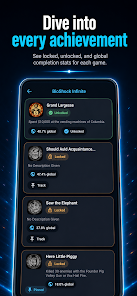
The app presents a dashboard that surfaces the metrics players care about: total playtime, unlocked achievements, completion percentage per title, and a curated list of recently played games. Each game entry shows a compact snapshot with progress bars and the closest remaining achievements, helping you identify which titles can be finished quickly and which will require long grinds. Library search and filters let you find games by name, completion state, or playtime, while watchlists and quick links make planning your backlog straightforward.
User interface and controls
Navigation is intentionally simple: swipe and tap gestures move between the dashboard, library, and detailed game views. A top-level search field and persistent filters reduce the number of taps needed to locate a title, and long-press actions offer fast entry to achievement lists or profile settings. Visual hierarchy emphasizes the most relevant numbers first, with clear headings and consistent spacing to improve scanning on phones and tablets.
Progression and challenge tracking
Progression is tracked at both profile and game levels. At the profile level you can see aggregate completion and achievement counts; at the game level you get per-achievement progress where available, estimated time-to-complete notes, and a view of the closest achievements to target. The app highlights potential challenge systems within your library by flagging games with many small achievements versus those dominated by long, repetitive tasks so you can balance short sessions and longer grinds in your play schedule.
Visual style, library structure, and replay value
The aesthetic is minimalist and focused on readability: clean typography, compact game cards, and adjustable density allow you to choose between a data-rich view or a simplified browse mode. Library structure supports sorting by last played, completion percentage, and playtime, which creates natural replay loops—revisiting partially completed titles becomes easier when the app surfaces close completions and recent progress. This design encourages measured replay rather than blind list-clearing by showing what actually moves your completion metrics.
Customization and personalization
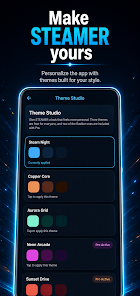
Built-in themes let you personalize color accents and contrast levels without changing functionality. You can tailor what appears on the dashboard by pinning favorite games or enabling a backlog-focused mode that prioritizes near-complete entries. Feedback tools are available inside the app so you can suggest refinements to how data is presented or request new sorting options.
Accessibility, offline use, and user experience
Accessibility is considered in layout and contrast choices and the app supports larger text scaling and simple navigation for assistive technologies. Basic account and library data can be cached for offline viewing so you can review your backlog or plan sessions where network access is limited, though live synchronization and owner data require an internet connection. Performance is optimized to be lightweight on battery and storage, keeping the app responsive even with large libraries.
Pro features, privacy, and limitations
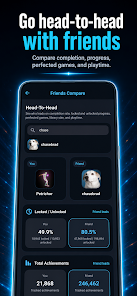
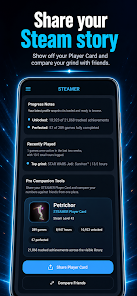
An optional Pro upgrade unlocks additional conveniences: comparisons with friends, multi-account support, persistent watchlists, and a shareable player card for social profiles. The app requires a public gaming profile to load account data, so private libraries will not be accessible through the companion. STEAMER - Achievement Tracker is an independent utility and is not affiliated with platform owners, which means official integrations may be limited by external APIs and platform policies.
Overall, STEAMER - Achievement Tracker is aimed at players who value measured progress and backlog management. It combines clear statistics, thoughtful navigation, and personalization options so achievement hunters and completion-minded players can plan sessions and track progress without distraction. If you want a focused, data-driven companion for managing playtime and completion goals, this app provides the tools to make informed decisions about what to play next and how to tackle longer challenges.
- No virus
- No advertising
- User protection
Information
- File size: 23.00 M
- Language: English
- Latest Version: 1.0.0
- Requirements: Android
- Votes: 226
- Package ID: com.thepetrichor.steamer
- Developer: ThePetrichor
Screenshots
















Explore More
Equip yourself with our all-in-one toolbox app for everyday tasks and projects. Instantly convert between units, calculate tips, scan documents, manage files, and more with handy productivity tools. Includes a level, compass, QR code reader, ruler, speedometer, decibel meter, and flashlight. Save frequently used tools to your customizable dashboard for one-tap access. Track billable hours, wages, budgets, and invoices. Annotate screenshots, magnify labels, and sign PDFs on the go.

Text Art - Write Text On Photo

MERA PROXY PRO

Domino's Pizza Sri Lanka

Hatekhori Shongkha

Halloween Photo Editor -Makeup

Connecting - Friends Near Me

HFonts - font & emoji manager

Virink





























