Introduction
Minibus Checklist is a practical inspection app that helps drivers complete daily vehicle safety checks quickly and reliably, designed specifically for schools, transport providers and small fleet operators who need a straightforward, paper-free process. The app guides users through a clear pass/fail workflow while collecting driver and vehicle details, capturing photos of issues and recording driver signatures, and it produces professional PDF reports that make audits and handovers easier to manage.
How the inspection workflow works
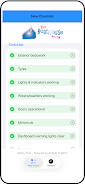
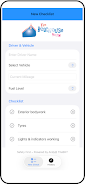
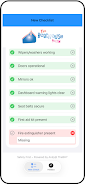
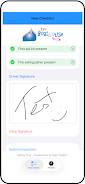
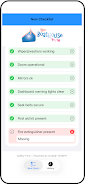
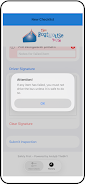
The inspection workflow is simple and deliberate: enter basic vehicle and driver information, move through a sequence of inspection sections, mark items as pass or fail, and attach a photo or written note for any failed item. Controls are built for touch devices so drivers can tap, swipe and use the device camera without navigating complex menus. Each inspection screen presents the relevant checks in logical groups such as exterior, lights and electricals, brakes and tyres, interior safety equipment and driver welfare items, allowing a single, uninterrupted inspection route that reduces missed steps and helps maintain consistent checks day to day.
Reporting and record-keeping
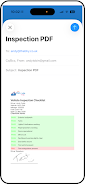
The app generates a clean, professional PDF report for every completed inspection that includes the inspection date and time, driver and vehicle details, highlighted failures and the captured signature. Reports can be previewed on-screen and exported from the device for sharing by email or local transfer, providing a clear audit trail without relying on paper. Stored inspections are indexed so authorised users can search by date, vehicle registration or driver name when they need to review past records for compliance or incident investigation.
Customization and inspection structure
Although Minibus Checklist presents a consistent pass/fail structure by default, the app is designed to reflect common minibus inspection needs and supports adapting checklist content to match an organisation’s standard procedures. Checklists are organised into sections, and each section can focus on a particular subsystem to make inspections faster and easier to train. This structure helps teams follow the same process across different vehicles and shifts and reduces variability in how checks are recorded.
User experience and accessibility
The interface emphasises clarity with large touch targets, readable fonts and a layout that works comfortably on both phones and tablets. Visual cues indicate which items require attention and which steps remain, and built-in tips guide new users through the first inspections so no specialised training is required. The app also considers accessibility needs by keeping controls simple and avoiding crowded screens, helping drivers complete checks safely and confidently under real-world conditions.
Offline capability and device requirements
Minibus Checklist is designed to operate on a single device so inspections can be completed without a persistent network connection; reports and photos are saved locally on the device and can be exported when a connection or transfer method is available. Because the app uses the device camera and touch input, drivers will need access to a compatible smartphone or tablet to capture photos and signatures, but this approach keeps the workflow fast and reliable even in low-signal environments.
Progression, replay value and practical limitations
Progression in daily use comes from building a consistent inspection history: repeated checks make it easier to spot recurring faults and to produce evidence for maintenance decisions or compliance reviews. The app encourages regular use by keeping the process short and repeatable, which increases adoption across driver teams. Minibus Checklist focuses narrowly on inspection reporting rather than on full fleet maintenance planning or automated scheduling, so organisations that need advanced maintenance workflows should consider complementary tools alongside the app.
Who benefits most
Transport managers, school administrators and drivers who need a reliable, paperless way to capture daily safety checks will find the app particularly useful. Minibus Checklist reduces administrative time, improves accountability through photo and signature capture, and produces shareable documents that simplify audits and handovers while keeping the inspection routine straightforward for drivers on the road.
- No virus
- No advertising
- User protection
Information
- File size: 47.96 M
- Language: English
- Latest Version: 1.1.0
- Requirements: Android
- Votes: 277
- Package ID: com.thbhy.minibus_checklist
- Developer: AndyTobin
Screenshots

















Explore More
Hit the open road with confidence using our automotive apps. Access comprehensive makes/models reference guides for expert vehicle knowledge. Get step-by-step repair and maintenance tutorials so you can DIY with ease. Scan diagnostic codes and get repair estimates from local shops. Stay on top of your vehicle's health with digital logs and alerts. Plan road trips leveraging real-time maps, traffic data, and trip computer integration.

Travel by Fresnaye

نور الحوزة

Pister Invoice

Аудио Диалогҳои Англисӣ–Тоҷикӣ

MyIPNow

S-Trader journal יומן מסחר

EV Charge Map: Station Finder

Digital Truck Binder