Introduction
Elev Gym puts a full-featured gym companion in your pocket: within seconds you can view assigned workouts, browse class schedules, reserve or check into sessions and receive timely alerts for openings or messages. The app is built for members who need quick, reliable access to their training plan while on the move, and Elev Gym integrates those everyday tasks into a single, easy-to-use interface so you spend less time managing logistics and more time training.
Key features
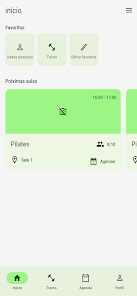
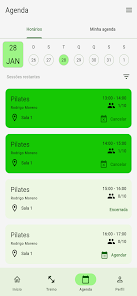
The core functionality centers on assigned workouts and class management—access your trainer-assigned routines, review exercises and see upcoming classes with instructor details and locations. Reserve a spot or join a waitlist if a class is full, and use the app to complete check-in when you arrive. Real-time notifications keep you informed about cancellations, openings and direct messages from staff or other members. These features are designed to streamline scheduling, reduce missed sessions and make communication about your plan straightforward and traceable.
Interaction mechanics and controls
The app’s interaction mechanics focus on simple, mobile-first controls: tap-to-book class flows, swipe through workout days, and clear action buttons for check-in or cancelling a reservation. Navigation is intentionally shallow so common tasks require few taps—calendar views for schedule browsing, a dedicated workout tab for assigned routines, and a notifications center for messages and waitlist updates. Input controls are optimized for single-handed use: quick confirmations, undo options for accidental changes, and concise prompts guide each step of booking or checking in.
Progression, personalization and training structure
Although Elev Gym is primarily a management tool, it supports progression systems through scheduled training plans and recurring routines assigned by your gym or trainer. Workouts are organized by session date and goal, letting you follow a steady progression of intensity or skill work as prescribed. Personalization options let you select preferred class types, mark favorite instructors, and adapt assigned plans where the gym permits edits—so your training schedule reflects both structured progression and practical availability.
Visual style and user experience
The visual style favors clarity and quick scanning: readable typography, high-contrast schedule cards, and consistent color coding for class status (available, reserved, waitlisted). UI affordances highlight actionable items like booking and check-in, while subtle animations provide feedback without distracting from workflow. Overall user experience emphasizes predictability—users can learn common workflows in minutes and return to the app between workouts with minimal cognitive load.
Customization, replay value and challenge options
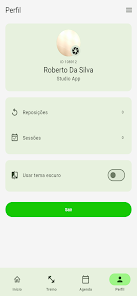
Customization is focused on making recurring use helpful: save preferred classes, create personal bookmarks for frequently used routines, and set notification preferences to control which alerts you receive. Replay value comes from routinely updated schedules and rotating class offerings that encourage repeated engagement rather than one-off interactions. Where gyms or trainers offer challenge-oriented programs, Elev Gym can surface those as time-limited plans or series of sessions, helping members track participation and stick to short-term goals without creating public leaderboards or competitive rankings.
Offline access, notifications and data handling
Basic offline access lets you view recently loaded assigned workouts and saved schedules when a connection is limited, while booking and waitlist actions require online connectivity and will synchronize once you reconnect. Push notifications and in-app alerts can be tailored to your routine so you receive reminders for upcoming sessions, open spots on waitlists or direct messages from staff. Any data synchronization depends on your gym’s management system; the app stores only the information needed to keep your schedule and messages current.
Accessibility, device support and limitations
Elev Gym includes accessibility considerations such as adjustable text sizes and clear iconography to support users with differing needs, and it works on a broad range of Android devices. Important limitations include the need for an active membership and the fact that some features—booking workflows, messaging, and roster visibility—vary by gym depending on their integration. If a gym has limited integration, certain operations may be handled by staff rather than through the app itself.
Getting started
Begin by installing the app, signing in with your gym membership credentials and granting notification permissions so you don’t miss important alerts. Link any assigned programs provided by your trainer, set your preferences for notifications and favorite classes, and review the schedule for the coming weeks to plan sessions. Elev Gym is intended to simplify daily management of your training plan and class bookings while keeping controls and interactions straightforward for repeated use.
- No virus
- No advertising
- User protection
Information
- File size: 51.00 M
- Language: English
- Latest Version: 2.0.800
- Requirements: Android
- Votes: 378
- Package ID: br.com.w12.elevgym
- Developer: W12 EVO
Screenshots
















Explore More
Connect deeper through meaningful conversations with our communication apps. Enjoy crystal-clear calls, video chats, messaging, and file sharing. Find the perfect emojis, GIFs, and stickers to express yourself. Keep the non-stop group banter organized in one place. Block unwanted interactions at the source. Meet new people worldwide through our global community features.

IZI: play, listen, watch, call

OnDjoss

Connecting - Friends Near Me

TryController

DATING SITES

TownSq Community

69ers

LR Store