Introduction
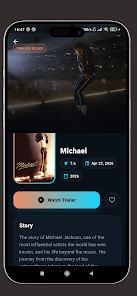
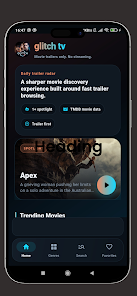
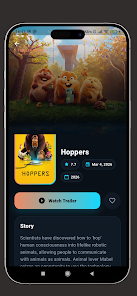
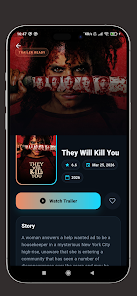
Glitch TV: Films and Series puts movie discovery in one place; Glitch TV: Films and Series organizes cast lists, trailers and ratings; Glitch TV: Films and Series presents a clean, fast interface so you can learn about films quickly and decide what to watch next. This lightweight discovery app focuses on metadata, official trailers and concise summaries rather than full-length streaming, making it a practical companion for casual viewers and cinephiles alike. The layout favors speed and clarity so search results, cast pages and trailer playback load with minimal friction.
Browsing and interaction mechanics
The app uses simple, predictable controls tuned for mobile use: tap a poster to open a film detail card, swipe between related titles, and pinch to change poster grid density. Search supports typed queries and progressive filtering by genre, year and rating, and each filter combination is preserved as you move through results to reduce repetitive typing. Navigation mechanics are intentionally lightweight so you can move from discovery to detail pages in two or three gestures, keeping exploration efficient on phones and tablets.
Information depth and progression
Glitch TV: Films and Series presents layered information that grows as you explore: initial cards surface synopsis, runtime and primary ratings, while deeper detail pages reveal cast and crew credits, production notes and trailer embeds. Progression through the app is user-driven rather than gamified — you build momentum by adding titles to custom watchlists, marking episodes or sequels as seen, and curating personal queues. These simple progression tools help you track ongoing series and follow a director or actor’s filmography without artificial leveling or forced incentives.
Visual style and layout design
The visual approach favors large poster imagery, readable typography and neutral backgrounds to keep attention on film art and metadata. A responsive grid adapts poster size to screen dimensions and a compact card view offers denser results for power users. Color contrast and spacing emphasize legibility: important details like release year, duration and rating are grouped together for quick scanning, while secondary information is tucked deeper into the detail page to avoid clutter.
Customization and user preferences
Personalization features let you adjust how much information appears on lists and how results are sorted, from newest releases to popularity and user rating. Choose between a poster-first view for visual discovery or a list view for text-focused browsing. You can create and rename multiple watchlists, reorder items within a queue, and set default filters so your preferred genres and time periods appear first. These customization options keep the interface familiar and focused on the films you care about.
Replay value and exploration tools
The app encourages repeated use through rotating editorial sections, seasonal collections and curated theme pages that refresh periodically to surface forgotten titles and overlooked gems. Revisiting curated collections and browsing cast filmographies are natural ways to rediscover cinema, while the inclusion of official trailers on detail pages makes it easy to preview titles before committing to a watchlist. The result is sustained replay value for people who enjoy digging into filmography chains and follow-ups.
Accessibility and device support
Glitch TV: Films and Series is designed with accessibility in mind: clear labeling, high-contrast elements and predictable touch targets support Android’s built-in accessibility tools and screen readers. Font sizes scale with system settings, and layout compression preserves essential information on smaller screens. Because the interface avoids dense menus, it remains navigable with assistive technologies while still providing rich metadata for sighted users.
Offline and performance considerations
Performance is a priority: the app caches recently viewed film pages and poster thumbnails for quicker reloads and reduced data usage. That cache allows you to re-open recently visited details and watch saved trailers when connectivity is intermittent, though the app does not host or stream full-length films. Its compact installation footprint and modest background activity make it well suited for devices with limited storage and for users who want fast response times without constant network polling.
Who benefits most
Glitch TV: Films and Series is useful for anyone who wants a focused reference for movie information rather than a streaming hub. Film students, weekend viewers, and catalog browsers will appreciate the depth of credits, the quick access to trailers and the ability to assemble personal watchlists. If you prefer an uncluttered, performance-minded way to research films and follow release schedules, this app centralizes essential metadata and keeps the discovery process simple and repeatable.
- No virus
- No advertising
- User protection
Information
- File size: 94.00 M
- Language: English
- Latest Version: 1.0.0
- Requirements: Android
- Votes: 112
- Package ID: com.glitchtv.appmediaplayerglitch
- Developer: PERSEUS LABS LTD
Screenshots
















Explore More
Equip yourself with our all-in-one toolbox app for everyday tasks and projects. Instantly convert between units, calculate tips, scan documents, manage files, and more with handy productivity tools. Includes a level, compass, QR code reader, ruler, speedometer, decibel meter, and flashlight. Save frequently used tools to your customizable dashboard for one-tap access. Track billable hours, wages, budgets, and invoices. Annotate screenshots, magnify labels, and sign PDFs on the go.

Text Art - Write Text On Photo

MERA PROXY PRO

Domino's Pizza Sri Lanka

Hatekhori Shongkha

Halloween Photo Editor -Makeup

Connecting - Friends Near Me

HFonts - font & emoji manager

Virink