


Introduction
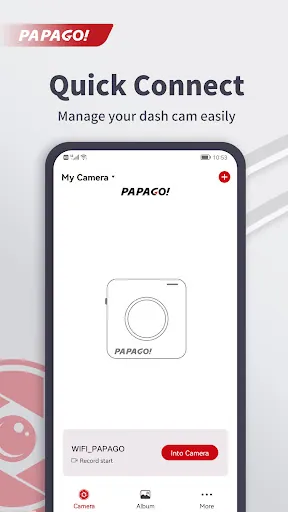
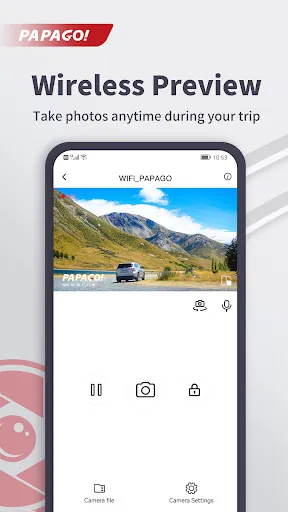
PAPAGO Focus is the companion Android app for PAPAGO dash cams that brings live preview, on-phone video access and camera control to your smartphone without a computer. From the moment you connect your dash cam over a direct WiFi link, PAPAGO Focus provides an intuitive view of the camera’s live feed, a straightforward way to browse saved clips, and an easy route to change core device settings — all designed to make reviewing incidents and managing recordings faster while you are on the move.
Playback and controls
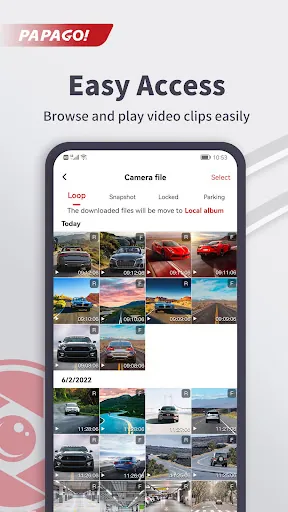
The app provides familiar playback controls so you can play, pause and seek through recording timelines with minimal learning curve. A visual timeline and thumbnail previews help you locate key moments quickly; scrubbing lets you step through footage to check details such as license plates or timestamps. Video playback is handled on-device, so you can watch without streaming to external servers. Controls are laid out to be reachable with one hand while maintaining safe use practices; the interface clearly labels playbacks, timestamps and file durations for straightforward review.
Device settings and customization
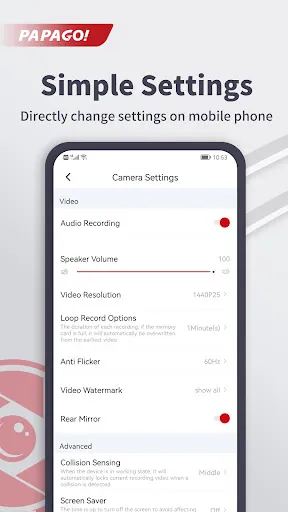
PAPAGO Focus centralizes the dash cam configuration you would otherwise change on the camera itself. Typical adjustable settings exposed in the app include recording resolution, loop recording intervals, time and date stamps, and motion or G-sensor sensitivity for event marking; toggles for audio recording and parking mode behavior can usually be accessed as well. These options let you tailor how the dash cam records and flags incidents so the device fits your driving habits. The app stores preferences, so the camera will apply your chosen profile each time it connects.
Organization, file management and offline use
Browse recorded files directly from the dash cam’s storage using a straightforward folder and file view. You can preview clips on the phone to confirm which files contain incidents you need to keep. Because PAPAGO Focus works over a direct local WiFi connection between phone and camera, it functions without an internet connection; this offline capability lets you review footage on-site, export or delete unnecessary clips, and free up camera storage before a long trip, all without relying on cellular data.
Visual style and user experience
The app emphasizes legibility and minimal distraction: menus use clear labels and a simple visual hierarchy so critical controls are accessible during quick checks at safe stops. Video playback prioritizes clarity over flashy effects, ensuring that thumbnails, timestamps and metadata remain readable. The interface is optimized for a wide range of Android screen sizes so icons and text scale appropriately for compact phones and larger displays alike.
Accessibility and reliability
PAPAGO Focus aims to be accessible to a broad user base by using large tap targets and straightforward language in settings descriptions. Notifications and warnings are direct and actionable, for example indicating when the camera loses WiFi connection or when storage is near capacity. The app’s local-only workflow reduces complexity and avoids unnecessary network dependencies, improving reliability in roadside or underground parking situations where mobile reception can be limited.
Practical use and replay value
For everyday driving, PAPAGO Focus becomes the quickest path to confirm that a trip was recorded correctly or to capture a still for insurance or reporting purposes. For longer-term use, the app simplifies routine tasks such as clearing old loops, checking event-marked videos, and adjusting sensitivity when driving in different environments. These repeated management actions give the app strong practical replay value: you will return to it whenever you need to verify footage or tweak camera behavior.
Compatibility and getting started
To begin, enable the dash cam’s WiFi hotspot and connect your Android device to that network; then open PAPAGO Focus to see the live preview and access recordings. The app is tailored to PAPAGO dash cam models and focuses on the core tasks drivers expect: preview, playback and configuration. If you already use a PAPAGO camera, installing PAPAGO Focus streamlines how you interact with recordings and settings so you spend less time transferring files and more time handling the moments that matter.
- No virus
- No advertising
- User protection
Information
- File size: 116.40 M
- Language: English
- Latest Version: v2.6.0.231215
- Requirements: Android
- Votes: 424
- Package ID: com.vidure.papago
- Developer: PAPAGO Inc.
Screenshots

















Explore More
Immerse yourself in an audio wonderland with our exceptional audio app downloads! Escape into a world of captivating stories, immersive podcasts, and spellbinding audiobooks. Let your imagination soar as you listen to gripping narratives, engaging interviews, and mind-expanding educational content. With our vast collection of audio content, there's something for everyone.

51 Game
YAWT - Timer for Tabata, HIIT, Interval Training

Furspark

AZ Screen Recorder - Video Recorder, Livestream

XMTV Player

IPTV Player

Xena Live -Group Voice Chat

Pony Torture 2





























