


Introduction
Concrete & Gravel Calc is a practical mobile calculator designed to estimate volumes, weights and costs for concrete, gravel and aggregate projects. It helps builders, landscapers and DIYers determine material quantities, mix ratios and price estimates quickly, with clear units and waste allowances to avoid overbuying or shortages.
Key Tools and Calculations
The app groups essential estimating tools into one interface so you can compute volumes for slabs, footings, columns and trenches without switching screens. Concrete & Gravel Calc includes volume calculations for common geometries and converts between cubic meters, cubic yards, litres and cubic feet. Built-in density references allow conversion from volume to weight for concrete, sand, gravel and other aggregates.
Practical Workflow for Job Planning
Rather than sifting through spreadsheets, the app provides a step-by-step workflow: enter dimensions, select material type, set waste percentage and review required bags, tonnes or truckloads. Users can save multiple project presets and recall them to compare scenarios, which speeds estimating for repeat jobs or bid preparation. The interface minimizes data entry by offering helpful defaults while keeping everything editable.
Customization and Unit Support
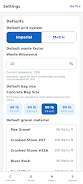
Unit flexibility is a core feature. You can switch between metric and imperial units at any point, and the app recalculates instantly. Concrete & Gravel Calc supports custom densities and bag sizes so regional material specifications can be accommodated. Common mix ratios and a quick mix calculator let you specify cement, sand and aggregate proportions to determine how many bags of cement and how much sand/gravel are required for a given volume.
Features That Save Time
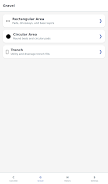
- Volume calculators for slabs, circular columns, tapered footings and trenches.
- Material converters between volume and weight using density tables.
- Waste allowance settings for trimming or overage percentages.
- Cost estimation by unit price to generate material budgets and totals.
- Project presets to store common job parameters for reuse.
Accuracy and Reporting
Accuracy matters on the jobsite. The app provides clear handling of rounding and significant figures so results are appropriate for purchasing orders. A concise summary screen shows quantities by unit type and also presents suggested ordering sizes — for instance, number of 20 kg bags or bulk cubic meters. While it’s an estimating tool rather than a lab instrument, its calculations reduce guesswork and help avoid costly mistakes.
Costing, Quotes and Material Lists
Estimating material cost is easier with the integrated costing module. Enter per-unit prices and the app will break down totals by material category and provide a grand total. This is useful for preparing quick quotes or comparing supplier prices. Exportable lists can be written down or photographed on screen for contractors and suppliers; the clear line-item view simplifies ordering and delivery planning.
Interface and Performance
The design focuses on clarity: labeled inputs, live-calculation feedback and prominent results. Concrete & Gravel Calc performs calculations locally, so it remains responsive without a constant internet connection. Performance is optimized for smartphones and tablets, and the app handles large numbers and complex unit combinations without noticeable lag.
Compatibility and Offline Use
Designed to be compatible with a broad range of Android devices, the app supports offline usage for remote sites where connectivity is limited. Saved projects and custom settings persist between sessions, and a lightweight footprint means it won’t consume excessive storage or battery life.
Tips for Best Results
- Measure twice: accurate dimensions make the estimate reliable.
- Adjust waste allowances to reflect site conditions and handling losses.
- Use custom bag sizes to match local suppliers and reduce rounding errors.
- Keep density values current if you switch material types or suppliers.
Getting Started
Begin by creating a new project, choose the relevant calculator type, and enter the dimensions. Set your preferred units and waste percentage, then review the suggested quantities and costs. Concrete & Gravel Calc streamlines the common tasks of estimating so you can focus on scheduling, delivery and construction instead of manual calculations.
- No virus
- No advertising
- User protection
Information
- File size: 63.11 M
- Language: English
- Latest Version: 1.0.2
- Requirements: Android
- Votes: 320
- Package ID: com.fieldtools.constructioncalc
- Developer: EckoByteStudios
Screenshots
























Explore More
Equip yourself with our all-in-one toolbox app for everyday tasks and projects. Instantly convert between units, calculate tips, scan documents, manage files, and more with handy productivity tools. Includes a level, compass, QR code reader, ruler, speedometer, decibel meter, and flashlight. Save frequently used tools to your customizable dashboard for one-tap access. Track billable hours, wages, budgets, and invoices. Annotate screenshots, magnify labels, and sign PDFs on the go.

Board Game Stats

MEXC Global: BTC, ETH, Gamefi

Text Art - Write Text On Photo

Domino's Pizza Sri Lanka

Hatekhori Shongkha

Halloween Photo Editor -Makeup

Connecting - Friends Near Me

Cartola





























