


Introduction
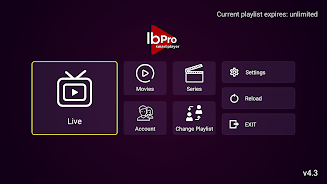
Ibpro Smart Player is a lightweight, feature-rich Android media player designed for smooth playback, wide format support, and advanced streaming capabilities. It organizes local and network media, provides subtitle and audio track controls, and offers customizable playback settings to fit different viewing and listening needs.
What Ibpro Smart Player Offers
Ibpro Smart Player brings a blend of practical tools for everyday media use and power-user options for custom setups. The app supports a broad range of audio and video codecs, lets you stream from network shares or URLs, and includes subtitle handling, audio track switching, and playlist management. Its balance between simplicity and depth makes it useful on phones, tablets, and Android TV devices.
Core Features
- Broad format compatibility: Plays common and less common media file types so you can avoid constant transcoding.
- Network streaming: Connect to SMB, FTP, DLNA/UPnP servers, or open direct HTTP/HTTPS links for remote playback.
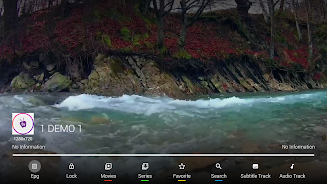
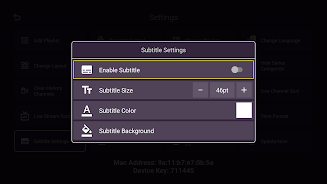
- Subtitle support: Load external subtitle files, adjust timing and appearance, and use built-in subtitle search when available.
- Multiple audio tracks: Switch between language tracks or different mixes without leaving the player.
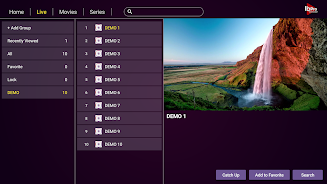
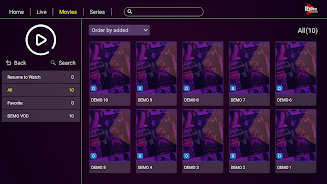
- Playlist and library: Create and save playlists, browse media by folders, and scan libraries for quick access.
User Interface and Controls
The interface is organized to reduce friction: large playback controls, swipe gestures for seeking and volume, and an on-screen menu for quick toggles. A compact file browser keeps folder navigation straightforward, while a media library view groups content by type and recently played items. Settings are grouped logically, so less technical users can find playback options without getting lost.
Playback Quality and Performance
Ibpro Smart Player is optimized to take advantage of hardware acceleration when available, minimizing CPU load and improving battery life during long sessions. For devices with limited resources, the app can fall back to software decoding while maintaining smooth playback for most files. Adaptive buffering helps prevent stuttering on slower networks, and options to adjust decoding threads or enable low-latency mode give power users control over performance.
Customization and Advanced Options
Advanced users will appreciate the customization options that let Ibpro Smart Player adapt to specific needs. Change the audio output method, tweak subtitle fonts and colors, enable gapless playback for albums, or set default actions for when external storage is mounted. The player also supports custom gestures and controller mapping for use with Bluetooth gamepads or remote controls on Android TV.
Connectivity and Integration
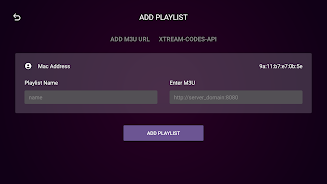
Integration with network sources and casting protocols makes it easy to use Ibpro Smart Player in multi-device environments. Stream from local servers, open media via magnetized links, or cast to Chromecast-compatible devices where supported. The app also works well with file managers and can be set as the default handler for media files, so launching content from other apps is seamless.
Security and Privacy
Ibpro Smart Player requests only essential permissions for its functionality: access to storage for local media and network permissions for streaming. Media scanning can be limited to selected folders, and the app does not require account creation. These design choices help keep your media private while providing the features needed for a modern player.
Compatibility and Device Support
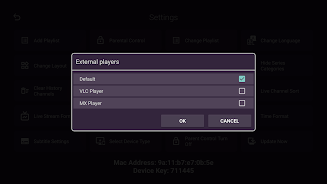
The app supports a wide range of Android versions and form factors, from small phones to Android TV boxes. Regular updates add codec support and compatibility fixes for newer devices. If you depend on a specific hardware decoder or want to use the app on a TV with a remote, check the device settings within Ibpro Smart Player to enable the best options for your hardware.
How to Get Started
Begin by granting storage access and letting the app scan the folders where you keep media. Add network sources under the server or stream settings, then create playlists or pin favorite folders for fast access. Experiment with subtitle and audio track settings during playback to find your preferred defaults. With a short setup, Ibpro Smart Player becomes a reliable hub for both local and streamed content.
Practical Tips
- Use hardware acceleration on supported devices to reduce battery usage.
- Keep subtitle files in the same folder as videos with matching names for automatic loading.
- Create playlists for long drives or workouts to avoid manual selection.
- Enable adaptive buffering if you experience intermittent network hiccups.
Ibpro Smart Player is a practical choice for users who want a dependable, configurable media player on Android. It combines essential playback tools with advanced options so you can tailor the experience to how you watch and listen.
- No virus
- No advertising
- User protection
Information
- File size: 14.25 M
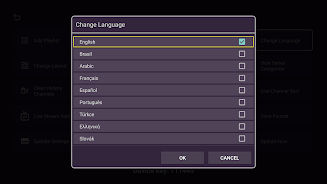
- Language: English
- Latest Version: 4.3
- Requirements: Android
- Votes: 116
- Package ID: ibpro.smart.player
- Developer: appdevelopmentfortv
Screenshots
















Explore More
Equip yourself with our all-in-one toolbox app for everyday tasks and projects. Instantly convert between units, calculate tips, scan documents, manage files, and more with handy productivity tools. Includes a level, compass, QR code reader, ruler, speedometer, decibel meter, and flashlight. Save frequently used tools to your customizable dashboard for one-tap access. Track billable hours, wages, budgets, and invoices. Annotate screenshots, magnify labels, and sign PDFs on the go.

Board Game Stats

MEXC Global: BTC, ETH, Gamefi

Text Art - Write Text On Photo

MERA PROXY PRO

Domino's Pizza Sri Lanka

Hatekhori Shongkha

Halloween Photo Editor -Makeup

Connecting - Friends Near Me





























