Introduction
Real Violin Solo brings a portable bowed-string studio to your device, giving violinists, teachers and hobbyists a realistic way to practice, compose and record on the go. Real Violin Solo models violin, viola, cello and double bass timbres with studio-quality samples and a scrollable 64-note interface so you can play across an extended range. The app is designed to feel familiar to string players while remaining approachable for those learning technique or exploring new arrangements.
Key features and audio quality
The app uses high-fidelity, studio-recorded samples for each instrument, capturing different articulations and tone colors so notes respond musically rather than sounding flat. A detailed visual instrument model complements the audio so what you hear matches what you see. Built-in recording stores practice takes as MP3 or OGG files for easy archiving, and export options let you move performances to other apps or cloud folders. Real Violin Solo emphasizes natural sound over artificial effects, while still offering practical controls to shape tone and output level for different listening environments.
How it plays: mechanics and controls
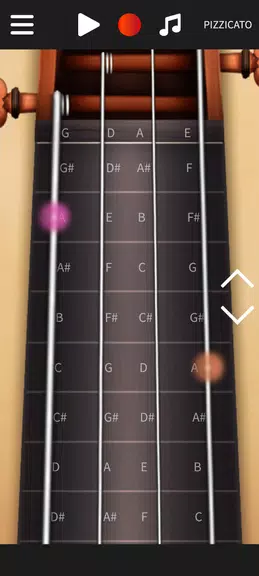
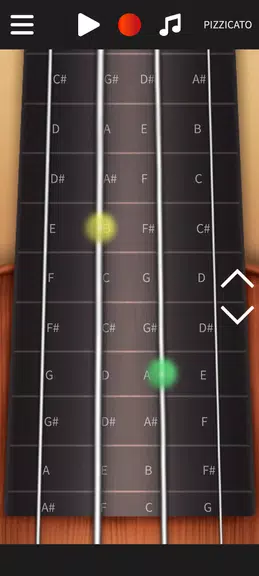
Playback is driven by an interactive, scrollable fingerboard with 64 distinct notes covering several positions. You play by touching or dragging along the fingerboard: short taps produce articulate attacks useful for pizzicato-style passages, while smooth drags simulate sustained bowing for legato lines. The interface supports position shifts by scrolling left or right to access higher or lower notes, and visual note highlights help you follow patterns when practicing scales or melodies.
Progression, practice modes and challenge options
Real Violin Solo supports focused practice without requiring internet access. Users can set practice goals such as repeating a phrase a set number of times, working at a fixed tempo, or recording multiple takes to compare progress. Built-in tempo control and a simple metronome let you increase speed gradually, and an optional accuracy drill mode highlights missed notes during playback so you can target problem areas. These progression tools are flexible rather than prescriptive, suitable for beginners refining scales and for experienced players sketching arrangements.
Visual style and level structure
The app presents a clean, realistic instrument view with clear fingering markers and an uncluttered control area. The scrollable layout creates a natural left-to-right movement similar to shifting positions on a real instrument, and adjustable interface scaling helps you focus on either a compact overview or a detailed playing area. While there are no game-like levels in the sense of stages, the app’s practice targets and tempo increments create an implicit structure that supports steady improvement over time.
Customization and user experience
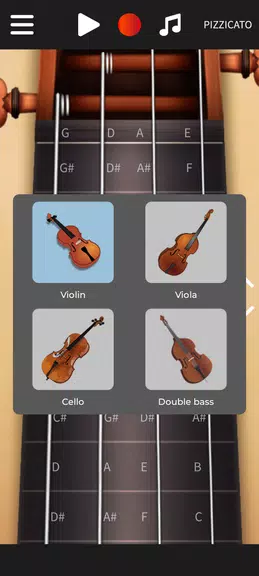
Users can switch between violin, viola, cello and double bass timbres to experiment with different sonorities or to arrange parts for small ensembles. Visual options let you toggle note labels and change the color contrast for easier reading during long practice sessions. The recording workflow is straightforward: capture a take, trim or rename it, and export it as MP3 or OGG for sharing or archiving. Session persistence means your last instrument choice and scroll position are retained for fast resuming.
Replay value and offline use
Replay value comes from repeatedly practicing patterns, experimenting with different instruments and recording variations for comparison. The app is fully usable offline, so you can practice on commutes or in locations without a network connection. Because sessions can be exported, the app also serves as a portable idea-capture tool for composers and arrangers who want to document sketches quickly.
Accessibility and controls
Real Violin Solo includes accessibility-minded options such as adjustable interface scale, visual note highlighting and clear contrast settings to support a range of users. Touch-based controls are designed for both right- and left-handed use by allowing flexible placement of interface elements, and the metronome and tempo controls are accessible without interrupting playback. These choices aim to make practice efficient for learners and comfortable for extended sessions.
Recording, sharing and limitations
The app’s recording and export options make it easy to track progress or share performances with teachers and collaborators. Recordings export as MP3 or OGG, which covers common workflows but does not include niche formats; external editors can be used if other file types are required. Also, while Real Violin Solo delivers expressive sampled tones, it cannot replicate the full physical feedback and nuanced touch of an acoustic instrument, so it is best used as a complementary practice and composition tool rather than a complete substitute for live playing.
- No virus
- No advertising
- User protection
Information
- File size: 26.50 M
- Language: English
- Latest Version: 1.7.9
- Requirements: Android
- Votes: 326
- Package ID: batalsoft.real.violin.solo
- Developer: Batalsoft Music Apps
Screenshots
















Explore More
Equip yourself with our all-in-one toolbox app for everyday tasks and projects. Instantly convert between units, calculate tips, scan documents, manage files, and more with handy productivity tools. Includes a level, compass, QR code reader, ruler, speedometer, decibel meter, and flashlight. Save frequently used tools to your customizable dashboard for one-tap access. Track billable hours, wages, budgets, and invoices. Annotate screenshots, magnify labels, and sign PDFs on the go.

Board Game Stats

MEXC Global: BTC, ETH, Gamefi

Text Art - Write Text On Photo

MERA PROXY PRO

Domino's Pizza Sri Lanka

Hatekhori Shongkha

Halloween Photo Editor -Makeup

Connecting - Friends Near Me