


Introduction
Go Speed is a lightweight Android utility designed to free memory, optimize background processes, and boost app responsiveness. It combines one-tap cleanups, CPU and RAM monitoring, and automated routines so phones feel snappier without complex settings, making routine maintenance simple for daily users and power users alike.
What Go Speed Does
Go Speed targets sluggish performance by identifying resource-hungry processes and reclaiming system memory. Rather than promise unrealistic speed gains, it focuses on realistic improvements: reducing app load times, limiting background activity, and minimizing stutter during multitasking. The app exposes useful diagnostics so you can see what changed after each cleanup.
Key Tools and Features
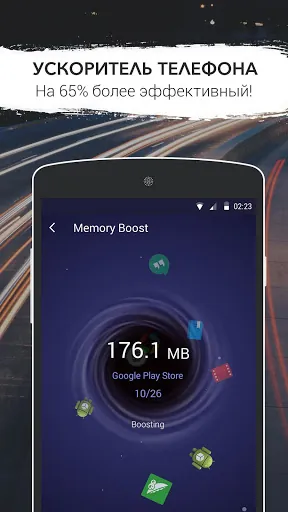
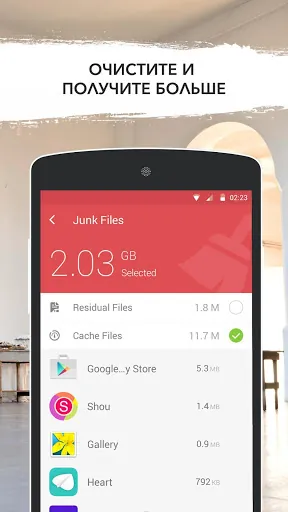
- One-tap Booster: Instantly clears cached files and stops unnecessary background services to free RAM and reduce lag.
- Intelligent Cleanup: Prioritizes space and RAM recovery without terminating essential system processes or killing apps that need to run in the background.
- Scheduled Optimization: Automates routine maintenance at times you choose, keeping device performance consistent without manual intervention.
- App Manager: Lists installed applications by resource use so you can uninstall or restrict apps that drain memory or battery.
- Real-time Monitoring: Displays CPU, RAM, and storage usage in a compact dashboard for quick troubleshooting.
How the Optimization Engine Works
Under the hood, Go Speed uses Android APIs to detect idle processes and cached data suitable for cleanup. The engine separates vital system services from discretionary apps, so essential functions remain untouched. When you trigger a boost, the app frees reclaimable memory and adjusts process priorities to deliver smoother foreground performance. Scheduled tasks run in low-priority windows to avoid interrupting active use.
User Interface and Daily Workflow
The interface emphasizes clarity: a simple dashboard highlights immediate issues, while deeper sections let you manage permissions and view historical optimization reports. Go Speed organizes tools into clear tabs for cleaning, monitoring, and app management, reducing the learning curve. Notifications are configurable, so you receive only the tips and alerts that matter to your routine.
Performance, Battery and Compatibility
Designed for modern Android distributions, Go Speed balances performance gains with battery friendliness by avoiding aggressive CPU throttling. It supports most common Android versions and adapts behavior according to device capabilities. On mid-range phones you should notice smoother app switching and reduced lag during memory-heavy tasks; on flagship devices, the app focuses on preventing temporary slowdowns rather than large measurable speed boosts.
Practical Tips for Best Results
- Run a full scan after installing new apps to identify background services that may affect performance.
- Use scheduled cleanups during idle hours, like overnight, to avoid interruption and preserve battery life.
- Avoid excessive use of boosters: a single well-timed cleanup delivers better long-term stability than repeated forced kills.
- Combine Go Speed with good storage hygiene—uninstall unused apps and clear large media files—to maximize responsiveness.
Installing and First Run
After installing Go Speed, grant the minimal permissions it requests for monitoring and cleanup. The initial scan produces a short report with recommended actions; applying these recommendations usually yields the most noticeable improvement. Customize the auto-clean schedule and notification preferences to match how you use your device, then monitor the dashboard for ongoing insights.
Why Choose This App
Go Speed prioritizes safe, predictable optimization over flashy claims. It provides clear feedback, customizable automation, and practical tools that help keep Android devices feeling responsive day to day. If you prefer an app that explains its actions and lets you control the level of intervention, Go Speed offers a sensible balance between automation and transparency.
- No virus
- No advertising
- User protection
Information
- File size: 9.80 M
- Language: English
- Latest Version: 2.13.1
- Requirements: Android
- Votes: 225
- Package ID: com.gto.zero.zboost
- Developer: Best Free Video Editor & Video Maker Dev
Screenshots

















Explore More
Equip yourself with our all-in-one toolbox app for everyday tasks and projects. Instantly convert between units, calculate tips, scan documents, manage files, and more with handy productivity tools. Includes a level, compass, QR code reader, ruler, speedometer, decibel meter, and flashlight. Save frequently used tools to your customizable dashboard for one-tap access. Track billable hours, wages, budgets, and invoices. Annotate screenshots, magnify labels, and sign PDFs on the go.

Board Game Stats

MEXC Global: BTC, ETH, Gamefi

Text Art - Write Text On Photo

Domino's Pizza Sri Lanka

Hatekhori Shongkha

Halloween Photo Editor -Makeup

Connecting - Friends Near Me

Cartola





























