Introduction
Monect PC Remote is a versatile and powerful app that turns your smartphone into a wireless controller for your PC. Whether you need to control your desktop for media playback, presentations, or gaming, Monect offers a wide range of features to enhance your PC experience. The app provides customizable controls, remote keyboard and mouse functionality, and even the ability to stream your PC’s display to your phone. With its easy setup, smooth performance, and variety of control modes, Monect PC Remote is perfect for anyone looking to enhance their PC usage with the convenience of their mobile device.
Features of Monect PC Remote:
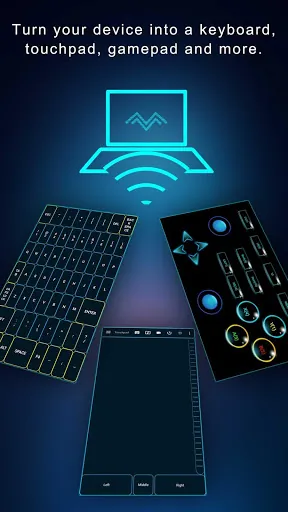
- Remote Control Modes: Use your phone as a keyboard, mouse, gamepad, or even as a remote for media control, adapting to various needs.
- Screen Mirroring: Stream your PC's display to your mobile device, making it easier to control and view your PC remotely from anywhere in your home.
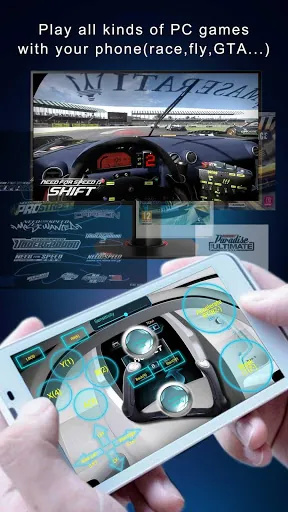
- Gaming Controller: Play PC games with touch controls on your smartphone, offering a great alternative to using a traditional keyboard and mouse setup.
- File Management: Browse and manage files on your PC remotely, allowing you to easily access and transfer files without having to be physically at your computer.
- Easy Setup: The app’s intuitive interface and simple connection process make it easy to set up, even for first-time users.
Playing Tips for Monect PC Remote:
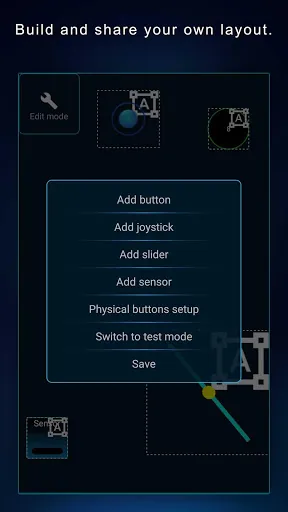
- Customize Your Controls: Take advantage of the app's customizable control options to set up the layout and functions that work best for your needs.
- Use in a Well-Connected Area: For the best performance, ensure both your PC and mobile device are connected to the same Wi-Fi network to minimize lag and enhance responsiveness.
- Explore Gamepad Mode: If you’re playing games on your PC, try using the gamepad mode to turn your smartphone into a full-featured controller for a smoother gaming experience.
- Optimize Screen Mirroring: To get the clearest and most responsive stream, adjust the resolution and settings based on your Wi-Fi speed and device capabilities.
- Try Multiple Control Options: Don’t limit yourself to one mode. Experiment with the keyboard, mouse, and gamepad modes to see which is most efficient for the task at hand.
Conclusion:
Monect PC Remote is an excellent app for anyone looking to control their PC from the convenience of their smartphone. Whether you need to manage files, control media, or play games remotely, Monect offers a seamless and versatile solution. With its customizable controls, screen mirroring capabilities, and easy setup, it’s a great tool for enhancing your productivity and entertainment experiences. The app’s smooth performance and wide range of functions make it a must-have for users looking for a more flexible way to interact with their PC from afar.
- No virus
- No advertising
- User protection
Information
- File size: 34.80 M
- Language: English
- Latest Version: 8.0.19
- Requirements: Android
- Votes: 406
- Package ID: com.monect.portable
- Developer: Monect
Screenshots
















Explore More
Boost your productivity with our handpicked selection of top-rated apps designed to help you get things done faster and easier. Streamline tasks, organize projects, collaborate with others, and maximize your efficiency with powerful productivity tools optimized for mobile. Say goodbye to wasting time and hassle. Our editors rigorously test and curate the most useful apps that will supercharge your productivity wherever you are. Download now and accomplish more every day.

Vanced Tube PopUp Video Guide For Vanced

Classic Solitaire-Leisure Card

Saregama Mobile

Stamps

CRHESA
Lithuanian for AnySoftKeyboard

时间管家

MotiveMate