Introduction
TV Brasil - TV ao Vivo is a lightweight media player for Android designed to play M3U and Xtream Codes (XC) playlists with reliable, low-overhead performance. From the first launch you can import or paste playlist URLs, open local M3U files and begin browsing live channels immediately, making TV Brasil - TV ao Vivo a practical choice for users who manage their own IPTV lists and want a focused playback and playlist management tool.
Core features and playback behavior
The app centers on stable streaming and straightforward playlist handling rather than providing channels or hosting content. It fully supports standard M3U and Xtream Codes formats and parses common playlist tags so channel names, groupings and basic metadata appear correctly. Playback controls include play, pause, seek when supported by the stream, channel up/down and quick channel switching. Buffering is tuned to reduce interruptions on typical home networks, and the player displays simple status information about the current stream so you can see bitrate and connection activity while watching.
Controls and navigation
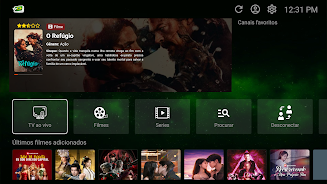
Navigation is optimized for both touch and D-pad/remote control interaction: large focusable elements, predictable left/right/up/down movement and short-press behavior for fast channel changes. On touch devices gestures are minimized in favor of explicit controls to avoid accidental skips during viewing. Import and export of playlists is clearly presented in the UI so you can switch lists, back up local files or load a new URL without digging through settings.
Playlist management and progression
Rather than a game-style progression, TV Brasil - TV ao Vivo offers a simple progression system for organizing content: you can create and edit custom channel groups, mark favorites to build a personalized lineup and use a recent history to return to channels you watched earlier. These organizational features act like a progression curve for your library — the more you tune and classify channels, the faster you can navigate to the content you use most.
Customization and visual style
The user interface focuses on clarity: readable fonts, clear channel thumbnails when provided by the playlist and a layout that highlights categories and group names. Light and dark interface modes reduce eye strain in different viewing conditions and allow users to match the look of TV Brasil - TV ao Vivo to their device or room lighting. Simple visual feedback for loading states and errors helps you identify problematic streams without guessing.
Level structure, replay value and longevity
Instead of levels, the app’s structure is driven by playlists and categories. This flexible approach increases replay value because you can continually update or swap playlists to access new sources and reorganize channels into different category trees. The app’s lightweight footprint and fast startup make short or repeated viewing sessions convenient, and managing multiple playlists is straightforward for users who maintain several lists for different types of programming.
Accessibility and device support
Accessibility considerations include large, contrast-friendly UI elements and support for typical Android accessibility services so screen readers and focus navigation behave consistently. The app is intended to run smoothly on a wide range of Android phones, tablets and Android TV boxes; controls scale appropriately for touchscreen and remote-based environments.
Offline behavior and performance notes
TV Brasil - TV ao Vivo stores playlists and user settings locally so your curated channel groups and favorites remain available without reloading, but live streams themselves require an active network connection. The player uses progressive buffering and can cache short segments to smooth playback; it is not designed to download or permanently store streamed content for offline viewing. Performance optimizations keep resource use low so the app remains responsive even on modest hardware.
Diagnostics and limitations
The app includes basic playlist parsing diagnostics that highlight malformed entries and help you locate broken links in a list, but it does not validate or host streams and cannot guarantee availability or legality of content supplied by third-party playlists. Users are responsible for the sources they add and should ensure they have proper rights to access any streams. Expect playback quality to follow the characteristics of the streams you provide: high-quality sources will yield better results than unstable feeds.
Who this app is for
TV Brasil - TV ao Vivo is best suited for users who already use M3U or XC playlists and need a stable, no-frills player that keeps playlist management simple. If you want an app that emphasizes playback reliability, clear organization and cross-device navigation without bundling or distributing channels, this app provides a focused toolset for arranging and watching your own live streams.
- No virus
- No advertising
- User protection
Information
- File size: 20.81 M
- Language: English
- Latest Version: 2.3
- Requirements: Android
- Votes: 419
- Package ID: com.tvvivoghb.ar
- Developer: UpTurn Digital Marketing
Screenshots
















Explore More
Equip yourself with our all-in-one toolbox app for everyday tasks and projects. Instantly convert between units, calculate tips, scan documents, manage files, and more with handy productivity tools. Includes a level, compass, QR code reader, ruler, speedometer, decibel meter, and flashlight. Save frequently used tools to your customizable dashboard for one-tap access. Track billable hours, wages, budgets, and invoices. Annotate screenshots, magnify labels, and sign PDFs on the go.

1xSlots Casino

NeoSpin Casino

LifePad

SocialTech VPN

Desire by Lovehoney

888bets moçambique Apk

TogelUp

HOMETOGEL