Introduction
VyMerge is a compact, privacy-first PDF merging app that combines PDF documents and image files directly on your Android device, so your files never leave the phone. VyMerge focuses on a fast, no-friction workflow for joining multiple PDFs, JPGs, or PNGs into a single, well-ordered document: add files, reorder them, preview the result, optionally add page numbers, then export or share the finished PDF — all without accounts or uploads and with an emphasis on staying offline and private.
Key features and workflow
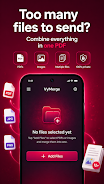
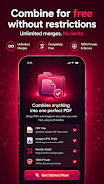
The core workflow in VyMerge is intentionally simple and linear to fit everyday tasks. Tap to add individual PDF files or images from your device storage, then use drag-and-drop gestures to reorder items into the exact sequence you need. Images are converted into PDF pages automatically and inserted where you place them, preserving the file order you choose. Before exporting, you can preview the combined document page by page and enable optional page numbering so the final PDF is ready for print, email, or archiving. When you are satisfied, save the merged file to your device or share it directly via the Android share sheet — no cloud transfer required.
Controls and user experience
VyMerge uses familiar touch controls that behave consistently across modern Android devices. Adding files is a one- or two-tap action from your gallery or file browser. Reordering relies on a straightforward drag-and-drop interface with clear visual feedback, and the preview screen supports standard gestures such as pinch-to-zoom and swipe to move between pages. Long-press selection is supported for multi-select actions, making it faster to assemble larger documents. The interface is uncluttered so common tasks require minimal taps, which helps users complete routine merges quickly.
Document structure and progression
The app treats a merged output as a single linear document composed of individual page elements pulled from source PDFs and images. This level-based structure — source file, page order, preview, export — keeps progression predictable: you start by collecting files, then refine the order, add simple final touches like optional numbering, and finally export. This predictable progression is useful for producing reports, scans, photo albums, or multipage invoices where maintaining a specific sequence is important.
Customization and export options
Although VyMerge is focused on merging rather than heavy editing, it provides practical options that affect the final export. You can choose whether to include page numbers, name the output file before saving, and select the target folder on your device. By handling conversions from common image formats to PDF on-device, VyMerge keeps the output consistent without requiring additional tools. These lightweight customization choices are designed to meet real-world needs without introducing complexity.
Visual design and accessibility
The visual style prioritizes clarity and contrast to make navigation quick and readable on a range of screen sizes. Controls are sized for comfortable tapping, icons are minimal and self-explanatory, and the preview area maximizes readable space so you can inspect pages before exporting. The simplified layout improves accessibility for users who rely on larger touch targets or screen magnification. Because the app is intentionally compact, it avoids nested menus and keeps common actions within reach.
Performance, offline play and replay value
VyMerge runs entirely on your device which makes it useful when you are offline or in situations where you prefer not to upload sensitive documents. Local processing reduces latency compared with cloud services and makes repeated use practical: users who routinely compile reports, school assignments, or photo collections will find the same fast, repeatable steps each time. The app handles small to moderately large merges smoothly, and its simplicity encourages frequent reuse for common document assembly tasks.
Limitations and transparency
VyMerge is purpose-built for merging and basic preparation rather than full PDF editing. It does not include advanced page-level editing, optical character recognition (OCR), or online synchronization and cloud backups. Files are stored only on the device by design; if you need versioned cloud storage or collaborative editing, you will need a separate tool. The app favors reliability, privacy, and speed over a broad feature set.
Who is VyMerge for
VyMerge is well suited for students, professionals, and anyone who needs a quick, private way to assemble documents on Android without creating accounts or uploading content. It is particularly useful for compiling scanned images into single PDFs, merging multi-part reports, organizing photo series, or preparing documents for printing and sharing. The straightforward controls, predictable progression, and offline processing make VyMerge a convenient utility for recurring document tasks where privacy and speed matter.
- No virus
- No advertising
- User protection
Information
- File size: 61.92 M
- Language: English
- Latest Version: 1.0.0
- Requirements: Android
- Votes: 221
- Package ID: com.vyntalabs.vymerge
- Developer: Vynta Lab Studio
Screenshots





















Explore More
Equip yourself with our all-in-one toolbox app for everyday tasks and projects. Instantly convert between units, calculate tips, scan documents, manage files, and more with handy productivity tools. Includes a level, compass, QR code reader, ruler, speedometer, decibel meter, and flashlight. Save frequently used tools to your customizable dashboard for one-tap access. Track billable hours, wages, budgets, and invoices. Annotate screenshots, magnify labels, and sign PDFs on the go.
View more