


Introduction
Maimo Fit is a mobile fitness companion that blends guided workouts, personalized plans, and activity tracking into a single app. It helps users set goals, follow tailored routines, and monitor progress with clear metrics, making daily exercise more structured and accessible for people at different fitness levels.
What Maimo Fit Does
Maimo Fit focuses on simplifying fitness routines through a combination of guided sessions and data-driven recommendations. The app organizes exercises by duration, intensity, and target muscle groups, while syncing with wearable devices to collect performance data and present it in a digestible format.
Core Functionality
- Personalized workout plans: Adaptive schedules that change based on your activity and feedback.
- Exercise library: A catalog of workouts with step-by-step instructions and visual cues.
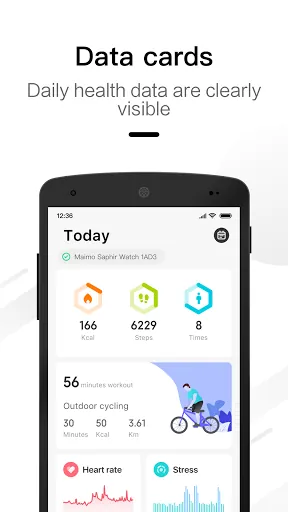
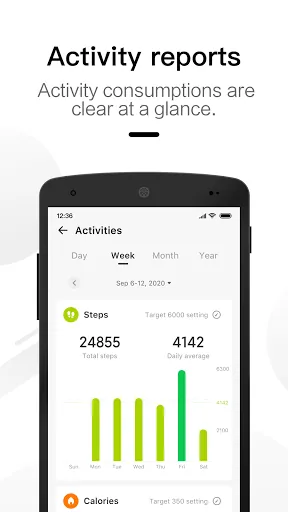
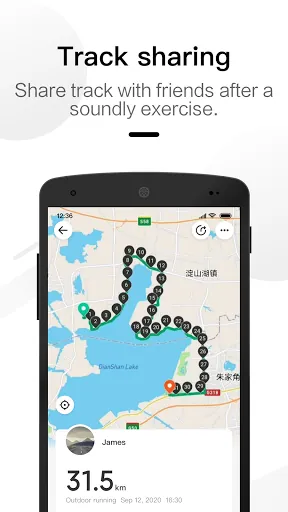
- Activity tracking: Integration with sensors to record steps, heart rate, and calories.
How It Works in Daily Use
Using Maimo Fit starts with a brief onboarding questionnaire that captures your fitness level, goals, and available time. Based on these inputs, the app generates a recommended weekly plan. Each session includes clear timers, warm-up cues, and progression markers so users can focus on performance rather than planning.
Session Flow
- Choose or accept a recommended workout for the day.
- Follow guided instructions with optional voice prompts.
- Review post-session metrics and adapt the next workout accordingly.
Customization and Training Controls
Customization is a highlight. Users can modify intensity, swap exercises, and set preferences for workout length. Maimo Fit supports creating custom routines from the exercise library, letting experienced users build hybrid sessions or emphasize specific muscle groups for targeted improvement.
Program Types
- Strength-focused plans for hypertrophy and endurance.
- Cardio-oriented programs to boost stamina and burn calories.
- Mixed routines that balance mobility, flexibility, and strength.
Interface Design and Performance
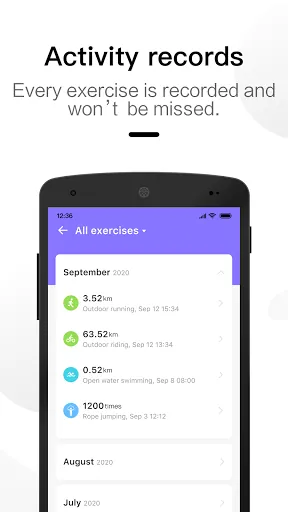
The interface emphasizes clarity and responsiveness. Menus are organized so key actions—start workout, review history, adjust plan—are reachable within a few taps. Visual feedback uses concise graphs and color-coded progress markers, making metrics understandable at a glance without overwhelming new users.
Speed and Reliability
Maimo Fit typically performs smoothly on modern Android devices, with fast load times for sessions and stable sensor integration. Background syncing and local caching reduce interruptions, and the app provides fallback options when real-time data from wearables is unavailable.
User Experience Highlights
Users often praise the app for practical usability: the guided sessions remove guesswork, and the adaptive plans maintain momentum without demanding constant manual input. The app balances automation with control, offering both newbie-friendly guidance and options for experienced practitioners to fine-tune their routines.
Motivation and Feedback
- Progress badges and streak tracking to encourage consistency.
- Clear summaries after each workout to highlight improvements.
- Actionable suggestions—like rest or intensity adjustments—based on recent activity.
Tips for New Users
Start with conservative goals and let the app adapt your schedule gradually. Use the exercise library to learn proper form before increasing weight or intensity. Enable device integration to get the most accurate heart rate and calorie estimates, and check summaries weekly to spot trends and tweak your plan.
Practical Suggestions
- Set a realistic weekly time commitment and stick to it for at least two weeks.
- Swap exercises if you experience discomfort; the app supports quick replacements.
- Review sleep and recovery data, if available, to prevent overtraining.
Why People Choose Maimo Fit
Maimo Fit appeals to users who want a balanced combination of guidance and flexibility. It is useful for people building consistent habits, athletes fine-tuning specific skills, and anyone seeking a clear, data-informed way to progress. The app’s modular design means you can scale your involvement as goals evolve.
Getting Started
Install the app, complete a short setup, and allow permission for activity data if you use a wearable. Begin with a recommended plan and gradually customize it to reflect your preferences. Regularly review performance summaries to ensure your routine stays aligned with your goals.
- No virus
- No advertising
- User protection
Information
- File size: 81.20 M
- Language: English
- Latest Version: 2.4.0
- Requirements: Android
- Votes: 402
- Package ID: com.banyac.sport
- Developer: 70mai Co.,Ltd
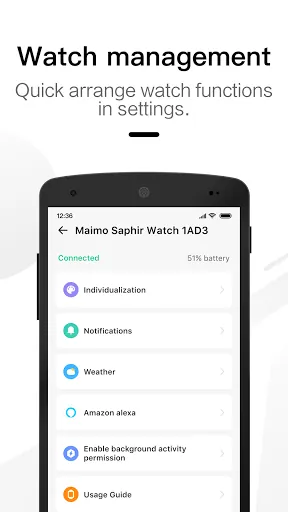
Screenshots
















Explore More
Reach your fitness goals and maximize workouts with our revolutionary exercise apps. Track progress, log workouts, and analyze performance using our intuitive tracking tools. Follow customized training plans tailored to your level and interests. Learn new exercises and techniques with our video instructional library. Monitor heart rate, calories burned, and other metrics to optimize your routine.

Home Workouts - Lose Weight

Half Marathon Trainer 13.1 21K

DWP Fitness - Diet & Workout
Pedometer - Step Tracker

Health Connect (Beta)
DU Speed Booster
Huawei Wear

Huawei Health





























