


Introduction
Scan Match is an industrial tool for comparing QR codes and barcodes to confirm that paired tags refer to the same item, and it is designed to reduce mislabeling and speed up verification on busy production floors. Scan Match places emphasis on a focused tag-to-tag workflow so teams can enforce two-tag validation without bringing the complexity of a full inventory suite into the process. The first paragraph introduces the app purpose and the core advantage: repeatable, reliable tag matching where accuracy is a priority.
Key features and verification mechanics
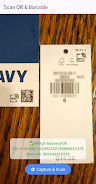
At its core, Scan Match reads two tags in sequence and evaluates whether the encoded identifiers match according to configurable tolerance rules. The app supports common barcode and QR standards, performs checksum and format validation where applicable, and highlights mismatches clearly so operators know when manual intervention is required. The verification mechanics are intentionally straightforward: capture tag A, capture tag B, receive a match or mismatch result with contextual information about which field failed validation.
Controls and user interaction
The user interface offers simple, fast controls adapted for touchscreens and handheld scanners. Operators can trigger scans by tapping a large on-screen button, by using a hardware scan key if the device supports it, or by placing items under a fixed mount for continuous read mode. Scan Match provides immediate visual feedback, a short vibration or tone option, and an audit note field where users can add a quick reason for any exception to keep handoffs clear. These input options reduce cognitive load and help maintain a steady pace in packing, assembly, and goods receipt tasks.
Workflow progression and configuration
Progression in Scan Match is task-oriented rather than game-like: a workflow can be configured to require different levels of confirmation, for example an immediate pass/fail check or a secondary manual approval step for transient mismatches. Administrators can adjust validation sensitivity, set required data fields on the tags, and define whether a mismatch locks an item for review. Because the app focuses on a single verification task, operators spend less time learning multiple screens and more time performing consistent checks.
Visual style and environment suitability
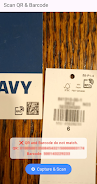
The interface uses high-contrast elements, large legible fonts, and color-coded results to make pass/fail outcomes readable at a glance in bright warehouses or dim production lines. Scan Match is built to be legible while wearing gloves and to remain usable on devices with different screen sizes. The visual layout prioritizes the active scan area and the result panel so technicians can complete cycles quickly without shifting attention between unrelated information.
Customization, templates, and export
Administrators can create scan templates that define which barcode formats to accept, mandatory fields, and the order of scanning. Templates let teams adapt Scan Match to different stations — for example, packing versus goods receipt — without changing the operator experience. Where recordkeeping is required, the app supports local export of audit logs in common file formats so supervisors can review matches and mismatches. These settings keep the verification tool focused and adaptable without adding inventory management functions.
Reliability, offline operation, and error handling
Scan Match is designed to work reliably in environments with intermittent connectivity: the app performs validations locally and queues audit records for export when a connection is available. Error handling is explicit and actionable; when a scan fails the app explains whether the issue was a poor read, incompatible format, or data mismatch, and suggests next steps such as rescanning, checking label alignment, or flagging the item. This resilience helps maintain throughput when network conditions are variable.
Accessibility, training, and replay value
Because the workflow is intentionally narrow, training time is short and new operators can reach proficiency quickly. The app includes adjustable feedback modes for operators with hearing or vision considerations and supports simple language selection for multinational teams. Replay value in this context means consistent utility: Scan Match remains useful across repeated shifts and processes where two-tag verification is required, reducing human error over long-term use.
Best-fit use cases and limitations
Scan Match is best suited to production lines, packing stations, and goods receipt points where dual-tag validation is already part of the process and teams need a focused, reliable tool for tag-to-tag confirmation. It is not intended to replace full inventory management or complex tracking systems; organizations that require broader asset tracking, live stock levels, or warehouse management features should consider complementary tools alongside Scan Match. Understanding this scope helps set realistic expectations for deployment and integration into existing workflows.
- No virus
- No advertising
- User protection
Information
- File size: 40.90 M
- Language: English
- Latest Version: 1.0.0
- Requirements: Android
- Votes: 213
- Package ID: com.artistic.scan_match
- Developer: Artistic Milliners
Screenshots


















Explore More
Equip yourself with our all-in-one toolbox app for everyday tasks and projects. Instantly convert between units, calculate tips, scan documents, manage files, and more with handy productivity tools. Includes a level, compass, QR code reader, ruler, speedometer, decibel meter, and flashlight. Save frequently used tools to your customizable dashboard for one-tap access. Track billable hours, wages, budgets, and invoices. Annotate screenshots, magnify labels, and sign PDFs on the go.

Board Game Stats

MEXC Global: BTC, ETH, Gamefi

Text Art - Write Text On Photo

Domino's Pizza Sri Lanka

Hatekhori Shongkha

Halloween Photo Editor -Makeup

Connecting - Friends Near Me

Cartola





























