Introduction
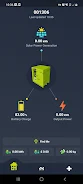
LiQ is a monitoring system designed to integrate with the Lifos Fort platform and provide fleet managers with continuous visibility into vehicle state-of-charge, precise locations, and fuel consumption trends. LiQ collects and surfaces live telemetry so operators can see battery levels and position data at a glance while also accessing the raw data required for deeper analysis or compliance reporting. The app emphasizes clarity and exportable records, enabling teams to translate operational metrics into audit-ready documents without leaving the platform.
Key Features
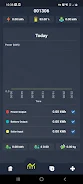
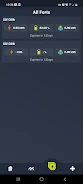
The core of LiQ is a real-time metrics dashboard that presents state-of-charge, location coordinates, and estimated fuel savings together in one place. Rather than scattering information across multiple screens, the interface groups telemetry by asset and time window so that managers can quickly compare current status with recent history. Built-in charting visualizes charge cycles and consumption trends, and data filters let users narrow the view to specific vehicles, time ranges, or operational conditions.
LiQ also supports downloadable raw telemetry exports in common formats for offline analysis; these exports preserve time stamps, GPS traces, and sensor readouts so your analytics tools can reconstruct event sequences. In addition to raw dumps, the app can generate structured ESG-oriented reports that summarize emissions-reduction indicators and energy efficiency metrics useful for internal audits or external compliance workflows. Report templates can be adapted to reflect the metrics your organization tracks most closely.
User Controls and Interface
The app uses straightforward on-screen controls tailored for operational use: toggle filters, date selectors, asset search, and sorting options that prioritize the most relevant fields. Interactive maps present location data with contextual telemetry overlays so a user can click an asset and immediately view charge state and recent consumption. Visual status indicators and colored badges highlight assets that fall outside configured thresholds, helping teams focus on exceptions without sifting through raw logs.
Progression, Trends and Analysis
LiQ is built around progression-style insights: rather than only reporting instantaneous values, it maintains time-series views so managers can track charging and consumption patterns over days, weeks, or months. This progression view supports trend analysis and helps identify operational changes — for example, altered charging schedules, route shifts, or seasonal consumption differences. Exported history supports deeper statistical analysis, enabling users to validate efficiency improvements claimed by fleet changes or new operational rules.
Customization and Visual Style
The visual design focuses on legibility and practical contrast to make large data sets easier to scan. Dashboards are modular so teams can arrange widgets relevant to their workflows, and report templates are customizable so jurisdictions or internal standards can be accommodated. Map layers and telemetry overlays are designed to remain clear at different zoom levels, and chart styles adapt between detailed inspection and high-level summaries to suit daily monitoring or executive reporting.
Accessibility, Offline Use and Replay Value
Accessibility considerations include scalable text, high-contrast display modes, and simplified navigation for users who need quick status checks on mobile devices. While LiQ relies on live telemetry for real-time views, its export capability supports offline review: downloaded telemetry and generated reports can be opened and explored without a network connection, allowing analysts to replay operational scenarios and reproduce findings in meetings or audits. The ability to re-run analyses on historical exports increases the app's long-term value by turning raw logs into repeatable investigations.
Data Integration and Practical Limits
LiQ centralizes Lifos Fort telemetry so that charge, fuel, and location data are presented together, simplifying comparison and reporting. Because the application depends on data provided by the Lifos Fort system, functionality is scoped to available telemetry fields; if a particular sensor or feed is not present in an asset, corresponding metrics will not be available in the app. Integration is optimized for Lifos Fort deployments and may not extend to non-Lifos Fort platforms without additional connectors or data translation steps.
Who Should Use LiQ
Operational teams and sustainability officers working with Lifos Fort-equipped fleets will find LiQ useful for routine monitoring, investigating anomalies, and producing exportable evidence for ESG initiatives. By combining live state-of-charge monitoring, location-aware telemetry, and structured exports, LiQ supports everyday decision-making as well as compliance and retrospective analysis in a single, audit-friendly package.
- No virus
- No advertising
- User protection
Information
- File size: 18.15 M
- Language: English
- Latest Version: 1.0.2
- Requirements: Android
- Votes: 389
- Package ID: com.lifos.mobile_app
- Developer: Lifos Ltd
Screenshots
















Explore More
Equip yourself with our all-in-one toolbox app for everyday tasks and projects. Instantly convert between units, calculate tips, scan documents, manage files, and more with handy productivity tools. Includes a level, compass, QR code reader, ruler, speedometer, decibel meter, and flashlight. Save frequently used tools to your customizable dashboard for one-tap access. Track billable hours, wages, budgets, and invoices. Annotate screenshots, magnify labels, and sign PDFs on the go.

myJersey

Training Feel

7 Bussid Private Bus Mod

1win

Iwan fals Paling Lengkap

CZUR

The Doylo
Radio You FM 106.9