Introduction
SV File Manager is a compact, material-design file manager for Android that helps you browse, organize and secure files on your device. Designed to be both approachable for casual users and efficient for power users, SV File Manager combines a clean interface with practical tools: fast file operations, built-in media and document viewers, ZIP compression and AES-256 encryption, all within a lightweight, ad-free app.
Key features and how they work
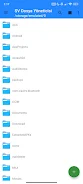
The core navigation centers on a familiar folder-and-file hierarchy, with instant search and quick sorting to find items by name, date or size. Tap, long-press and drag interactions are supported for straightforward controls: a single tap opens a file or folder, long-press enables multi-select for batch operations, and drag-and-drop makes moving files between folders intuitive. A toggle between list and card views lets you choose denser or more visual browsing depending on the task, while a preview pane displays quick metadata so you can confirm file details without opening the full viewer.
SV File Manager includes built-in media playback capable of handling common formats such as MP4, MKV and WebM with playback controls, background audio support and gesture-driven seeking. The image viewer supports pinch-to-zoom, swipe-to-navigate and quick wallpaper setting, and the document tools provide PDF viewing and simple conversion utilities (for example, PDF-to-PNG). A lightweight text/HTML editor with word and character counters and an embedded WebView preview makes editing small files convenient on-device without needing third-party apps.
Archiving and APK management are built into the file workflow: compress or extract ZIP archives with progress indicators and pause/resume behavior, install APK/APKS packages directly from the file browser, and back up installed apps while inspecting package metadata. For private data, AES-256 encryption lets you encrypt files and decrypt them locally; encrypted containers are stored on-device so nothing is transmitted to external services.
User experience, customization and accessibility
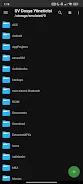
Customization is a strong focus: multiple themes and color accents let you adapt the visual style, and swappable folder icon packs provide a personal touch to directory listings. The interface follows Material Design principles for consistent spacing, readable typography and touch targets sized for mobile use. Accessibility considerations include adjustable font sizes, clear contrast options and compatibility with Android screen readers to make navigation easier for users with visual impairments.
Progression with the app is practical rather than gamified: as you use SV File Manager more, workflows become faster through saved shortcuts, favorites and recent-items lists. Power users will appreciate quick access to package details, batch operations and the ability to tailor the layout for different tasks, while casual users benefit from sensible defaults and guided interactions. The app is fully functional offline, so file management and local encryption do not rely on network connections.
Performance, reliability and replay value
Designed to be lightweight, SV File Manager minimizes background activity to preserve battery and system resources. Frequent operations such as copy, move and delete are optimized to display real-time progress and allow cancellation. The Safe Trash feature moves deleted items to a recoverable area so accidental deletions can be undone, which reduces the anxiety of cleanup tasks and increases the app’s day-to-day usefulness. Because it brings multiple utilities together—viewers, editor, archiver, media player and encryption—users often return to SV File Manager as an all-purpose tool rather than juggling several specialized apps.
Limitations and compatibility notes
There are a few intentional trade-offs to keep the app focused and compact: cloud synchronization and remote network transfer options such as FTP or SMB are not part of the current feature set, and advanced root-level exploration tools are not included. Video format support emphasizes common containers (MP4, MKV, WebM); very niche codecs may need external decoders. The app supports multiple languages natively, and it keeps privacy local by design—no mandatory accounts or cloud processing.
Who should use it
SV File Manager is suitable for users who want a reliable, no-frills file manager that respects privacy and runs well on a wide range of Android devices. It fits people who manage media libraries, organize documents, install APKs for testing or need a secure place to store sensitive files. The combination of straightforward controls, customization options and offline capabilities make it a practical daily driver for both newcomers and experienced users.
- No virus
- No advertising
- User protection
Information
- File size: 6.49 M
- Language: English
- Latest Version: 2.5.2
- Requirements: Android
- Votes: 455
- Package ID: com.svcstudio.filemanager
- Developer: SVC Studio
Screenshots
















Explore More
Equip yourself with our all-in-one toolbox app for everyday tasks and projects. Instantly convert between units, calculate tips, scan documents, manage files, and more with handy productivity tools. Includes a level, compass, QR code reader, ruler, speedometer, decibel meter, and flashlight. Save frequently used tools to your customizable dashboard for one-tap access. Track billable hours, wages, budgets, and invoices. Annotate screenshots, magnify labels, and sign PDFs on the go.

Spotify MT

أعمال القلوب

I-Ching Predictions

gps maps camera compass

Karty Mocy - Myśli Inaczej!

رسائل حب منوعة

IseeU

Kingdom Connection