Introduction
Ecofitness BodyFit is a versatile fitness app that blends guided workouts, personalized plans, and tracking tools to help users build healthier routines. It delivers clear exercise instruction, adaptive progressions, and lightweight performance features designed for everyday use on Android devices while prioritizing usability and efficient battery use.
Core Features and Tools
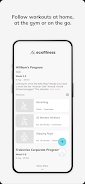
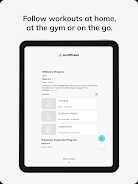
Ecofitness BodyFit organizes its tools into an accessible suite for both quick sessions and long-term training. The app includes structured workout libraries—strength, cardio, mobility, and yoga—along with timed circuits and HIIT templates. A built-in exercise demonstration library provides video and animated form cues, while a customizable warm-up and cooldown builder helps prevent injuries and promotes consistency.
Interface and Daily Workflow
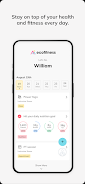
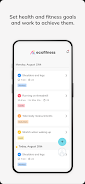
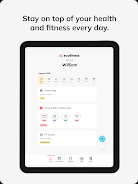
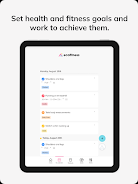
The app interface focuses on fast navigation and minimal friction. A clean dashboard summarizes today’s session, recent achievements, and heart-rate trends. Workouts can be added to a calendar with reminders and integrated with your phone’s notification system. The playback screen highlights rep counts, tempo cues, and rest timers so you can follow sessions hands-free.
Personalized Plans and Adaptive Progression
Ecofitness BodyFit adapts to your experience and goals. During onboarding, the app asks about fitness level, available equipment, target areas, and time per session to generate a tailored plan. Progression algorithms adjust intensity and volume based on completed workouts, perceived exertion inputs, and logged performance, creating a dynamic plan that scales with improvements.
Tracking, Metrics, and Insights
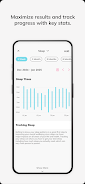
Tracking is comprehensive without being overwhelming. The app records workout duration, calories burned estimates, sets and reps, and heart-rate zones when using compatible devices. A trend view shows strength increases, cardio endurance improvements, and weekly activity patterns. Exportable progress reports let users share results with coaches or health professionals.
Customization and Accessibility Options
Customization is a strong point in Ecofitness BodyFit. You can create custom workouts from a catalog of exercises, set interval timers, and save favorite routines. Accessibility features include adjustable font sizes, high-contrast themes, and voice prompts for hands-free guidance. A variety of difficulty levels makes it simple to modify workouts for beginners or seasoned athletes.
Connectivity and Wearable Support
Ecofitness BodyFit supports a range of integrations to enhance tracking and convenience. Sync with popular wearable devices for heart-rate monitoring and step data, or connect to cloud services for backup and cross-device continuity. Chromecast and smart TV casting let you project workouts to a larger screen for group sessions or clearer demonstrations.
Performance, Footprint, and Battery Use
Designed for mobile use, the app maintains a compact storage footprint and offers a low-power mode to reduce battery drain during long workout sessions. Offline downloads allow you to save workout videos and instructions for areas with limited connectivity. Regular updates aim to keep performance smooth across newer and older Android releases.
Safety, Privacy, and Data Controls
Privacy settings in Ecofitness BodyFit allow users to control what data is shared and stored. Personal health information is kept local unless you opt into cloud syncing. Clear permissions prompts explain why sensors or accounts are requested. Safety reminders and form cues are emphasized in every workout to minimize injury risk.
How to Get Started
Getting started takes just a few minutes: install Ecofitness BodyFit, complete the guided onboarding, and choose a starter plan. If you prefer immediate activity, pick a quick workout from the library. Regular check-ins help the app refine your plan and recommend session adjustments based on real usage and self-reported feedback.
User Experience Highlights
Users appreciate the intuitive layout, the variety of programs, and the balance between guided instruction and customization. Ecofitness BodyFit aims to remove barriers to exercise by providing clear cues, flexible scheduling, and measurement tools that make progress visible and motivating.
SummaryEcofitness BodyFit positions itself as a practical fitness companion for Android users who want structured plans, adaptable workouts, and efficient tracking without unnecessary complexity. Its combination of personalization, device compatibility, and thoughtful performance features makes it suitable for regular home training and on-the-go sessions.
- No virus
- No advertising
- User protection
Information
- File size: 116.27 M
- Language: English
- Latest Version: 8.10.3
- Requirements: Android
- Votes: 185
- Package ID: com.trainerize.ecofitness
- Developer: Trainerize CBA-STUDIO 2
Screenshots


















Explore More
Make your house a home with our suite of helpful home apps. Discover clever tools to organize closets, streamline chores, and simplify cooking. Take the stress out of cleaning and maintenance with handy checklists and schedules. Enhance security and control appliances and lighting with our smart home integrations. Design, visualize, and renovate like a pro using our 3D planning software.

All Recovery - Photos & Videos

Tax Calculator India 2024-2025

OnDjoss

Park4Me

Scary sound effects

Home Workouts - Lose Weight

Juice Recipes

HFonts - font & emoji manager