

Introduction
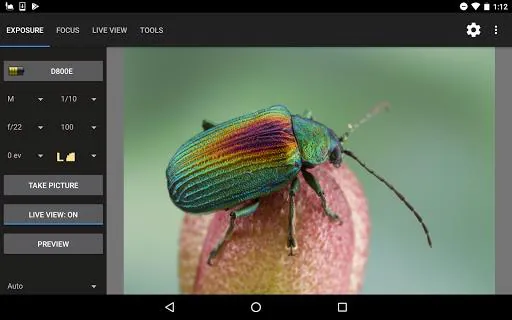
Helicon Remote brings advanced tethering and remote-control tools to Android devices, letting photographers trigger shots, monitor Live View and build focus stacks from a phone or tablet. Helicon Remote is designed for studio, macro and landscape work where precise control over focus, exposure and timing improves results; the app emphasizes predictable, repeatable sequences rather than attempting to replace camera controls entirely. The interface is intended to let you prepare a complex capture sequence on the device, watch a full-screen Live View feed while the sequence runs, and inspect images on-device so you can make rapid adjustments without needing a laptop.
Key Features
The app supports Wi‑Fi connections to compatible cameras with built-in wireless and to specific Nikon and Canon wireless modules, as well as USB OTG tethering where supported by your Android device. Automated focus bracketing is available and can be combined with exposure bracketing and interval shooting to create focus stacks, exposure blends or time-lapse sequences with controlled depth of field and exposure variation. A stacking preview shows a quick composite of bracketed frames so you can validate focus progression before exporting to desktop stacking and editing tools. Live View includes full-screen display, selectable focus areas, and noise averaging options to improve the preview for long-exposure or high-ISO work.
Controls and Workflow
Controls are grouped around the main shooting tasks: framing and Live View, sequence setup, and execution/monitoring. You set interval, number of frames, focus step size and exposure increments in one setup screen, then start the sequence and observe progress through a status indicator and image review thumbnails. Manual triggering for single frames is available for test shots, while automated modes run unattended. The interface aims to reduce the number of repeated steps: once you configure a stacking or bracketing sequence you can let it run and use the preview to decide whether to refine parameters. This workflow supports iterative shooting where small adjustments to position, lighting or step size are common between runs.
How Focus Stacking and Bracketing Work
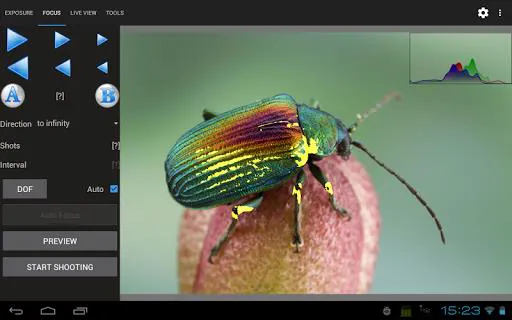
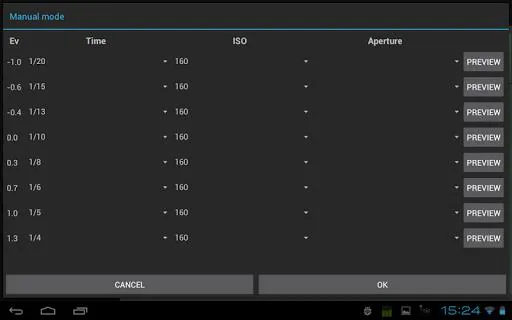
Focus stacking is implemented by moving the camera focus between exposures and collecting a series of images with overlapping focal planes; Helicon Remote controls the camera to perform those focus steps automatically when the connected model exposes that functionality. Exposure bracketing alternates shutter or exposure compensation to capture highlights and shadows for HDR blending. The app allows you to combine both approaches in a single run so you can capture several focus steps for each exposure increment, useful for macro subjects with very shallow depth of field. A stacking preview provides a rapid composite that helps determine whether the chosen focus range and step size covered the subject adequately before leaving the field.
Compatibility and Requirements
Helicon Remote requires a device with USB OTG host-mode when using a wired connection and works only with supported camera models, primarily certain Canon and Nikon bodies and the listed wireless modules. Wireless support covers cameras with built-in Wi‑Fi and selected Nikon WT and Wu-1 modules as well as Canon WFT modules; not all models support every function, and some Nikon bodies have limitations to extra-long BULB exposures. Check the supported cameras list before relying on a specific feature. If your Android device lacks a full-size USB socket you will need a USB OTG adapter to connect for tethered operation.
User Experience, Accessibility and Offline Use
The app aims to provide clear feedback during long operations: status messages, progress indicators and on-device image review help you decide when a sequence is complete. Live View noise averaging and selectable focus-area highlighting improve accessibility for users working in low light or with limited screen visibility. Because the app communicates directly with the camera over Wi‑Fi or USB, many core functions work without an internet connection, which is useful for remote fieldwork or studio sessions where network access is restricted. Battery and power considerations are important for long timelapse or BULB exposures; using external power for camera and device is recommended for extended unattended runs.
Limitations and Practical Tips
Helicon Remote centralizes focus stacking, bracketing and interval shooting, but it does not add unsupported camera capabilities. Some advanced options, such as extra-long BULB exposures, are not available on several Nikon models and behavior varies by camera firmware. Because functionality depends on camera support and the Android device's OTG capabilities, verify compatibility before a critical shoot. For best results, practice sequences in controlled conditions, use preview composites to refine step sizes, and consider tethered USB control when wireless latency could affect precise timing. These precautions help make the most of the app's automated capture features while avoiding unexpected limitations in the field.
- No virus
- No advertising
- User protection
Information
- File size: 23.18 M
- Language: English
- Latest Version: 4.4.7
- Requirements: Android
- Votes: 213
- Package ID: com.HeliconSoft.HeliconRemote2
- Developer: Helicon Soft Ltd.
Screenshots
















Explore More
Equip yourself with our all-in-one toolbox app for everyday tasks and projects. Instantly convert between units, calculate tips, scan documents, manage files, and more with handy productivity tools. Includes a level, compass, QR code reader, ruler, speedometer, decibel meter, and flashlight. Save frequently used tools to your customizable dashboard for one-tap access. Track billable hours, wages, budgets, and invoices. Annotate screenshots, magnify labels, and sign PDFs on the go.

Board Game Stats

MEXC Global: BTC, ETH, Gamefi

Text Art - Write Text On Photo

Domino's Pizza Sri Lanka

Hatekhori Shongkha

Halloween Photo Editor -Makeup

Connecting - Friends Near Me

Cartola





























