Introduction
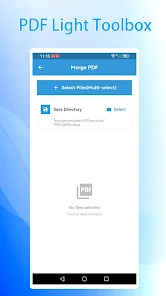
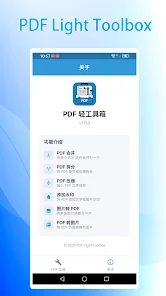
PDF Light Toolbox is a lightweight PDF processing app for Android that lets you view and manage PDF files locally without accounts or ads. It supports both English and Chinese interfaces and performs all operations on-device to keep your documents private. The installer is about 78 MB and the app runs on Android 7.0 and up, so it fits on most modern phones and tablets while keeping storage and background activity to a minimum.
Key Features
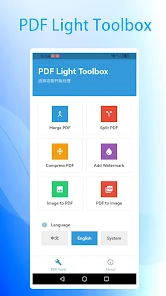
Lightweight footprint with a compact installation size of approximately 78 MB. Bilingual interface supporting English and Chinese. No login required so you can start using the app immediately. Ad-free user experience for distraction-free PDF handling. All file operations are performed locally on your device to protect privacy.
Advantages
Strong privacy protection because processing happens entirely on-device. Simple and fast setup with no account creation or advertising interruptions. Small install size and compatibility with Android 7.0 and newer devices. A clean, focused utility suitable for users who prefer minimal, no-frills tools.
Disadvantages
No cloud sync or built-in online backup since all work is local. Requires Android 7.0 or higher, so it is not compatible with older devices. As a recently released app, it currently has limited adoption and a small usage history.
Development Team
PDF Light Toolbox is offered by Floating Kunpeng Network Technology Co., Ltd., the developer responsible for the app's design and updates.
Market Performance
The app was initially released on Apr 3, 2026 and shows 0+ downloads in available records, indicating an early-stage public presence.
Version Information
Current version 1.0.3, updated on Apr 13, 2026. PDF Light Toolbox requires Android 7.0 and up and installs at roughly 78 MB.
- No virus
- No advertising
- User protection
Information
- File size: 78.00 M
- Language: English
- Latest Version: 1.0.3
- Requirements: Android
- Votes: 141
- Package ID: com.zzsr.lightpdf
- Developer: Floating Kunpeng Network Technology Co., Ltd
Screenshots


















Explore More
Equip yourself with our all-in-one toolbox app for everyday tasks and projects. Instantly convert between units, calculate tips, scan documents, manage files, and more with handy productivity tools. Includes a level, compass, QR code reader, ruler, speedometer, decibel meter, and flashlight. Save frequently used tools to your customizable dashboard for one-tap access. Track billable hours, wages, budgets, and invoices. Annotate screenshots, magnify labels, and sign PDFs on the go.

1xSlots Casino

NeoSpin Casino

LifePad

SocialTech VPN

Desire by Lovehoney

888bets moçambique Apk

TogelUp

HOMETOGEL